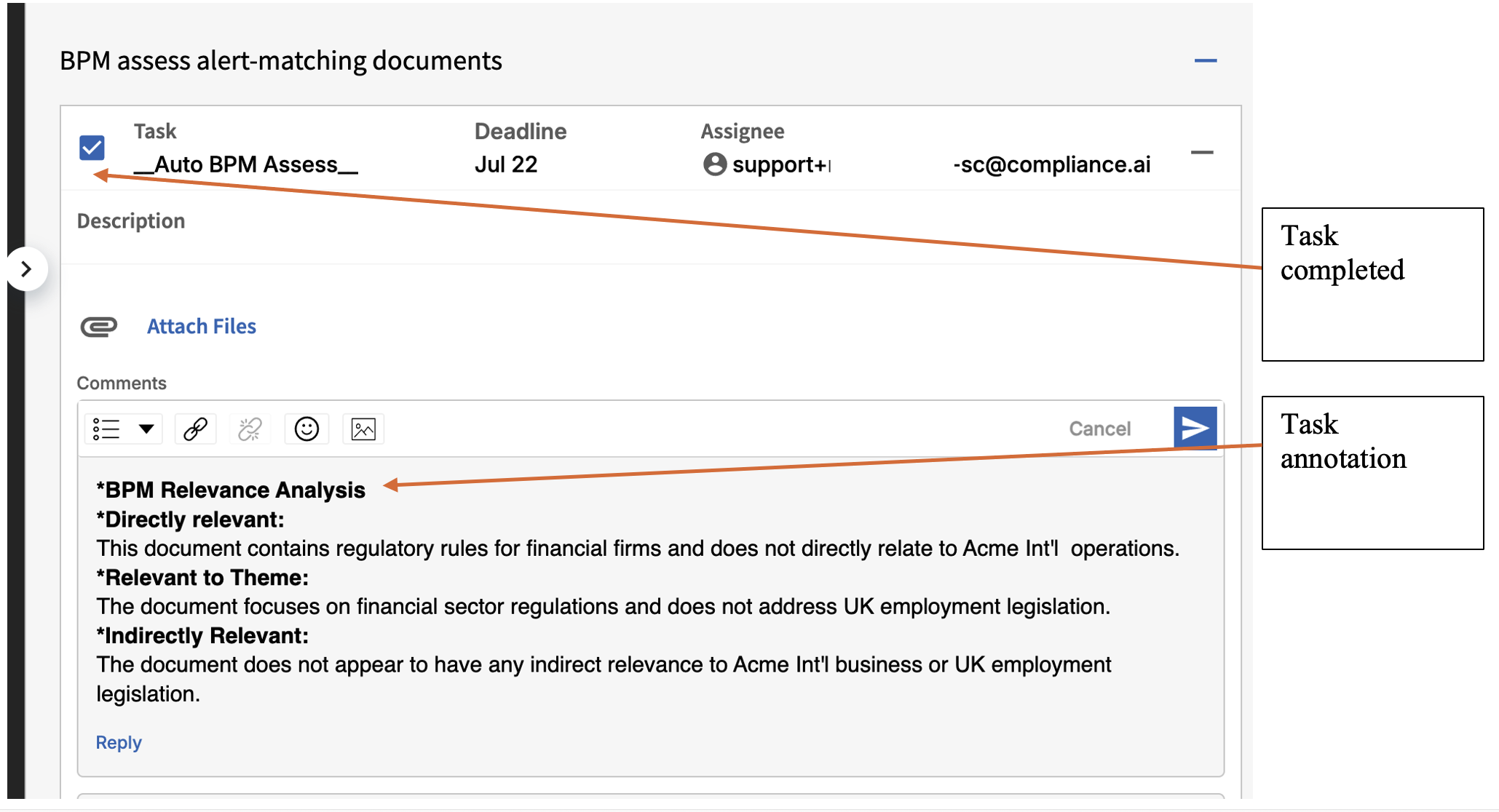
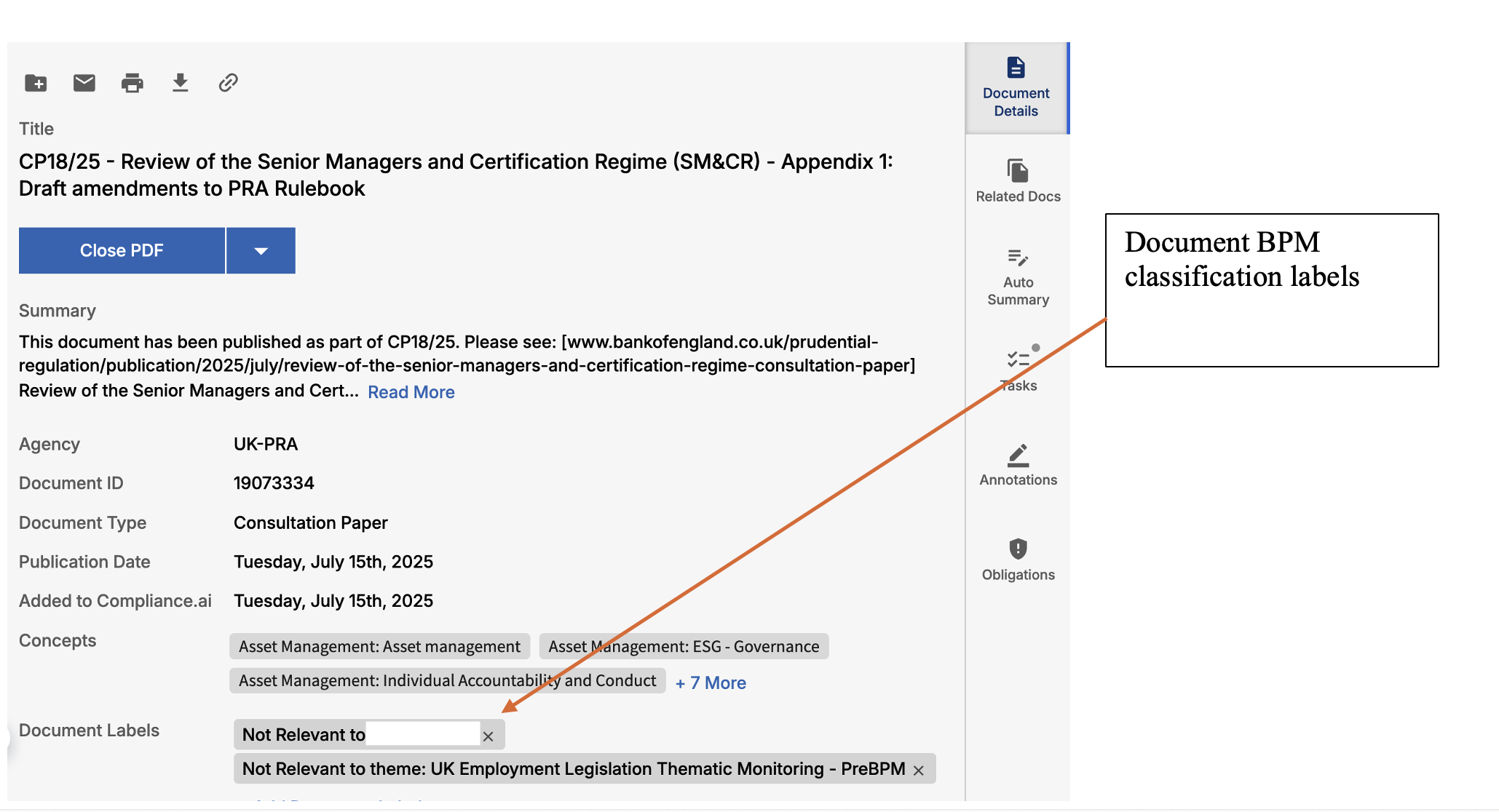
Objective
This document serves as a reference guide for configuring the Archer Evolv Service Connector (Archer Evolv SC).
Archer Evolv Service Connector (Archer Evolv SC) Configuration
Archer Evolv SC is designed to facilitate the exchange of information between Archer Evolv and external systems, and to automate various processes and workflows.
Understanding the SC configuration structure enables administrators to define how the integration should function and specify the necessary details to establish connections, authenticate access, and determine the transformation and publication actions to be performed.
The Archer Evolv SC Configuration file contains various settings and parameters used to configure and customize the behavior of a single Archer Evolv SC instance.
The configuration file includes settings related to API access & authentication, content transfer protocols, publishing destinations, task definitions, content mapping and transformation settings. These settings can be modified according to the specific requirements and use cases.
Archer Evolv SC Operational Mode and Job descriptions
Each Archer Evolv SC instance can perform a specific job, based on the Archer Evolv SC mode of
operation:
-
Job type 1: Transform & Publish newly published regulatory documents, annotations, obligations and tasks from Archer Evolv to supported 3rd party GRC/SFTP/DMS systems
-
Job type 2: Transform & Publish newly user defined labeled documents/annotations to 3rd party GRC/SFTP/DMS
-
Job type 3: Update and apply user defined Archer Evolv labels to newly published versions of regulatory documents (from previous versions)
-
Job type 4: Bulk Associate (import) user provided mapping content to Archer Evolv Document and/or Annotation labels
-
Job type 5: Externally & dynamically update document/obligation level workflow tasks and associated attributes to manage various workflow attributes
-
Job type 6: Ingest and publish customer-managed SharePoint Online documents into Archer Evolv using BYOC, including automated retrieval, metadata generation, and incremental updates.
-
Job type 7: Sync structured organisational data (business units, products, functional areas, etc.) published by Archer to SFTP into Evolve Business Profile annotation label assets
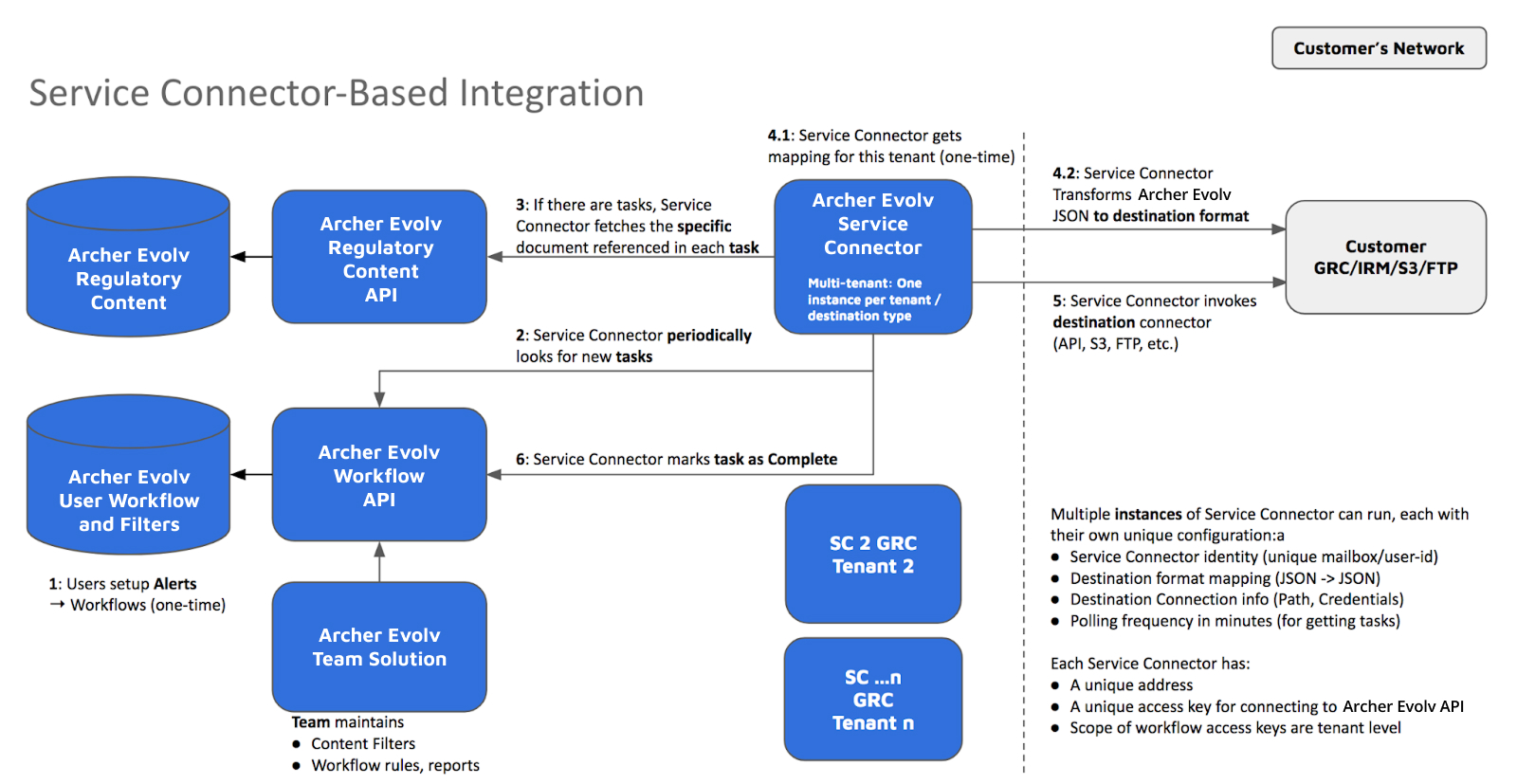
Archer Evolv — Service Connector Quick Start Guides
Job Type 1 – Quick Start: Transform & Publish Newly Published Regulatory Content to Archer
1. Overview
Job Type 1 publishes newly released regulatory content from Compliance.ai (CAI) into Archer’s RII, RIR, or AS applications. Supported content includes published documents, obligations derived from documents, and optional annotations created through analysis workflows. This job type forms the foundational regulatory intake pipeline, enabling organizations to maintain timely awareness of changes while structuring data for compliance programs within Archer.
2. How It Works (User Workflow)
The workflow begins by creating curated Alerts in CAI targeting specific combinations of agencies, jurisdictions, publication types, and topics. Once new content is detected, the Service Connector extracts document metadata, applies transformation logic, and normalizes values—such as aligning jurisdiction names to Archer’s picklist conventions. Archer must be prepared with the correct data model, Data Feed configurations, and field mappings. A scheduled cadence then determines how frequently SC checks for new publications, packages them, and sends them into Archer via SFTP or Web Feed. After each run, teams verify end-to-end integrity by spot-checking fields and verifying links.
3. Action Keywords
Keyword |
Type |
Required? |
Description |
Example |
|---|---|---|---|---|
ENABLE_PUBLISH_TO_ARCHER |
boolean |
Yes |
Activates publishing workflow |
true |
PUBLISH_DOCS |
boolean |
Yes |
Publishes documents |
true |
PUBLISH_OBLIGATIONS |
boolean |
No |
Publishes related obligations |
true |
PUBLISH_ANNOTATIONS |
boolean |
No |
Publishes annotations |
false |
TRANSPORT |
string |
Yes |
Output transport |
"SFTP_CSV" |
RUN_FREQUENCY |
string |
Yes |
Scheduled interval |
"1h" |
4. Configuration Parameters
Configuration includes operational mode (PUBLISH_TO_ARCHER), mapping blocks for Document, Obligation, and Annotation metadata, and an optional Attribute_Translate block to align values between systems. SC instances also require transport configuration; for SFTP, defining host, path, username; for Web Feed, specifying Archer endpoint URLs. High-volume customers may tune throughput settings for performance.
5. Sample Payloads
{
  "operational_mode": "PUBLISH_TO_ARCHER",
  "ENABLE_PUBLISH_TO_ARCHER": true,
  "PUBLISH_DOCS": true,
  "TRANSPORT": "SFTP_CSV",
  "frequency": "1h",
  "Document_Mapping": {
    "title": "name",
    "jurisdiction": "jurisdiction",
    "guid": "uid"
  }
}
6. Example Use Case — Regulatory Final Rule Intake
A large financial institution tracks Final Rules across multiple U.S. regulators. When CAI detects a new Final Rule, SC processes and normalizes the jurisdiction from "United States of America" to "US Federal" (matching Archer picklists). The job publishes the item via SFTP CSV into Archer RII. Compliance analysts then use connected dashboards to monitor impact and initiate regulatory change workflows.
JSON Payload
{
  "ENABLE_PUBLISH_TO_ARCHER": true,
  "PUBLISH_DOCS": true,
  "TRANSPORT": "SFTP_CSV",
  "frequency": "1h",
  "Attribute_Translate": {
    "jurisdiction": { "United States of America": "US Federal" }
  },
  "Document_Mapping": {
    "title": "name",
    "summary": "summary",
    "citation": "citation",
    "jurisdiction": "jurisdiction",
    "guid": "uid"
  }
}
7. Troubleshooting
Failures in publishing usually relate to missing Data Feed permissions or mismatched metadata fields. Ensure Archer picklist values are synchronized with CAI translations. Validate SFTP connectivity and ensure path-level permissions are correct.
8. Best Practices
• Use Alert scoping to reduce noise.
• Maintain consistency in field mappings across job types.
• Implement pre-production testing in Archer before enabling in production.
Job Type 2 – Quick Start: Publish Newly User-Labeled Content
1. Overview
Job Type 2 enables content to be published to Archer based on analyst-applied labels, giving compliance teams precise control over what content is routed to which stakeholders. Labels such as Business Unit (BU), Applicability, Priority, or Topic can be used to dynamically classify regulatory content.
2. How It Works
Analysts identify relevant content in CAI and apply labels using established taxonomies. Prefix-based label patterns (e.g., BU: or Applicability:) are mapped directly into Archer fields using SC configuration. When the job runs, it evaluates newly labeled content and publishes structured output rows. This enables granular routing logic in Archer dashboards and workflows.
3. Action Keywords
Keyword |
Type |
Required? |
Description |
Example |
|---|---|---|---|---|
PUBLISH_NEW_LABELS |
boolean |
Yes |
Enables label-triggered publication |
true |
ATTRIBUTE_LABEL_PREFIX_MAPPING |
object |
No |
Defines prefix-to-field mappings |
{"BU": "assigned_business_unit"} |
RUN_FREQUENCY |
string |
Yes |
Publishing interval |
"30m" |
4. Configuration Parameters
SC must be configured with the underlying label workflows and mapping logic. Transport settings determine how and where labeled content is delivered. CAI_matching_conditions may define multi-row output behaviors.
5. Sample Payloads
{
  "PUBLISH_NEW_LABELS": true,
  "TRANSPORT": "SFTP_CSV",
  "frequency": "30m",
  "Attribute_Label_Prefix_Mapping": {
    "BU": "assigned_business_unit",
    "Applicability": "applicability_status"
  }
}
6. Example Use Case — Departmental Routing
Content labeled BU: Retail and BU: Wealth results in two separate rows being published, allowing Archer workflows to direct content to teams specializing in Retail banking and Wealth management.
JSON Payload
{
  "PUBLISH_NEW_LABELS": true,
  "TRANSPORT": "SFTP_CSV",
  "frequency": "30m",
  "Attribute_Label_Prefix_Mapping": {
    "BU": "assigned_business_unit",
    "Applicability": "applicability_status"
  },
  "CAI_matching_conditions": {
    "unique_row_per_label": true,
    "unique_identifier_attribute": "guid",
    "unique_identifier_prefix": "BU:"
  }
}
7. Troubleshooting
If labels are not publishing correctly, verify that prefix strings match exactly between CAI and SC configuration. Also check Data Feed paths and credentials.
8. Best Practices
• Maintain a centralized labeling taxonomy.
• Train analysts to apply consistent label patterns.
Job Type 3 – Quick Start: Auto-Apply Labels to New Versions & Publish Updates
1. Overview
Job Type 3 ensures that when documents receive updated versions, all relevant labels applied to prior versions are carried forward, preserving continuity across version updates without redundant manual work.
2. How It Works
SC monitors new document versions within CAI. When a new version is detected, SC identifies labels from earlier versions, applies them to the updated content, and publishes updated rows into Archer.
3. Action Keywords
Keyword |
Type |
Required? |
Description |
Example |
|---|---|---|---|---|
UPDATE_LABEL_VERSION |
boolean |
Yes |
Enables version tracking for label inheritance |
true |
Apply_Label_To_New_Versions_Task_name_prefix |
string |
Yes |
Workflow prefix for inherited labels |
"__SC_Label_Other_Versions" |
RUN_FREQUENCY |
string |
Yes |
Publishing interval |
"1h" |
4. Configuration Parameters
Users specify the label inheritance prefix, maintain consistent mapping structures, and define transport settings for publishing updated versions.
5. Sample Payloads
{
  "UPDATE_LABEL_VERSION": true,
  "Apply_Label_To_New_Versions_Task_name_prefix": "__SC_Label_Other_Versions",
  "TRANSPORT": "ARCHER_WEB_FEED",
  "frequency": "1h"
}
6. Example Use Case — Version Roll-Forward
If an Enforcement Action is updated by a regulator, SC applies all previously assigned labels—such as Business Unit and Theme—to the new version and republishes it into Archer RIR.
JSON Payload
{
  "UPDATE_LABEL_VERSION": true,
  "Apply_Label_To_New_Versions_Task_name_prefix": "__SC_Label_Other_Versions",
  "TRANSPORT": "ARCHER_WEB_FEED",
  "frequency": "1h",
  "Document_Mapping": {
    "title": "name",
    "guid": "uid",
    "version": "version",
    "summary": "summary"
  }
}
7. Troubleshooting
If labels are not carried forward, confirm the previous version contained the labels and ensure task name prefixes are configured correctly.
8. Best Practices
• Implement strong version-tracking practices within Archer and ensure field mappings remain synced across versions.
Job Type 4 – Quick Start: Bulk Associate Mapping Content to CAI Labels
1. Overview
Job Type 4 enables bulk label application using an external mapping file. This approach is especially useful when onboarding large-controlled document libraries or retrofitting label structures.
2. How It Works
Teams curate mapping files listing document GUIDs alongside intended labels. SC pulls these files from SFTP or cloud locations and applies labels en masse, eliminating manual tagging.
3. Action Keywords
Keyword |
Type |
Required? |
Description |
Example |
|---|---|---|---|---|
ENABLE_LABEL_ASSOCIATION |
boolean |
Yes |
Turns on bulk labeling workflows |
true |
ASSOCIATION_FILE_PATH |
string |
Yes |
Mapping file location |
"sftp://ingest/matrix.csv" |
unique_row_per_label |
boolean |
No |
Output one row per label |
true |
4. Configuration Parameters
File structure definitions, matching rules, and output formatting must be defined. Multi-row settings support granular routing into Archer.
5. Sample Payloads
{
  "ENABLE_LABEL_ASSOCIATION": true,
  "Associate_Label_To_Doc": {
    "path": "sftp://ingest/matrix.csv",
    "format": "csv"
  },
  "TRANSPORT": "SFTP_CSV",
  "frequency": "daily"
}
6. Example Use Case — Applicability Matrix Import
Consider a mapping sheet containing 2,500 documents and departmental applicability ratings. SC applies all corresponding labels and publishes the structured output for Archer Data Feeds.
JSON Payload
{
  "ENABLE_LABEL_ASSOCIATION": true,
  "Associate_Label_To_Doc": {
    "path": "sftp://ingest/applicability_matrix.csv",
    "format": "csv"
  },
  "CAI_matching_conditions": {
    "unique_row_per_label": true,
    "unique_identifier_attribute": "guid",
    "unique_identifier_prefix": "MAP:"
  },
  "TRANSPORT": "SFTP_CSV",
  "frequency": "daily"
}
7. Troubleshooting
Common errors include mismatched GUIDs and missing label columns. Review mapping file formatting and ensure consistent naming conventions.
8. Best Practices
• Store mapping files under version control.
• Pilot batch labeling on small subsets before full rollout.
Job Type 5 – Quick Start: Dynamically Update Workflow Tasks & Attributes
1. Overview
Job Type 5 (SC_Operations) automates workflow updates required before content can be published to Archer. This ensures regulatory content passes quality checks—such as reviewed status, ownership assignment, and risk rating—before reaching downstream systems.
2. How It Works
Teams define required workflow checkpoints in CAI. SC modifies workflow attributes (e.g., setting "Reviewed" to "Yes") or assigns owners so that only compliant content proceeds to Archer publication.
Prerequisites
Before configuring a Job Type 5 dispatch instance, verify that all label types referenced in ATTRIBUTE_UPDATES (such as products, business units, or functional areas) already exist as annotation types in Evolve. If they do not, create them via the Evolve Swagger API before deploying the SC configuration.
To create a new label type:
1. Navigate to your Evolve environment’s Swagger UI (typically at https://<your-instance>/swagger).
2. Expand the Label Types section and select POST /label-types.
3. Click Try it out and provide a request body in the following format:
{
  "grouping": "functional_areas",
  "name": "Functional Areas"
}
4. Execute the request. Note the returned id — this label type is now available for annotation imports and SC references.
Repeat for each label type required by the dispatch configuration (e.g., products, business_units, functional_areas). Label types only need to be created once per environment.
Note: If a label type referenced in the dispatch config does not exist in Evolve at run time, the SC will silently skip the assignment for that attribute. Always verify label types are present before testing the workflow.
3. Action Keywords
Keyword |
Type |
Required? |
Description |
Example |
|---|---|---|---|---|
ENABLE_SC_OPERATIONS |
boolean |
Yes |
Enables workflow operations |
true |
TARGET_TASKS |
list |
Yes |
Names of workflow tasks to update |
["Initial Review"] |
ATTRIBUTE_UPDATES |
object |
No |
Attribute updates (key/value) |
{"Reviewed": "Yes"} |
RUN_FREQUENCY |
string |
Yes |
Run interval |
"20m" |
4. Configuration Parameters
Users define the tasks and fields to update, including ordering constraints. If combined with publishing jobs, dependency order ensures updates occur first.
5. Sample Payloads
{
  "ENABLE_SC_OPERATIONS": true,
  "TARGET_TASKS": ["Initial Review"],
  "ATTRIBUTE_UPDATES": {
    "Reviewed": "Yes"
  },
  "frequency": "20m"
}
6. Example Use Cases
Example Use Case 1 — Automated Quality Gate Before Archer Publication
A financial services team requires all regulatory documents to be marked as reviewed and assigned to a risk owner before publication to Archer. SC_Operations runs every 20 minutes, automatically setting the “Reviewed” flag and assigning ownership so that only compliant content proceeds downstream.
JSON Payload
{
  "ENABLE_SC_OPERATIONS": true,
  "TARGET_TASKS": ["Initial Review", "Risk Assessment"],
  "ATTRIBUTE_UPDATES": {
    "Reviewed": "Yes",
    "Assigned To": "risk_team@company.com",
    "Risk Rating": "Medium"
  },
  "RUN_FREQUENCY": "20m"
}
Example Use Case 2 — Skills-Based Routing via Archer SME Data (Dispatch Service)
An organization uses Evolve to route incoming regulatory documents to the correct subject matter experts (SMEs) based on jurisdiction, product area, and business unit. Rather than manually assigning tasks, a dispatch SC instance reads an Archer-published SME data file from SFTP and uses it to auto-populate workflow task dropdowns — assignee, impacted products, and impacted business units — using a skills-based matching approach.
How it works:
1. Archer publishes a structured JSON file to a pre-agreed SFTP path. The file lists contacts alongside their areas of expertise — jurisdiction, product coverage, and business unit affiliation.
2. The dispatch SC instance reads this file on each run and evaluates each open workflow task of the specified type.
3. For each task, SC identifies the best-matched SME(s) based on the document’s attributes and sets the relevant dropdowns.
4. If multiple SMEs match equally, SC assigns randomly or to the first available, depending on configuration.
SME Data File — Sample Format (Archer-published JSON)
[
  {
    "contact_name": "Jane Smith",
    "email": "jsmith@company.com",
    "jurisdiction": ["US Federal", "California"],
    "product": ["Credit Cards", "Consumer Lending"],
    "business_unit": ["Retail Banking"],
    "functional_area": ["Sanctions", "AML"]
  },
  {
    "contact_name": "Tom Lee",
    "email": "tlee@company.com",
    "jurisdiction": ["EU", "UK"],
    "product": ["Payments", "FX"],
    "business_unit": ["Corporate Banking"],
    "functional_area": ["Prudential", "Market Risk"]
  }
]
This file is placed on SFTP by Archer and referenced in the SC configuration via the SME_DATA_FILE_PATH parameter.
Dispatch Configuration — Sample JSON Payload
{
  "ENABLE_SC_OPERATIONS": true,
  "TARGET_TASKS": ["Plan Relevancy"],
  "SME_DATA_FILE_PATH": "sftp://ingest/sme_expertise.json",
  "ROUTING_MODE": "skills_based",
  "ROUTING_FALLBACK": "random",
  "ATTRIBUTE_UPDATES": {
    "Impacted Products and Services": {
      "source": "sme_file",
      "sme_field": "product",
      "dropdown_key": "impacted_products_and_services"
    },
    "Impacted Business Units": {
      "source": "sme_file",
      "sme_field": "business_unit",
      "dropdown_key": "impacted_business_units"
    },
    "Assignee": {
      "source": "sme_file",
      "sme_field": "email",
      "dropdown_key": "assignee",
      "subtype": "assign_only",
      "match_on": ["jurisdiction", "product"]
    }
  },
  "RUN_FREQUENCY": "1h"
}
Key configuration notes:
• TARGET_TASKS must exactly match the workflow task name as it appears in Evolve. Confirm the task name in your environment before deploying.
• dropdown_key values must match the annotation attribute key names in the Evolve workflow, not the display labels. These can be found by inspecting the task definition in the workflow editor.
• ROUTING_MODE: "skills_based" instructs SC to score SMEs against the document’s attributes before assigning. ROUTING_FALLBACK: "random" determines tie-breaking behavior.
• The subtype: "assign_only" setting on the Assignee attribute restricts the SC to assigning tasks rather than reassigning already-owned tasks.
Day-one limitation: If Archer adds new values to the SME file that do not yet exist as annotation labels in Evolve, SC will skip those assignments until the Evolve annotation list is updated to match. See Job Type 7 for automating this synchronisation.
7. Troubleshooting
If tasks are not updating, ensure SC’s integration account holds necessary workflow permissions.
8. Best Practices
• Use consistent task naming conventions.
• Run SC_Operations more frequently during peak review periods.
Job Type 6 – Quick Start: SharePoint Ingestion Workflow
1. Overview
The SharePoint Ingestion Workflow enables Archer Evolv to automatically retrieve documents from a customer-managed SharePoint Online site and ingest them into Archer Evolv as part of Evolv’s Bring Your Own Content (BYOC) process. This workflow leverages Microsoft Graph app-only authentication, folder-level scoping, incremental sync, and automated metadata generation to ensure accurate, efficient delivery of documents into Evolv.
This workflow is designed to serve as Job Type 6 under the "Archer Evolv SC Operational Mode and Job Descriptions" section.
Why Use It?
• Automates document retrieval from SharePoint Online.
• Ensures new and updated documents flow automatically into Evolv.
• Reduces manual uploading and reconciliation efforts.
• Provides structured metadata for better processing, labeling, and pipeline accuracy.
2. How It Works (User Workflow)
This section outlines the steps a content-update or operations team would follow to configure and operate the SharePoint ingestion workflow.
Step 1: Provide Required SharePoint and Authentication Information
Users supply the connector operator with:
• Tenant ID, Client ID, and Client Secret (Azure AD App Registration).
• SharePoint hostname and site path to resolve the site.
• Optional folder scoping and filters such as file extension or recursion.
Step 2: Configure the Service Connector
The operator sets up the connector instance with:
• Authentication credentials.
• Include paths and recursion settings.
• Polling frequency for incremental polling runs.
• Extension filters (e.g., .pdf).
Step 3: Connector Run Execution
During each scheduled run:
• The connector authenticates via Microsoft Graph using OAuth client credentials.
• The site is resolved and folder structures are enumerated.
• Files matching filters and modified since the last-run timestamp are downloaded.
• A document metadata manifest is generated.
• A BYOC import set is created and documents + metadata are uploaded to Evolv.
• The last-successful-run timestamp is updated.
Step 4: Review Results in Evolv
• BYOC imports can be reviewed in the Evolv dashboard.
• New documents appear in the configured workspace or bucket.
• Incremental behavior can be validated by confirming unchanged documents are skipped.
3. Action Keywords (SharePoint Workflow)
Keyword |
Type |
Required? |
Description |
Example |
|---|---|---|---|---|
ENABLE_SHAREPOINT_INGESTION |
boolean |
Yes |
Enables the SharePoint ingestion workflow; must be enabled for any SharePoint job to run. |
true |
SHAREPOINT_RECURSIVE_SCAN |
boolean |
No |
Enables traversal of all subfolders under each include path. |
true |
SHAREPOINT_EXTENSION_FILTER |
string / list |
No |
Restricts ingestion to one or more specific file extensions. |
|
SHAREPOINT_LAST_RUN_INCREMENTAL |
boolean |
No |
Enables incremental ingestion by skipping files unchanged since the last successful run. |
true |
SHAREPOINT_INCLUDE_PATHS |
list |
No (Recommended) |
Specifies the SharePoint folders to be ingested under the target site. |
["Shared Documents/Policies"] |
GENERATE_METADATA_MANIFEST |
boolean |
Yes (Default: true) |
Generates the required metadata manifest (CSV/XLSX) for BYOC ingestion. |
true |
4. Configuration Parameters
Authentication Parameters
• tenant_id (string, required) – Azure AD tenant for token requests.
• client_id (string, required) – App registration ID.
• client_secret (string, required) – App secret or certificate.
• graph_permissions – Must include Sites.Read.All for enumeration + downloads.
SharePoint Location Parameters
• hostname (required) – Example: contoso.sharepoint.com.
• site_path (required) – Example: /sites/PolicyGovernance.
• include_paths (optional) – e.g., Shared Documents/Policies.
• recursive_scan (optional) – Boolean.
• extension_filter (optional) – e.g., .pdf.
Operational Parameters
• polling_frequency (required) – e.g., every 1 hour.
• last_successful_run_state_key (optional).
• default_author (optional).
5. Sample Configuration Payloads (Input → Output)
Example 1: Basic SharePoint Ingestion
{
  "ENABLE_SHAREPOINT_INGESTION": true,
  "tenant_id": "<TENANT_GUID>",
  "client_id": "<CLIENT_GUID>",
  "client_secret": "<SECRET>",
  "hostname": "contoso.sharepoint.com",
  "site_path": "/sites/PolicyGovernance",
  "include_paths": [
    "Shared Documents/Policies"
  ],
  "recursive_scan": false,
  "extension_filter": ".pdf",
  "polling_frequency": "1h"
}
What this does:
• Pulls PDFs from a single folder.
• Uses non-recursive scanning.
• Runs hourly.
Example 2: Recursive Multi-Folder Ingestion with Incremental Sync
{
  "ENABLE_SHAREPOINT_INGESTION": true,
  "tenant_id": "<TENANT_GUID>",
  "client_id": "<CLIENT_GUID>",
  "client_secret": "<SECRET>",
  "hostname": "contoso.sharepoint.com",
  "site_path": "/sites/RegulatoryDocs",
  "include_paths": [
    "Shared Documents/Policies",
    "Shared Documents/Procedures"
  ],
  "recursive_scan": true,
  "SHAREPOINT_LAST_RUN_INCREMENTAL": true,
  "extension_filter": ".pdf"
}
What this does:
• Recursively scans multiple folders.
• Only pulls new or recently updated documents.
Example 3: Dry Run Mode (No Upload)
{
  "ENABLE_SHAREPOINT_INGESTION": true,
  "hostname": "contoso.sharepoint.com",
  "site_path": "/sites/Compliance",
  "include_paths": ["Shared Documents/Reviews"],
  "dry_run": true
}
What this does:
• Enumerates and validates folder access.
• Does not ingest any documents.
6. Example Use Case
Use Case: Policy Governance Team Onboarding New Material
A compliance team maintains policies in SharePoint and needs updates to flow automatically.
Configuration:
{
  "ENABLE_SHAREPOINT_INGESTION": true,
  "site_path": "/sites/PolicyGovernance",
  "include_paths": ["Shared Documents/Policies"],
  "extension_filter": ".pdf",
  "SHAREPOINT_LAST_RUN_INCREMENTAL": true
}
Outcome:
• New or changed PDFs automatically arrive in Evolv.
• Metadata is imported and processed by downstream labeling/annotation pipelines.
7. Troubleshooting & FAQs
Files not appearing in Evolv?
Ensure Microsoft Graph permissions include Sites.Read.All and include paths are correct.
Incremental sync not working?
Confirm last_successful_run_state_key is set or the connector has run at least once.
Missing subfolders?
Ensure recursive_scan is set to true.
No metadata?
Ensure manifest generation is enabled; the connector generates XLSX/CSV metadata for BYOC ingestion.
8. Best Practices
• Scope ingestion to specific folders via include paths.
• Use extension filtering to reduce noise and cost.
• Start with a dry run to validate access.
• Set reasonable polling frequency (e.g., hourly).
• Use least-privilege Graph permissions and store secrets securely.
Job Type 7 – Quick Start: Sync Archer Data to Evolve Business Profile Assets
1. Overview
Job Type 7 keeps Evolve’s Business Profile annotation labels in sync with structured organisational data published by Archer to SFTP. Where Job Type 5 uses Archer data to populate workflow task dropdowns, Job Type 7 writes that same data as persistent annotation assets in Evolve — making it available to AI operators, BPM classification, and manual labeling workflows.
This job type is particularly useful when Archer is the system of record for entities such as business units, products, functional areas, and legal entities, and those lists change over time. Rather than manually importing updated lists via the Evolve UI, Job Type 7 automates the refresh on a configurable schedule.
2. How It Works (User Workflow)
Step 1: Prepare the Archer export file
Archer publishes a structured CSV or JSON file to a pre-agreed SFTP path. The file should include at minimum a name column and a description column for each entity, along with a type column indicating the label type (e.g., business_unit, product, functional_area).
Step 2: Confirm label types exist in Evolve
Each type value in the Archer file must correspond to an existing label type in Evolve. If a label type does not yet exist, create it via the Evolve Swagger API before running this job. See the Job Type 5 Prerequisites section for instructions.
Step 3: Configure the SC instance
Provide the SFTP path, file format, and a mapping of Archer column names to Evolve label type fields. Set the run frequency to match the cadence at which Archer publishes updates.
Step 4: Run and verify
After the first run, navigate to Business Profile > Assets (or Hub > Annotation Management) in Evolve and confirm that the expected labels have been created or updated. Both entry points write to the same underlying label store.
Step 5: Monitor for drift
If Archer adds new entity names not yet reflected in workflow dropdowns, those dropdowns will not auto-select the new values until the relevant SC_Operations (Job Type 5) instance has also been updated. Job Types 5 and 7 should be reviewed together whenever the Archer export schema changes.
3. Action Keywords
Keyword |
Type |
Required? |
Description |
Example |
|---|---|---|---|---|
ENABLE_ASSET_SYNC |
boolean |
Yes |
Enables Business Profile asset synchronisation from Archer file |
true |
ASSET_FILE_PATH |
string |
Yes |
SFTP path to the Archer-published asset file |
"sftp://ingest/org_assets.csv" |
ASSET_FILE_FORMAT |
string |
Yes |
File format of the Archer export |
"csv" or "json" |
ASSET_TYPE_FIELD |
string |
No |
Column/field name in the source file that identifies label type |
"type" |
ASSET_NAME_FIELD |
string |
Yes |
Column/field name to map to the Evolve label name |
"name" |
ASSET_DESCRIPTION_FIELD |
string |
No |
Column/field name to map to the Evolve label description |
"description" |
ASSET_VISIBILITY |
string |
No |
Visibility of created labels in Evolve |
"public" (default) |
UPSERT_MODE |
boolean |
No |
If true, updates existing labels rather than creating duplicates |
true |
RUN_FREQUENCY |
string |
Yes |
How often SC polls SFTP for an updated file |
"daily" |
4. Configuration Parameters
The SC instance requires SFTP credentials and a field mapping block. The field mapping instructs SC how to translate columns in the Archer export to Evolve label attributes. All label types referenced in the file must already exist in Evolve before the job runs.
The UPSERT_MODE flag controls deduplication behaviour. When set to true, SC matches on name within each label type and updates the description if it has changed, rather than creating a duplicate entry. This is strongly recommended for recurring sync jobs.
If the Archer file contains multiple entity types in a single export (e.g., both business units and products), the ASSET_TYPE_FIELD parameter tells SC which column carries the type discriminator. SC will route each row to the correct label type in Evolve accordingly.
5. Sample Payloads
Example 1: Single label type (Business Units only)
{
  "ENABLE_ASSET_SYNC": true,
  "ASSET_FILE_PATH": "sftp://ingest/business_units.csv",
  "ASSET_FILE_FORMAT": "csv",
  "ASSET_NAME_FIELD": "name",
  "ASSET_DESCRIPTION_FIELD": "description",
  "ASSET_VISIBILITY": "public",
  "ASSET_LABEL_TYPE": "business_unit",
  "UPSERT_MODE": true,
  "RUN_FREQUENCY": "daily"
}
What it does:
• Reads a daily CSV published by Archer, creates or updates Business Unit labels in Evolve with the provided names and descriptions.
Example 2: Multi-type export (Business Units, Products, and Functional Areas in one file)
{
  "ENABLE_ASSET_SYNC": true,
  "ASSET_FILE_PATH": "sftp://ingest/org_assets.csv",
  "ASSET_FILE_FORMAT": "csv",
  "ASSET_TYPE_FIELD": "entity_type",
  "ASSET_NAME_FIELD": "name",
  "ASSET_DESCRIPTION_FIELD": "description",
  "ASSET_VISIBILITY": "public",
  "UPSERT_MODE": true,
  "RUN_FREQUENCY": "daily"
}
Expected CSV format:
entity_type,name,description
business_unit,Retail Banking,Consumer-facing banking products and services
business_unit,Corporate Banking,Institutional and commercial client services
product,Credit Cards,Revolving credit products for retail customers
product,Payments,Domestic and international payment processing
functional_area,Sanctions,OFAC and international sanctions compliance
functional_area,AML,Anti-money laundering programmes and controls
What it does:
• Reads a single multi-type export and routes each row to the correct label type in Evolve, upserting on name match.
6. Example Use Case — Keeping PayPal Workflow Dropdowns in Sync with Archer
PayPal’s legal review workflow includes dropdowns for Impacted Products, Impacted Business Units, and Functional Area. These lists are maintained in Archer and change periodically as the organisation evolves. Previously, an administrator manually imported updated lists via the Evolve UI template importer whenever Archer made changes.
With Job Type 7, a daily SC instance reads Archer’s published org asset file from SFTP and automatically upserts the corresponding Evolve labels. The Job Type 5 dispatch instance (which populates the workflow dropdowns) then has accurate, up-to-date values to match against when routing documents to SMEs.
JSON Payload
{
  "ENABLE_ASSET_SYNC": true,
  "ASSET_FILE_PATH": "sftp://ingest/paypal_org_assets.csv",
  "ASSET_FILE_FORMAT": "csv",
  "ASSET_TYPE_FIELD": "entity_type",
  "ASSET_NAME_FIELD": "name",
  "ASSET_DESCRIPTION_FIELD": "description",
  "ASSET_VISIBILITY": "public",
  "UPSERT_MODE": true,
  "RUN_FREQUENCY": "daily"
}
Important: Job Type 7 syncs the label list — it does not assign those labels to documents or tasks. Label assignment is handled by Job Type 5. Both instances should be deployed and tested together. If Job Type 7 has not run since new entity types were added in Archer, Job Type 5 dispatch assignments for those new values will fail silently until the label list is updated.
7. Troubleshooting
• Labels not appearing in Evolve after the first run: Verify that the label type referenced in ASSET_LABEL_TYPE (or in the ASSET_TYPE_FIELD column) exists in Evolve. Use the Swagger API to list label types and confirm the name matches exactly, including case.
• Duplicate labels being created: Ensure UPSERT_MODE is set to true. Without it, each run will create new entries rather than updating existing ones.
• Some rows skipped, others imported: Check that all entity_type values in the source file have corresponding label types in Evolve. Rows with an unrecognised type are skipped. Review SC run logs for "unknown label type" warnings.
• File not found on SFTP: Confirm the Archer export job is publishing to the exact path in ASSET_FILE_PATH, including filename and extension. SFTP paths are case-sensitive.
• Dropdown in Job Type 5 still not matching new values: Job Type 7 updates labels but not workflow dropdown picklists separately configured in Archer. If the Evolve workflow dropdown is bound to a separate picklist (not the label store), that picklist may also need updating.
8. Best Practices
• Run Job Type 7 on a schedule aligned to the Archer export cadence — typically daily. There is no benefit to running it more frequently than Archer publishes updates.
• Always deploy Job Type 7 before Job Type 5 in a new environment. The label list must be populated before the dispatch instance can successfully match and assign values.
• Use a single multi-type export file (Example 2 format) rather than separate files per type where possible. This reduces the number of SC instances to maintain and simplifies SFTP management.
• After any Archer schema change (new entity types, renamed values), re-run Job Type 7 manually once and verify the Evolve label store before relying on the next scheduled run.
• Coordinate with the Archer team to agree on a stable entity_type vocabulary. SC uses exact string matching — a value of "Functional Area" and "functional_area" will be treated as different types.
SC Configuration Parameters and Settings
Note: Values such as "TODO_TENANT_NAME" reflect parameters that need to be updated with actual values during the configuration of each Archer Evolv SC instance, specific to each deployment environment.
|
Parameter |
Description |
Sample value |
Type |
|---|---|---|---|
|
config_location |
Name of the Archer Evolv SC instance configuration file for the environment (on AWS S3). |
Managed by Archer Evolv |
String |
|
operational_mode |
Archer Evolv SC instance operational mode: Each SC instance has a unique operational mode. Possible values for Operational Mode:
|
UPDATE_LABEL_VERSION |
String |
|
api_key |
Archer Evolv provided API key for accessing Archer Evolv SC functionality
|
Managed by Archer Evolv |
String |
|
doc_limit_count |
Maximum number of documents to process as part of each Archer Evolv API run. |
200 |
String |
|
how_long_to_postpone_enforcements |
Number of days to postpone enforcement action processing while Archer Evolv retrieves enhanced meta data (to prevent double publication) . |
7 |
String |
|
max_records |
Maximum number of tasks being processed per SC run |
200 |
String |
|
LogLevel |
Log level for debugging purposes or providing information. |
DEBUG or INFO |
String |
|
frequency |
Frequency of SC execution (Every 15 minutes to 1 once a day) |
multi |
String |
|
publish_mode |
Enable and use only when SC is setup to retrieve tasks and docs |
docs_and_tasks |
String |
|
max_execution_time |
Maximum execution time in minutes. |
15 |
String |
|
refresh_jurisdictions_cache_days |
Frequency (days) to refresh jurisdictions cache |
400 |
String |
|
enforcement_category_doc_types |
Document types associated with enforcement actions and penalties. |
["Enforcement Document", "Enforcement Action", "Cease and Desist", "Civil Money Penalty", "Complaint", "Consent Order", "Decision", "Enforcement", "Final Decision", "Final Notice", "Final Order", "Financial Sanction", "Monetary Penalty", "Notice of Intent", "Prohibition from Banking", "Prosecutions", "AWCs (Letters of Acceptance, Waiver, and Consent)"] |
List |
|
resource_category_doc_types |
Document types associated with resource categories. |
["CFR", "CFR Navigation", "US Code", "US Code Navigation", "US Public Law", "US Public Law Navigation", "State Code", "State Code Navigation", "Statute", "Statute Navigation", "Guide Navigation", "Guide", "Rule Navigation"] |
List |
|
CAI_doctypes_cached |
File name for the cached Archer Evolv document types for
performance purposes
|
CAI_doctypes_cached.csv |
String |
|
CAI_jurisdictions_cached |
File name for the cached Archer Evolv jurisdictions for performance purposes (refreshed periodically every 24 hours by Archer Evolv SC) |
Managed by Archer Evolv |
String |
|
PUBLISH_NEW_LABELS |
See section PUBLISH_NEW_LABELS |
{.. } |
Dictionary |
|
UPDATE_LABEL_VERSION |
See section UPDATE_LABEL_VERSION |
{.. } |
Dictionary |
|
DOC_LABEL |
See section DOC_LABEL |
{.. } |
Dictionary |
|
AB |
Connection and mapping Instructions for AuditBoard See section AB |
{.. } |
Dictionary |
|
SFTP_CSV |
Connection and mapping Instructions for any system using SFTP published content that is CSV formatted. See section SFTP_CSV |
{.. } |
Dictionary |
|
SFTP |
Connection and mapping Instructions for any system using SFTP published content that is JSON formatted. See section SFTP |
{.. } |
Dictionary |
|
cached_regulations_file |
File name for the cached Archer Evolv regulations for performance
purposes
|
Managed by Archer Evolv |
String |
|
CAI_Org_Users_cached |
File for caching user email & team subscribers/licenses for performance purposes (Refreshed periodically every 24 hours by Archer Evolv SC) |
Managed by Archer Evolv |
String |
|
gdrive_access_info |
Access information for publishing content to a Google Drive folder |
Managed by Archer Evolv |
List |
|
upload_rules |
When publishing content, what type of content to upload and where (SFTP, S3, GDRIVE, etc.) |
"upload_rules": {"output_doc_name": ["SFTP","S3"], "outputFile_obl": ["SFTP","S3"], "outputFile_ann": ["SFTP","S3"], "outputFile_task": ["SFTP","S3"], "outputFile_recent":["SFTP","S3"], "outputFile_obl_recent":["SFTP","S3"], "outputFile_ann_recent": ["SFTP","S3"],"outputFile_task_recent": ["SFTP","S3"], "outputFile_auth_recent":["SFTP","S3"], "outputFile_auth_l":["SFTP","S3"] } |
Dictionary |
Conditional rule based attribute mapping: CAI_matching_conditions
The "CAI_matching_conditions" section provides a set of conditions that will be applied to any Archer Evolv SC attributes being mapped. Specific Archer Evolv attributes can be mapped based on conditional rules.
Each set of conditional rules enables rules based attribute selection and supports a flexible mapping process:
If the Archer Evolv attributes don’t meet conditions outlined in Rule 1 (r1) ->
apply Rule 2 (r2). And if Archer Evolv attributes don’t meet the conditions outlined
in Rule -> apply r3, so forth and so on.
Each mapped content type (Document, Obligation, Annotation, etc.) can have its own "matching conditions" collection of rules.
Archer Evolv SC also supports publishing multiple records for each
annotation/obligation entry in
Archer Evolv that
has one or more associated labels.
This enables users to make an annotation in
CAI,
apply more than one label to an annotation/obligation -> publish the
results as 'individual/unique' records (one entry per label).
While the same annotation and/or obligation is being assessed by multiple
teams/departments within an organization in
Archer Evolv,
they may want to take distinctly different actions on each
obligation/annotation on a per team/department basis when published to an
external/downstream (for example GRC) system. So they may need the same
obligation/annotation to be published as multiple/unique entries.
To instruct an SC instance to create & publish unique records per each
label associated with an annotation/obligation assessment, apply the
following updates to CAI_matching_conditions section of the SC
configuration, under the Document_Mapping, Obligation_Mapping and/or
Annotation_Mapping sections of the SC configuration:
"CAI_matching_conditions": {
"unique_row_per_label":"true",
"unique_identifier_attribute":"Archer Evolv Review ID",
"unique_identifier_prefix": "BU:",
"Include_in_output":"false"
}
-
CAI_matching_conditions.unique_row_per_label accepted values : True, true, False, false.
-
Definition: Determines if SC should generate a unique output row per matching unique label (multi-row vs. single row). Default value (If not specified): "false"
-
CAI_matching_conditions.unique_identifier_attribute accepted values: Name of any attribute mentioned in the Obligation_Mapping or Annotation_Mapping sections of this service connector config document that uniquely identifies each published row for mapping purposes. Default value (If not specified): "guid"
-
Definition: The label id for the associated label is appended to the beginning of the unique_identifier_attribute to generate a unique id for the published row. The combination of attribute label_id + "_" + unique_identifier_attribute attribute is used to uniquely identify each published row. SC uses this new value to maintain a unique map between each Archer Evolv published record and the corresponding destination system data.
For example, if the unique_identifier_attribute value for a specific annotation is evaluated as "123_456" and the associated unique label id is "789", the mapped/published unique identifier value will be "789_123_456"
-
CAI_matching_conditions.unique_identifier_prefix accepted values: The "label name" prefix that triggers the unique publication consideration.
-
Definition: Any label associated with an obligation or annotation that matches the prefix requirement will be published as a unique row. For example, if a label name is "BU: xyz", that label will be considered for multi-row publication.
If more than one associated label matches the prefix specified, they will each be treated as a unique row. For example, if an annotation is associated with labels 3 labels: "BU: label1", "BU: label2" and "label3", 2 output rows will be published for the the same annotation data (uniquely identified using the results of unique_identifier_attribute assessment)
-
CAI_matching_conditions.include_in_output: Set to "false". Default value (If not specified): "false"
-
Definition: Setting the value to "false" instructs SC to use this attribute for instruction purposes, and not for attribute mapping. Informs SC that this entry (CAI_matching_conditions) is not a mapped attribute.
|
Sample Parameter-Target |
Description |
Value-Source |
Type |
|---|---|---|---|
|
section |
Conditions for the "section" parameter |
[{"group": "r1","condition": "not equal to","value": ""},{"group": "r2","condition": "not equal to","value": ""},{"group": "r3","condition": "equals","value": "ANY"}] |
Array |
|
framework_item_custom_select5_option_id |
Conditions for the "framework_item_custom_select5_option_id" parameter |
[{"group": "r1","condition": "not equal to","value": ""},{"group": "r2","condition": "equals","value": "ANY"}] |
Array |
|
subsection |
Conditions for the "subsection" parameter and for different rules |
[{"group": "r1","condition": "not equal to","value": ""},{"group": "r2","condition": "not equal to","value": ""},{"group": "r3","condition": "equals","value": "ANY"}] |
Array |
|
uid |
Conditions for the "uid" parameter and for different rules |
[{"group": "r1","condition": "not equal to","value": ""},{"group": "r2","condition": "not equal to","value": ""},{"group": "r3","condition": "not equal to","value": ""},{"group": "r4","condition": "equals","value": "ANY"}] |
Array |
|
name |
Conditions for the "name" parameter and for different rules |
[{"group": "r1","condition": "not equal to","value": ""},{"group": "r2","condition": "not equal to","value": ""},{"group": "r3","condition": "equals","value": "ANY"}] |
Array |
|
custom_text4 |
Conditions for the "custom_text4" parameter and for different rules |
[{"group": "r1","condition": "not equal to","value": ""},{"group": "r2","condition": "equals","value": "ANY"}] |
Array |
|
framework_item_custom_select4_option_id |
Conditions for the "framework_item_custom_select4_option_id" parameter and for different rules |
[{"group": "r1","condition": "not equal to","value": ""},{"group": "r2","condition": "equals","value": "ANY"}] |
Array |
|
unique_identifier_prefix |
"label name" prefix that triggers the unique publication consideration. |
"unique_identifier_prefix": "BU:" |
Key-Value paid |
|
unique_identifier_attribute |
Name of any attribute mentioned in the Obligation_Mapping or Annotation_Mapping sections of this service connector config document that uniquely identifies each published row for mapping purposes. Default value (If not specified): "guid" |
"unique_identifier_attribute":"Archer Evolv Review ID" |
Key-Value paid |
|
unique_row_per_label |
Publishing multiple records for each annotation/obligation entry in Archer Evolv that has one or more associated labels. |
"unique_row_per_label":"true", |
Key-Value paid |
|
include_in_output |
Ignore this attribute in the mapped output |
"include_in_output":"false" |
Key-Value paid |
Dynamically updating attributes mapped values: Attribute_Translate
Attribute translation mapping: Provides the ability to replace the CAI provided final value for an attribute with a mapped value, enabling for consistent representation of data between Archer Evolv and external systems.
The mappings defined in "Attribute_Translate" can be used to convert values from one format to another.
|
Parameter-Target |
Description |
Value-Source |
Type |
|---|---|---|---|
|
subsection |
Maps the "United States of America" to "US Federal" |
{"United States of America": "US Federal"} |
Object |
|
framework_item_custom_select5_option_id |
Maps options for the "REGULATION APPLICABLE?" field |
{"friendly_name": "REGULATION APPLICABLE?", "Yes": "1", "No": "2", "Y": "1", "N": "2"} |
Object |
|
framework_item_custom_select3_option_id |
Maps options for the "Requirement_Level" field |
{"friendly_name": "Requirement_Level", "Federal": "1", "State": "2", "Provincial": "3"} |
Object |
|
framework_item_custom_select2_option_id |
Maps options for the "Country" field |
{"friendly_name": "Country", "Australia": "1", "Canada": "2", "UK": "3", "US": "4"} |
Object |
|
framework_item_custom_select4_option_id |
Maps options for the "Cons/FinCrime" field |
{"friendly_name": "Cons/FinCrime", "Consumer": "1", "Financial Crime": "2"} |
Object |
|
Framework Category |
Maps options for the "Framework Category" field |
{"friendly_name": "Framework Category", "Compliance": "1", "ESG": "2"} |
Object |
|
Self-Assessment Result |
Maps options for the "Self-Assessment Result" field |
{"friendly_name": "Self-Assessment Result", "Pass": "1", "Fail": "2", "Other": "3"} |
Object |
Map to external attributes defined as labels: Attribute_Label_Prefix_Mapping
Archer Evolv labels can be used to map documents, annotations or obligations within documents to "custom" or external attributes. Each Archer Evolv label can have a prefix associated with its name.
Archer Evolv SC can perform the following actions:
-
Identify recently labeled artifacts (documents, annotations, obligations)
-
If "Attribute_Label_Prefix_Mapping" is configured: Strip the prefix of each label (the prefix can help determine the destination attribute name)
-
Publish the value in the label (post prefix) as the custom attribute value named in the label prefix:
-
Archer Evolv Label Prefix -> maps to the 3rd party system's custom attribute’s name
-
Additionally, the Archer Evolv Label prefix value can be mapped to another 3rd party attribute name
key -> value pairs under the Attribute_Label_Prefix_Mapping section -
Archer Evolv Label Suffix-> maps to 3rd party system custom attribute’s value
|
Sample Parameter-Target |
Description |
Value-Source |
Type |
|---|---|---|---|
|
uid |
label suffix maps to the unique identifier attribute value in destination system |
"uid" |
String |
|
section |
label suffix maps to the the section attribute in destination system |
"section" |
String |
|
subsection |
label suffix maps to the subsection attribute in destination system |
"subsection" |
String |
|
name |
label suffix maps to the name attribute in destination system |
"name" |
String |
|
framework_item_custom_select5_option_id |
label prefix maps to regulatory applicability attribute in destination system |
"reg applicability" |
String |
|
framework_item_custom_select2_option_id |
The label prefix for country attribute |
"country" |
String |
|
custom_text4 |
The label prefix for lifecycle attribute |
"lifecycle" |
String |
|
framework_item_custom_select4_option_id |
The label prefix for Cons/FinCrime attribute |
"Cons/FinCrime" |
String |
Monitor and publish recently labeled content: PUBLISH_NEW_LABELS
Archer Evolv SC supports 2 modes of publishing labeled content in CA:
-
User workflow driven:
-
A user labels a group of documents and completes other Archer Evolv tasks
-
The user marks Archer Evolv tasks associated with those documents as “complete” using Archer Evolv workflow task management
-
A dependant Archer Evolv SC task then publishes the labeled content to a 3rd party system
-
To enable this mode, use the Archer Evolv workflow and create a Archer Evolv SC dependant step
-
Unattended (monitored: PUBLISH_NEW_LABELS):
-
A user labels a group of documents
-
An unattended and recurring Archer Evolv SC process monitors recently labeled Archer Evolv content and publishes them to a 3rd party solution automatically based on a predefined workflow (no user action required).
-
To enable this mode, configure PUBLISH_NEW_LABELS
|
Parameter-Target |
Description |
Value-Source |
Type |
|---|---|---|---|
|
wf_sc_auto_q_labelled_docs |
Name of the workflow that initiates the PUBLISH_NEW_LABELS Activities. To disable the PUBLISH_NEW_LABELS actions, mark the task as Done. |
wf_sc_auto_q_labelled_docs |
string |
|
wf_sc_publish_label |
Name of the workflow to use for monitored labels. Newly labeled content is added to this workflow automatically |
wf_sc_publish_label |
string |
|
alert_sc_version_link |
Name of the dynamically Archer Evolv SC managed Alert that aggregates newly published labels. If new versions of labeled content are published, they are tracked in this alert -> they will also be published to the 3rd party system. |
alert_sc_version_link |
string |
|
last_label_review_date_file |
Last review date file for labels. Last time that newly labeled content was checked by the Archer Evolv SC. |
Archer Evolv managed |
string |
|
Cache_Workflow_Info |
Flag indicating whether to cache workflow information for performance purposes (refreshed periodically every 24 hours by Archer Evolv SC) |
True |
Bool |
|
CAI_Org_Workflow_file |
File containing cached Archer Evolv organization workflow information |
Archer Evolv managed |
string |
Monitor and publish new versions of previously labeled content: UPDATE_LABEL_VERSION
When users label Archer Evolv content, they often want Archer Evolv SC to continue monitoring incoming content for newly published versions of the content they labeled, and for Archer Evolv SC to publish updated versions to their 3rd party systems accordingly.
UPDATE_LABEL_VERSION achieves this goal:
-
An unattended Archer Evolv SC recurring process monitors recently labeled content and publishes new versions of the content to 3rd party solutions automatically, based on a predefined workflow that requires no user actions.
-
To enable this mode, configure UPDATE_LABEL_VERSION
|
Parameter-Target |
Description |
Value-Source |
Type |
|---|---|---|---|
|
Apply_Label_To_New_Versions_Task_name_prefix |
Prefix for the task name to apply labels to new versions |
__SC_Label_Other_Versions |
string |
|
wf_sc_auto_q_labelled_docs |
Name of the workflow that initiates the PUBLISH_NEW_LABELS Activities. To disable the PUBLISH_NEW_LABELS actions, mark the task as Done. |
wf_sc_auto_q_labelled_docs |
string |
|
wf_sc_publish_label |
Name of the workflow to use for monitored labels. Newly labeled content is added to this workflow automatically |
wf_sc_publish_label |
string |
|
alert_sc_version_link |
Name of the dynamically Archer Evolv SC managed Alert that aggregates newly published labels. If new versions of labeled content are published, they are tracked in this alert -> they will also be published to the 3rd party system. |
alert_sc_version_link |
string |
|
last_label_review_date_file |
Last review date file for labels. Last time that newly labeled content was checked by the Archer Evolv SC. |
Archer Evolv managed |
string |
|
Cache_Workflow_Info |
Flag indicating whether to cache workflow information for performance purposes (refreshed periodically every 24 hours by Archer Evolv SC) |
True |
Bool |
|
CAI_Org_Workflow_file |
File containing cached Archer Evolv organization workflow information |
Archer Evolv managed |
string |
|
relating_advanced_matching_critera |
Advanced matching criteria for relating labels. Versioned documents are linked directly by Archer Evolv based on the source’s docket for example, and/or based on this criteria. |
(this_doc.title == matched_doc.title and this_doc.agencies == matched_doc.agencies and this_doc.cai_category == matched_doc.cai_category and this_doc.location_id == matched_doc.location_id) or (this_doc.docket_id == matched_doc.docket_id or this_doc.official_id == matched_doc.official_id) |
string |
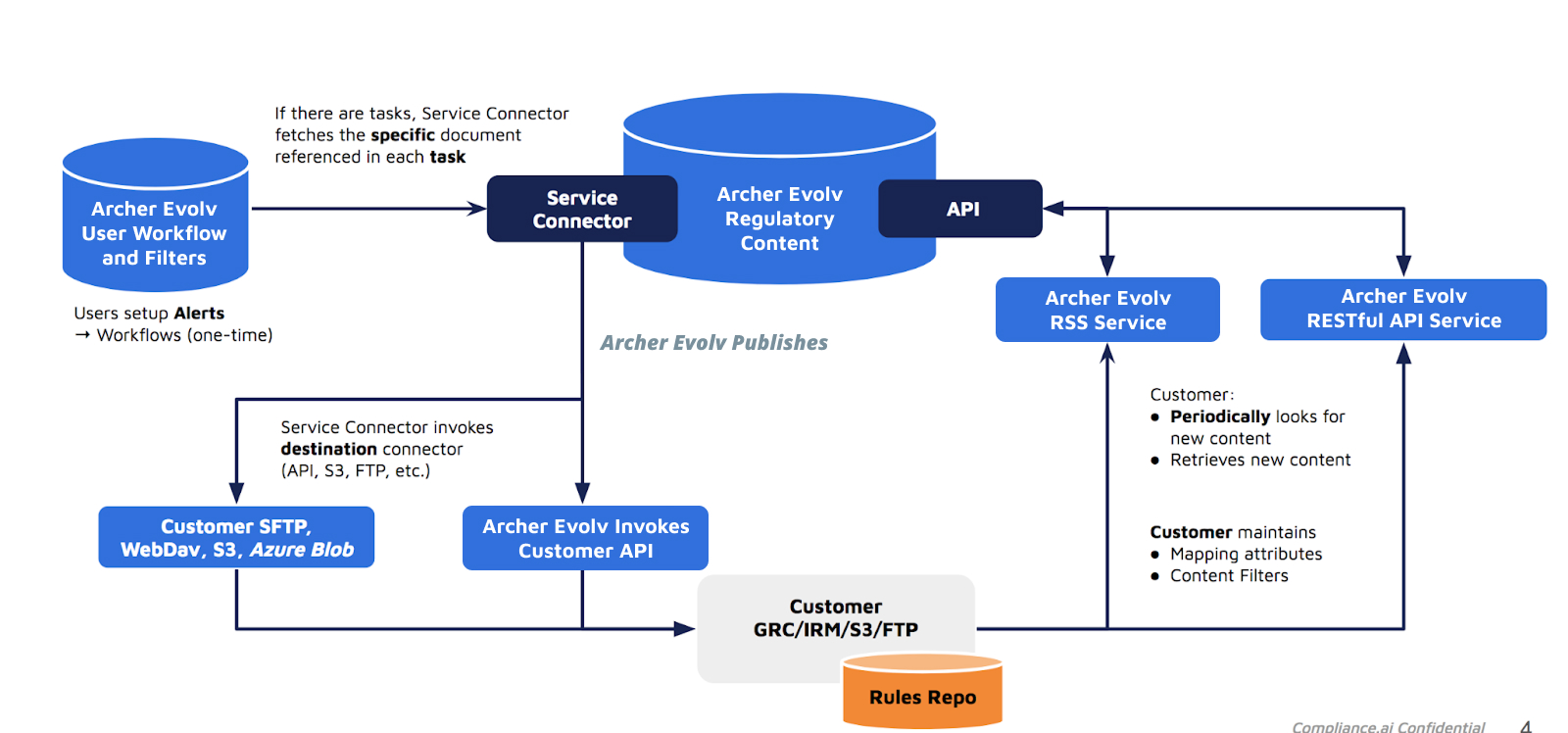
Bulk Label documents using previously mapped content: DOC_LABEL, Associate_Label_To_Doc
Using external files to load document or citation -> label pre-mapped content
If you maintain an existing labeling/tagging methodology outside of Archer Evolv, Team Edition workflows allow you to easily associate a group of labels to multiple regulatory citations/documents
This feature (Associate_Label_to_Doc) is especially useful during initial onboarding, assisting with the mass import of existing pre-mapped/pre-labeled documents/citations into Archer Evolv
|
Process for using External mapping files (doc id/citation -> labels) |
|---|
|
Step 1:
|
|
Step 2: Save/download the new spreadsheet as a Comma Separated Value file, for example: "Label_to_Doc.csv" |
|
Step 3:
|
|
Step 4: Mark your task as Complete |
|
Step 5:
Wait for the next Service Connector run (1-12 hours)
|
|
Step 6: Once complete, review the report attached to the Service Connector task, which provides the results of the processing on a per-row basis (date/time, success, failure, and error code) |
Importing external/extended attributes using external files
You can extend the attributes in Archer Evolv by importing an external Comma Separated Value (CSV) file .
Mapped values can be added as part of a bulk import, and processed using a Archer Evolv workflow.
This feature enables you to extend Archer Evolv to match your destination system's attributes automatically.
CSV File format
The format of the CSV file is follows:
Aside from the header (column names), each row in the CSV file represents additional external attributes to be used for add/update requests.
CAI.Document.id ⇒ External_File.id => 3rdParty.uid => GRC.App.Attribute
and similarly
CAI.Document.Label ⇒ GRC.App.Attribute
Follow the steps below to configure an external file to import external attributes or to override the ones being used by Archer Evolv
|
Process for using external attribute files |
|
Step 1: Open the new spreadsheet & populate rows 2 onwards with actual data, following the schema outlined above |
|
Step 2: Save/download the new spreadsheet as a Comma Separated Value file, for example: "abc.csv" |
|
Step 3: Attached "abc.csv' to a Archer Evolv task that is associated with the document & annotations referenced in "abc.csv", using "Provide External Assessments for Annotations" workflow as your template |
|
Step 4: Mark your task as Complete |
|
Step 5: Wait for the next Service Connector run (1-12 hours) |
|
Step 6: Once complete, review the report attached to the Service Connector task, which provides the results of the processing on a per-row basis (date/time, success, failure, and error code) |
Bulk loading labels using External Files
You can import an extended group of labels and associate them with Archer Evolv documents, annotations and obligations using an external Comma Separated value formatted file (CSV).
Mapped labels can be added in bulk and processed using Archer Evolv workflow.
This feature enables you to rapidly add labels to your annotations and then use them for mapping.
CSV File format for bulk loading Labels -> Annotations
The format of the CSV file is as follows:
|
Attribute to be included |
Attribute description |
Attribute Type |
Required Attribute |
|---|---|---|---|
|
annotation_group |
Unique group of sentences that form an annotation. As exported from Archer Evolv "annotation_groups" attribute: "first_sentence_id" + "_" + last_sentence_id" |
String |
Mandatory |
|
DocumentID |
Unique identifier of the Document in Archer Evolv . Associated with each Annotation Group (1 DocumentID would be associated with many Annotation Groups |
String |
Mandatory |
|
LabelName |
Name of Label to be associated with the annotation group |
String |
Mandatory |
|
LabelID |
Archer Evolv Label ID associated with the Label Name |
Integer |
Optional |
Aside from the header (column names), each row in the CSV file represents additional Label information to be used for add/update requests.
CAI.Document.id ⇒ CAI.Annotation.Annotation_Group.Label => ExternalFile.Label.Name
and similarly
CAI.Document.Label ⇒ ExternalFile.Label.Name
Follow the steps below to configure an external file for additional attributes or to override the ones being used by Archer Evolv
|
Process for using external label files |
|
Step 1: Open a new spreadsheet & populate rows with header & actual data, following the schema in CSV File format above |
|
Step 2: Save/download the new spreadsheet as a Comma Separated Value file, for example: "abc.csv" |
|
Step 3: Attached "abc.csv' to a Archer Evolv task that is associated with the document & annotations referenced in "abc.csv", using the Archer Evolv "Associate User provided Labels to Annotation Groups" workflow as your template |
|
Step 4: Mark your task as Complete |
|
Step 5: Wait for the next Service Connector run (1-12 hours depending on the frequency) |
|
Step 6: Once complete, review the report attached to the Service Connector task, which provides the results of the processing on a per-row basis (date/time, success, failure, and error code) |
Processing Rules: Order of execution
Archer Evolv SC applies an ordered sequence when mapping Archer Evolv attributes to external attributes.
-
External file content: Archer Evolv SC first finds any linked external file that is attached to its mapping and publication task. If such a file is present -> the Service Connector will use the attribute values present in the file to override/use those values.
If the attributes are missing or empty in the external file -> Service Connector will look for rules to map the attribute using a Label prefix (optional).
-
Labels: Archer Evolv SC will find any mapped labels (can be configured with or without prefixes). If not found, the Service Connector will look for mapped attributes (optional)
-
Internal attributes: Using any combination of Archer Evolv document or annotation attributes. Attributes can be concatenated and truncated prior to being published into the external system (optional).
-
Default values

|
Parameter-Target |
Description |
Value-Source |
Type |
|---|---|---|---|
|
Document_Task_name_prefix |
Prefix for document task names |
__SFTP_CSV_DOC__ |
String |
|
Annotation_Task_name_prefix |
Prefix for annotation task names |
__SFTP_CSV_ANN__ |
String |
|
Obligation_Relevant_Task_name_prefix |
Prefix for relevant obligation task names |
__SFTP_CSV_OBLR__ |
String |
|
Obligation_All_Task_name_prefix |
Prefix for all obligation task names |
__SFTP_CSV_OBL__ |
String |
|
Auth_Source_Task_name_prefix |
Prefix for authorization source task names |
__SFTP_CSV_RES__ |
String |
|
Associate_Label_to_Doc_Task_name_prefix |
Prefix for task names to associate labels with documents |
Associate_Label_to_Doc |
String |
|
Associate_Label_to_Annotation_Task_name_prefix |
Prefix for task names to associate labels with annotations |
Associate_Label_to_Annotation_Task_name_prefix |
String |
|
auth_source_levels |
Number of authorization source levels |
4 |
Integer |
|
Regulations |
Regulations information |
|
String |
|
ftp_server |
FTP server address |
complianceai.files.com |
String |
|
ftp_uid |
FTP server username |
complianceai_uid |
String |
|
ftp_pwd |
FTP server password |
pwd |
String |
|
ftp_key_file |
Path to the key file for FTP authentication |
Managed by Archer Evolv |
String |
|
sftp_folder |
SFTP folder name |
|
String |
|
exportfiles_folder_incremental |
Folder name for incremental export files |
_Internal/incremental |
String |
|
exportfiles_folder |
Folder name for export files |
_Internal |
String |
|
destination_type |
Type of destination (e.g., sftp, ftp) |
sftp |
String |
|
doc_name_prefix |
Prefix for document names |
ab_Files_ |
String |
|
recent_document_name |
File name for the recent document CSV file |
DOCS_RECENT.csv |
String |
|
recent_obligation_name |
File name for the recent obligation CSV file |
OBLS_RECENT.csv |
String |
|
recent_annotation_name |
File name for the recent annotation CSV file |
ANNS_RECENT.csv |
String |
|
recent_auth_name_l0 |
File name for the recent authorization (level 0) CSV file |
AUTH_RECENT_L0.csv |
String |
|
recent_auth_name_l1 |
File name for the recent authorization (level 1) CSV file |
AUTH_RECENT_L1.csv |
String |
|
recent_auth_name_l2 |
File name for the recent authorization (level 2) CSV file |
AUTH_RECENT_L2.csv |
String |
|
recent_auth_name_l3 |
File name for the recent authorization (level 3) CSV file |
AUTH_RECENT_L3.csv |
String |
|
max_recent_days_records |
Maximum number of days to maintain 'recent' information in 'recent" files. SC purges records in the 'recent' file which have been published by the SC more than max_recent_days_records ago, each time it runs. |
2 |
String |
|
Document_Mapping |
See section Document_Mapping |
{..} |
complex |
|
Annotation_Mapping |
See section Annotation_Mapping |
{..} |
complex |
|
Obligation_Mapping |
See section Obligation_Mpping |
{..} |
complex |
|
Auth_Mapping_0 |
See section Auth_Mapping_0 |
{..} |
complex |
|
Auth_Mapping_1 |
See section Auth_Mapping_1 |
{..} |
complex |
|
Auth_Mapping_2 |
See section Auth_Mapping_2 |
{..} |
complex |
|
Auth_Mapping_3 |
See section Auth_Mapping_3 |
{..} |
complex |
BPM Labeling & Business Process Mapping
1. Overview
BPM Labeling & Business Process Mapping in the Service Connector automates the classification and labeling of documents and alerts by their relevance to business profiles and operational themes. This enables rapid understanding of business impact, prioritization of actions, and effective workflow alignment.
Why use it?
• Save time by automating manual relevance checks.
• Ensure alerts and documents are mapped to the correct business units and themes.
• Improve operational readiness and compliance tracking.
2. Quick Start
How to Run a Basic BPM Labeling Assessment
Step 1: Prepare your environment
Identify the business profiles and themes in Evolv that you want to map. Gather documents and alerts associated with your workflows.
Step 2: Configure your assessment
Use the following JSON payload to enable standard BPM labeling and mapping:
{
  "bpm_directly_relevant_label_prefix": "Directly Relevant to ",
  "bpm_indirectly_relevant_label_prefix": "Indirectly Relevant to ",
  "bpm_not_relevant_label_prefix": "Not Relevant to ",
  "bpm_enforce_last_run_date": true,
  "bpm_processing_type": "bpm_process_doc_list"
}
What it does:
This configuration labels documents as directly or indirectly relevant to your business profiles and runs an incremental BPM process on workflow documents. Only new or updated documents since the last run are processed, ensuring efficiency and up-to-date labeling.
Step 3: Run BPM Labeling
Trigger the Service Connector with your configuration. The system will evaluate documents and alerts, apply relevance labels, and map them to business processes and themes.
Step 4: Review the results
Check the output in your compliance dashboard. Documents and alerts will be labeled as configured, and you can filter by business or theme relevance.
3. Action Keywords
bpm_processing_type: Controls the operating mode (document list, all alerts, or active themes).
bpm_enforce_last_run_date: Enables incremental runs (process only new/updated items).
bpm_enforce_label_list: Applies relevance checks against specific labels.
4. Configuration Parameters (Comprehensive Table)
Parameter |
Description |
Acceptable Values |
Required/Optional |
Default Value |
When to Use |
|---|---|---|---|---|---|
bpm_directly_relevant_label_prefix |
Label prefix to use to specify documents relevant to business. Append name of business as specified in Evolv for this business profile to the label. |
string |
Optional |
Directly Relevant to |
Use to customize how directly relevant documents are labeled for each business. |
bpm_indirectly_relevant_label_prefix |
Label prefix to use to specify documents indirectly relevant to business. Append name of business as specified in Evolv for this business profile to the label. |
string |
Optional |
Indirectly Relevant to |
Use to customize how indirectly relevant documents are labeled for each business. |
bpm_not_relevant_label_prefix |
Label prefix to use to specify documents not-relevant to business. Append name of business as specified in Evolv for this business profile to the label. |
string |
Optional |
Not Relevant to |
Use to customize how non-relevant documents are labeled for each business. |
bpm_directly_relevant_label |
Label to use to specify documents relevant to business. |
string |
Optional |
- |
Use for explicit labeling of directly relevant documents. |
bpm_indirectly_relevant_label |
Label to use to specify documents indirectly relevant to business. |
string |
Optional |
- |
Use for explicit labeling of indirectly relevant documents. |
bpm_not_relevant_label |
Label to use to specify documents not-relevant to business. |
string |
Optional |
- |
Use for explicit labeling of non-relevant documents. |
bpm_relevant_to_theme_label_prefix |
Label prefix to use to specify documents relevant to theme (alert and associated label). Append theme name as specified in Evolv for this alert name to the label. |
string |
Optional |
Relevant to theme: |
Use to customize how documents relevant to a theme are labeled. |
bpm_not_relevant_to_theme_label_prefix |
Label prefix to use to specify documents not relevant to theme (alert and associated label). Append theme name as specified in Evolv for this alert name to the label. |
string |
Optional |
Not Relevant to theme: |
Use to customize how documents not relevant to a theme are labeled. |
bpm_processing_type |
Determines the operating mode of BPM run.
|
bpm_process_doc_list |
Optional |
bpm_process_doc_list |
Choose based on whether you want to process all alerts, all active themes, or just a specific document list. |
bpm_enforce_doc_list |
Ignored if bpm_process_all_alerts is used for bpm_processing_type.
Determines if BPM process should evaluate the list of matching docs or matching docs + revisiting all alerts associated with the workflow.
|
true |
Optional |
false |
Set true for strict doc list evaluation; false to include all alerts. |
bpm_enforce_last_run_date |
Ignored if bpm_process_doc_list is used for bpm_processing_type.
Determines if BPM process should evaluate alerts associated with the BPM workflow regardless of the last time it was run.
|
true |
Optional |
true |
Set true for incremental runs (process only new/updated items); false for a full run. |
bpm_enforce_label_list |
Assess relevance of document against the listed labels. |
list of strings |
Optional |
- |
Use for custom relevance checks by specifying label names. |
5. Sample Configuration Payloads
Example 1: Basic BPM Labeling
{
  "bpm_directly_relevant_label_prefix": "Directly Relevant to ",
  "bpm_indirectly_relevant_label_prefix": "Indirectly Relevant to ",
  "bpm_not_relevant_label_prefix": "Not Relevant to ",
  "bpm_enforce_last_run_date": true,
  "bpm_processing_type": "bpm_process_doc_list"
}
What it does: Labels documents as directly or indirectly relevant. Runs an incremental BPM process on workflow documents.
Example 2: Advanced BPM with Themes
{
  "bpm_directly_relevant_label_prefix": "Directly Relevant to ",
  "bpm_relevant_to_theme_label_prefix": "Relevant to theme: ",
  "bpm_not_relevant_to_theme_label_prefix": "Not Relevant to theme: ",
  "bpm_enforce_last_run_date": true,
  "bpm_processing_type": "bpm_process_active_themes"
}
What it does: Labels documents and alerts by business and theme relevance. Processes all active themes for comprehensive mapping.
Example 3: Custom Label List for Relevance
{
  "bpm_enforce_label_list": [
    "Document publication close to assessment date",
    "Document published far back compared to assessment date",
    "Uncertain Publication date"
  ],
  "bpm_enforce_doc_list": false,
  "bpm_processing_type": "bpm_process_all_alerts"
}
What it does: Applies custom relevance checks using specified labels. Processes all alerts associated with the workflow.
Example 4: Full Payload (Comprehensive Configuration)
{
  "bpm_directly_relevant_label_prefix": "Directly Relevant to ",
  "bpm_indirectly_relevant_label_prefix": "Indirectly Relevant to ",
  "bpm_not_relevant_label_prefix": "Not Relevant to ",
  "bpm_directly_relevant_label": "Is Relevant to xyz",
  "bpm_indirectly_relevant_label": "Indirectly Relevant to xyz",
  "bpm_not_relevant_label": "Irrelevant to xyz",
  "bpm_relevant_to_theme_label_prefix": "Relevant to theme: ",
  "bpm_not_relevant_to_theme_label_prefix": "Not Relevant to theme: ",
  "bpm_enforce_last_run_date": true,
  "bpm_enforce_doc_list": false,
  "bpm_enforce_label_list": [
    "Document publication close to assessment date",
    "Document published far back compared to assessment date",
    "Uncertain Publication date"
  ]
}
What it does: Provides a complete configuration for business and theme relevance labeling, incremental processing, and custom label-based relevance checks. Use this as a starting template and adjust values (e.g., business or theme names) to match your Evolv profiles.
6. Viewing the Outcome
After running BPM, log into your compliance dashboard, navigate to your workflow or theme, and review labeled documents and alerts. Use filters to view by business relevance or theme relevance.
7. Troubleshooting & FAQs
Why are some documents not labeled?
Ensure prefixes and explicit labels are correctly configured.
How do I run a full BPM process instead of incremental?
Set bpm_enforce_last_run_date to false.
Can I restrict BPM to specific documents?
Yes, set bpm_enforce_doc_list to true.
8. Best Practices
• Start with a test configuration to validate your setup.
• Use incremental runs for efficiency.
• Combine business and theme relevance labeling for full impact analysis.
• Regularly review and update your configuration as business structures change.
Control Quality Assessment (CQA)
1. Overview
Control Quality Assessment (CQA) introduces automated evaluation of control attributes such as risk, cadence, test procedures, ownership, and alignment with standards or obligations. This feature ensures that controls are not only present but meet quality benchmarks for compliance and operational resilience.
Why use it?
• Save time by automating manual control quality checks.
• Identify gaps in control design and execution.
• Improve audit readiness and reduce compliance risk.
• Ensure controls align with regulatory obligations and internal standards.
2. How It Works (User Workflow)
Step 1: Prepare your environment
Ensure metadata for risk, cadence, owner, and test procedures is available for the controls you want to assess.
Step 2: Configure your assessment
Use the following JSON payload to enable all major CQA checks:
{
  "cqa_assess_risk": true,
  "cqa_assess_cadence": true,
  "cqa_assess_test_procedure": true,
  "cqa_assess_owner": true,
  "cqa_assess_alignment": true
}
Step 3: Trigger the Service Connector
Run the assessment using your configuration.
Step 4: Review results
Check the compliance dashboard for flagged controls and quality scores.
What it does:
This configuration runs a comprehensive quality check on your controls. It flags any controls missing key attributes (such as owner or cadence), highlights risk gaps, and reports alignment issues for compliance review.
3. Action Keywords
cqa_assess_risk: Evaluate risk associated with not executing a control.
cqa_assess_cadence: Check frequency of control execution.
cqa_assess_test_procedure: Validate existence of test procedures.
cqa_assess_owner: Confirm control ownership.
cqa_assess_alignment: Verify alignment with standards or obligations.
4. Configuration Parameters (Full Table)
Parameter |
Description |
Acceptable Values |
Required or Optional |
Default |
When to Use |
|---|---|---|---|---|---|
cqa_assess_risk |
Assess the risk(s) associated with not executing a control. |
true |
Optional |
true |
Enable for risk-based prioritization. |
cqa_assess_cadence |
Assess the frequency specified for executing a control. |
true |
Optional |
true |
Enable for operational consistency. |
cqa_assess_test_procedure |
Assess test procedure associated to a control. |
true |
Optional |
true |
Enable for audit readiness. |
cqa_assess_owner |
Assess the owner(s) associated with a control. |
true |
Optional |
true |
Enable for accountability. |
cqa_assess_alignment |
Assess control procedure existence as it relates to control standards or regulatory obligations. |
true |
Optional |
false |
Enable for regulatory compliance. |
5. Sample Configuration Payloads
Example 1: Basic CQA Assessment
{
  "cqa_assess_risk": true,
  "cqa_assess_cadence": true,
  "cqa_assess_test_procedure": true,
  "cqa_assess_owner": true,
  "cqa_assess_alignment": false
}
Performs a standard assessment, flagging controls missing cadence or owner information. Risk gaps are highlighted for prioritization.
Example 2: Full Assessment (All Checks Enabled)
{
  "cqa_assess_risk": true,
  "cqa_assess_cadence": true,
  "cqa_assess_test_procedure": true,
  "cqa_assess_owner": true,
  "cqa_assess_alignment": true
}
Runs a comprehensive evaluation, flagging missing test procedures and alignment gaps with standards or obligations.
Example 3: Custom Assessment (Disable Risk & Cadence)
{
  "cqa_assess_risk": false,
  "cqa_assess_cadence": false,
  "cqa_assess_test_procedure": true,
  "cqa_assess_owner": true,
  "cqa_assess_alignment": true
}
Focuses assessment on ownership, test procedures, and alignment only.
6. Viewing the Outcome
After running CQA, navigate to the compliance dashboard to view controls flagged for missing attributes, risk and alignment scores, and export reports for remediation planning.
7. Troubleshooting & FAQs
Why are some controls skipped?
Ensure metadata for risk, cadence, owner, and test procedures is populated.
How do I enable all checks?
Set all cqa_assess_* parameters to true.
What happens if owner info is missing?
The control is flagged for review.
8. Best Practices
• Start with a test collection to validate configuration.
• Enable alignment checks for regulatory audits.
• Regularly review flagged controls and update metadata.
9. Advanced Scenarios
Combine CQA with Obligation Mapping to ensure controls align with extracted obligations.
Schedule periodic CQA runs for continuous monitoring.
Use custom dashboards to track remediation progress.
Mapping regulatory documents: Document Mapping
Document Mapping enables transforming & publishing Archer Evolv documents. The mapping section specifies how various Archer Evolv document attributes are mapped/transformed to externally defined attributes or taxonomies.
Each mapped attribute is represented as a key-value pair:
-
Key: the external (Target) field name.
-
Value: A transformation or extraction instruction for the Archer Evolv content that follows the Archer Evolv dot notation syntax.
|
Parameter-Target |
Description |
Sample Mapped Source |
Type |
|---|---|---|---|
|
title |
Extraction rule for the document title |
["title.{'length':300}”] |
array |
|
description |
Extraction rule for the document description |
["summary_text"] |
array |
|
link |
Extraction rule for the document link |
["web_url"] |
array |
|
guid |
Extraction rule for the document GUID or identifier |
["id"] |
array |
|
Doc ID |
Extraction rule for the document ID |
["id"] |
array |
|
category |
Extraction rule for the document category |
["cai_category_id.{'lookup':'DocTypes'}"] |
array |
|
pubDate |
Extraction rule for the document publication date |
["publication_date.{'date_convert':'UTC'}"] |
array |
|
jurisdiction |
Extraction rule for the document jurisdiction |
["jurisdiction.{'lookup':'Jurisdiction'}"] |
array |
|
summary_text |
Extraction rule for the document summary text |
["“summary_text”"] |
array |
|
pdf_url |
Extraction rule for the document PDF URL |
["{'pre_val':'https://pro__compliance__ai/content?overlay=pdf-overlay&renderfromtask=tasks&summary_id='}"], ["id"] |
array |
|
effective_on |
Extraction rule for the document effective date |
["rule.effective_on.{'date_convert':'UTC'}"] |
array |
|
comments_close_on |
Extraction rule for the document comments close date |
["rule.comments_close_on.{'date_convert':'UTC'}"] |
array |
|
cfr |
Extraction rule for the document CFR |
["official_id"] |
array |
|
topic |
Extraction rule for the document topic |
["topics.{'attrib':'name', 'scope':'*', 'delim':','}"] |
array |
|
agency |
Extraction rule for the document agency |
["agencies.{'attrib':'short_name' , 'scope':'*' , 'delim':','}" "], [""mainstream_news.news_source.name" "] |
array |
|
docket_id |
Extraction rule for the document docket ID |
["docket_ids.[0]"] |
array |
|
DateProcessed |
Extraction rule for the document processed date |
["{'proc_date':'UTC'}"] |
array |
|
Auto Summary |
Extraction rule for the document auto summary |
["summaries."0].summary_sentences.{'attrib':'', 'scope':'', 'delim':' ', 'length':20000}"] |
array |
|
CreatedDate |
Extraction rule for the document creation date |
[“created_at.{'date_convert':'UTC'}"] |
array |
|
doc_labels |
Extraction rule for the document labels |
["{'doc_label':'True'}.{'attrib':'label', 'scope':'*', 'delim':',','length':20000}""] |
array |
|
workflow_name |
Extraction rule for the document workflow name |
[“{'WORKFLOW_NAME':'true'}"] |
array |
|
location |
Extraction rule for the document location |
[“document_location.{'attrib':'title', 'scope':'*', 'delim':','}"] |
array |
Mapping user defined annotations: Annotation Mapping
Annotation Mapping enables transforming & publishing of user defined Archer Evolv annotations. The mapping section specifies how various annotation related fields or attributes are mapped/transformed to externally defined attributes or taxonomies.
Each mapped attribute is represented as a key-value pair:
-
Key: the external (Target) field name.
-
Value: A transformation or extraction instruction for the Archer Evolv annotations that follows the Archer Evolv dot notation syntax.
|
Parameter-Target |
Description |
Value-Source |
Type |
|---|---|---|---|
|
Date Review Started |
Date when the review started |
[“{'proc_date':'UTC'}"] |
Array |
|
Review Description |
Description of the review |
["sentences_text"] |
Array |
|
Review Status |
Status of the review |
["{'pre_val':'In Progress'}"] |
Array |
|
Analysis |
Type of analysis |
["{'pre_val':'Annotation Review'}"] |
Array |
|
Policy Change Overview |
Overview of policy changes |
["labels.{'attrib':'label', 'scope':'*', 'delim':',','length':20000}"] |
Array |
|
Comments |
Comments related to the review |
["comment_threads.[*].comments.{'attrib':'richtext', 'scope':'', 'delim':',' , 'l':20000, 'attrib_type':'richtext'}”] |
Array |
|
Type of Impact |
Type of impact |
["{'pre_val':'Policy Change'}"] |
Array |
|
Archer Evolv Regulatory Intelligence Items (GUID) |
GUIDs of Archer Evolv regulatory intelligence items associated with the review |
["{'service_var':'document_id'}”] |
Array |
|
Archer Evolv Review ID |
Unique ID of the Archer Evolv review |
["first_sentence_id"], ["{'pre_val':'_'}"], ["last_sentence_id"] |
Array |
|
DateProcessed |
Date when the item was processed |
["{'proc_date':'UTC'}"] |
Array |
|
guid |
GUID of the review |
["first_sentence_id"], ["{'pre_val':'_'}"], ["last_sentence_id"] |
Array |
Mapping obligations: Obligation Mapping
Obligation Mapping enables transforming & publishing of both automated and user defined Archer Evolv obligations . The mapping section specifies how various obligation related fields or attributes are mapped/transformed to externally defined attributes or taxonomies.
Each mapped attribute is represented as a key-value pair:
-
Key: the external (Target) field name.
-
Value: A transformation or extraction instruction for the Archer Evolv obligations that follows the Archer Evolv dot notation syntax.
|
Parameter-Target |
Description |
Value-Source |
Type |
|---|---|---|---|
|
Date Review Started |
Start date of the obligation review |
[“{'proc_date':'UTC'}”] |
Extraction Rule |
|
Review Description |
Description of the obligation review |
["”sentences_text'”] |
Extraction Rule |
|
Review Status |
Status of the obligation review |
[{'pre_val':'In Progress'}"] |
Extraction Rule |
|
Analysis |
Indication that it is an obligation review |
[{'pre_val':'Obligation Review'}"] |
Extraction Rule |
|
Policy Change Overview |
Overview of policy changes |
["labels.{'attrib':'label', 'scope':'*', 'delim':','length':20000}'"] |
Extraction Rule |
|
Comments |
Comments related to the obligation review |
["comment_threads.[*].comments.{'attrib':'richtext', 'scope':'', 'delim':'n' , 'l':20000, 'attrib_type':'richtext'}'"] |
Extraction Rule |
|
Type of Impact |
Type of impact (e.g., policy change) |
[{'pre_val':'Policy Change'}"] |
Extraction Rule |
|
Archer Evolv Regulatory Intelligence Items (GUID) |
GUID of Archer Evolv Regulatory Intelligence items |
[{'service_var':'document_id'}"] |
Extraction Rule |
|
Archer Evolv Review ID |
ID of the Archer Evolv review, including first and last sentence IDs |
["first_sentence_id', {'pre_val':'_'}, 'last_sentence_id'"] |
Extraction Rule |
|
is_system_obligation |
Flag indicating if it is a system obligation |
["is_system_obligation'"] |
Extraction Rule |
|
DateProcessed |
Processed date of the obligation |
[{'proc_date':'UTC'}"] |
Extraction Rule |
|
title |
Title of the main document |
["main_doc_attrib.title.{'length':300}'"] |
Extraction Rule |
|
agency |
Agency responsible for the obligation, including short name and news source name |
["main_doc_attrib.agencies.{'attrib':'short_name' , 'scope':'*' , 'delim':','}"], ["main_doc_attrib.mainstream_news.news_source.name"] |
Extraction Rule |
|
effective_on |
Effective date of the main document |
[“main_doc_attrib.rule.effective_on.{'date_convert':'UTC'}”] |
Extraction Rule |
|
guid |
GUID or identifier of the obligation, including first and last sentence IDs |
["first_sentence_id', {'pre_val':'_'}, 'last_sentence_id"] |
Extraction Rule |
Obligation Extraction & Mapping
1. Overview
Obligation Extraction & Mapping in the Service Connector helps you automatically identify, classify, and label regulatory obligations from documents. This means you can quickly turn complex regulations into actionable tasks, assign them to the right business units, and track compliance more efficiently.
Why use it?
• Save time by automating manual review and classification.
• Ensure obligations are mapped to the correct business units, risks, and themes.
• Improve audit readiness and compliance tracking.
2. How It Works (User Workflow)
Step 1: Prepare Your Environment
• Identify the collection (business area or project) where obligations will be created.
• Gather your regulatory documents.
Step 2: Configure the Service Connector
• Use the configuration parameters (see table below) to set up how obligations are extracted and labeled.
• Decide if you want to process all documents, only new ones, or just a specific list.
Step 3: Run the Extraction
• Trigger the Service Connector with your configuration.
• The system will read your documents, extract obligations, suggest controls, and label everything according to your setup.
Step 4: Review the Results
• Check the output in your compliance dashboard.
• Obligations will be labeled by business unit, risk, and theme as configured.
3. Action Keywords
RUN_OBLIGATION_CONTROL_EXTRACTION_MAPPING: Main switch to enable extraction and mapping.
AUTO_LABEL_BU_AND_RISKS: Classifies obligations by business unit and risk.
CREATE_SUB_OBLIGATIONS: Breaks down broad obligations into specific items.
SUGGEST_CONTROL: Adds suggested controls to each obligation.
4. Configuration Parameters
Parameter |
Description |
Acceptable Values |
Required or Optional |
Default Value |
Depends on |
When to use |
|---|---|---|---|---|---|---|
RUN_OBLIGATION_CONTROL_EXTRACTION_MAPPING |
Determines if the solution should extract obligations, sugge..., ec. If turned Off => the "depends on" attributes are ignored |
true |
Optional |
true |
collection_name |
Always set to true to use this feature |
AUTO_LABEL_IRRELEVANT_OBLIGATION_TYPE |
Classify "obligaiton type" even if obligation is deemed as irrelevant |
true |
Optional |
false |
RUN_OBLIGATION_CONTROL_EXTRACTION_MAPPING |
Enable when downstream systems still require obligation type metadata even for irrelevant obligations. |
SUB_OBLIGATION_PREFIX |
Text appearing before the extracted sub-obligaitons; can be used to identify sub-obligations |
string of characters |
Optional |
Req.: ' |
RUN_OBLIGATION_CONTROL_EXTRACTION_MAPPING |
Use when documents contain enumerated obligation lists (e.g., (a), (b), (c)) that need consistent parsing. |
SUB_OBLIGATION_TYPE_LABEL |
Text appearing as the label for sub-obligaitons, can be used to filter/identify sub-obligations |
Alpha-numeric string of characters |
Optional |
Sub Obligation |
RUN_OBLIGATION_CONTROL_EXTRACTION_MAPPING |
Use when sub-obligations need a unique label for grouping, reporting, or GRC ingestion filters. |
SUB_OBLIGATION_CONFIDENCE_IN_SUMMARY |
Display AI Operator's confidence in the sub-obligaiton, appearing in the justification "summary" section, in this format: [Confidence level:75%] |
true |
Optional |
true |
RUN_OBLIGATION_CONTROL_EXTRACTION_MAPPING |
Enable when users require visibility into AI certainty for auditability or oversight workflows. |
RECONCILE_SUB_AND_COARSE_OBLIGATION_RELEVANCE |
Sync relevance assessment: if any sub-obligation is mapped to one or many Risks, BUs or Legal Entities, and the sub-obligation type is consequential (Obligatory, Procedural, Conditional or Prohibitive) => the coarse-grained obligation is also labelled as relevant. |
true |
Optional |
true |
RUN_OBLIGATION_CONTROL_EXTRACTION_MAPPING |
Enable when relevance evaluation must remain consistent between granular findings and overall obligation. |
AUTO_ANNOTATE_RELEVANCE_JUSTIFICATION |
Add justification as an annotation comment to each obligation. |
true |
Optional |
true |
RUN_OBLIGATION_CONTROL_EXTRACTION_MAPPING |
Set to true to add explanations |
AUTO_LABEL_BU_AND_RISKS |
Classify obligations by Business Unit labels or Risk labels (with Risk: prefix). |
true |
Optional |
false |
RUN_OBLIGATION_CONTROL_EXTRACTION_MAPPING |
Enable when BU/Risk mapping is needed |
AUTO_LABEL_CITATION_NAME |
Add a citation-style label to the obligation name. |
true |
Optional |
true |
RUN_OBLIGATION_CONTROL_EXTRACTION_MAPPING |
Enable for traceability back to source |
AUTO_LABEL_OBLIGATION_TYPE |
Classify the type of obligation (e.g., Obligatory, Prohibitive, etc.). |
true |
Optional |
true |
RUN_OBLIGATION_CONTROL_EXTRACTION_MAPPING |
Enable to categorize obligations by type |
AUTO_LABEL_RELEVANT_THEMES |
Classify obligations by matching business or operational themes. |
true |
Optional |
true |
RUN_OBLIGATION_CONTROL_EXTRACTION_MAPPING |
Enable if you want theme tagging for obligations |
AUTO_LABEL_SIMILAR_OBLIGATIONS |
Cluster similar obligations using matching language within the specified collection. |
true |
Optional |
false |
collection_name |
Enable when documents have repeated obligations |
DEFAULT_GROUP_OBLIGATION_PREFIX |
Default prefix name to use for Grouped/clustered obligation labels |
string |
Optional |
Group: |
AUTO_LABEL_SIMILAR_OBLIGATIONS |
Customize grouping label names |
collection_id |
Collection ID in Evolv to create obligations in. Provide this or collection_name. |
Collection ID |
Optional |
- |
collection_name |
Use if you prefer collection_id over collection_name |
collection_name |
Collection name in Evolv to create obligations in. |
Collection name |
Optional |
public |
- |
Use to target which collection obligations will be created in |
create_non_relevant_obligations |
Create obligations for non-relevant/non-obligatory segments based on scope. |
true |
Optional |
true |
RUN_OBLIGATION_CONTROL_EXTRACTION_MAPPING |
Enable if you want to capture non-relevant segments too |
create_obligations_in_app |
Create obligations in E4C or perform a dry run (report only). |
true |
Optional |
true |
RUN_OBLIGATION_CONTROL_EXTRACTION_MAPPING |
Use false for testing before creating records |
CREATE_SUGGESTED_CONTROL |
Create suggested controls as actual E4C control records and auto-link to obligations. |
true |
Optional |
true |
RUN_OBLIGATION_CONTROL_EXTRACTION_MAPPING |
Enable if you want suggested controls created as records |
LINE_OF_BUSINESS_SCOPE |
Line of Business scope to apply within the document. |
org |
Optional |
org |
RUN_OBLIGATION_CONTROL_EXTRACTION_MAPPING |
Use team when scoping to a specific Evolv team |
LINE_OF_BUSINESS_TEAM_NAME |
If LINE_OF_BUSINESS_SCOPE is team, specify the E4C team name. |
E4C team name |
Optional |
nan |
LINE_OF_BUSINESS_SCOPE |
Required when LINE_OF_BUSINESS_SCOPE is team |
auto_process_children |
Also process all children/grand-children of the document. |
true |
Optional |
true |
RUN_OBLIGATION_CONTROL_EXTRACTION_MAPPING |
Enable for resource-type docs with nested children |
SUGGEST_CONTROL |
Add suggested controls as annotation comments to obligations. |
true |
Optional |
true |
RUN_OBLIGATION_CONTROL_EXTRACTION_MAPPING |
Enable if you want control suggestions in comments |
GRANULARITY_LEVEL |
Determines the specificity and focus level of the obligation extraction. |
fine |
Optional |
coarse |
RUN_OBLIGATION_CONTROL_EXTRACTION_MAPPING |
Use fine when you need detailed obligations |
CREATE_SUB_OBLIGATIONS |
Break down coarse obligations into enumerated sub-obligation items and link them. |
true |
Optional |
false |
RUN_OBLIGATION_CONTROL_EXTRACTION_MAPPING |
Enable when you want enumerated sub-obligations |
AUTO_LABEL_BU_AND_RISKS_SUB_OBLIGATION |
Classify sub-obligations by Business Unit and Risk labels. |
true |
Optional |
false |
RUN_OBLIGATION_CONTROL_EXTRACTION_MAPPING |
Enable to apply BU/Risk labels to sub-obligations too |
CP_CONFIDENCE_LEVEL |
Provides a 0-100% confidence score for each auto-suggested control procedure. |
true |
Optional |
false |
RUN_OBLIGATION_CONTROL_EXTRACTION_MAPPING, SUGGEST_CONTROL |
Enable when you want confidence for suggested controls |
MAX_CONTROLS_TO_CREATE |
Maximum cap on the number of auto-suggested control procedures per obligation. |
int |
Optional |
- |
RUN_OBLIGATION_CONTROL_EXTRACTION_MAPPING, SUGGEST_CONTROL |
Use to cap control creation volume |
CREATE_SUB_OBLIGATIONS_FROM_CONTROLS |
Reuse control description language as obligation text and create obligations. |
true |
Optional |
false |
RUN_OBLIGATION_CONTROL_EXTRACTION_MAPPING, CREATE_SUB_OBLIGATIONS, SUGGEST_CONTROL |
Use when control language is best source for sub-obligations |
CREATE_CONTROLS_FOR_SUB_OBLIGATIONS |
Create controls for sub-obligations. |
true |
Optional |
false |
RUN_OBLIGATION_CONTROL_EXTRACTION_MAPPING, CREATE_SUB_OBLIGATIONS, SUGGEST_CONTROL |
Enable when each sub-obligation should have its own controls |
RISK_LABEL_PREFIXES |
establish a list of label prefixes to use for identifying Risk type annotations |
List of strings: ["Risk:", "RSK"] |
Optional |
["Risk:"] |
RUN_OBLIGATION_CONTROL_EXTRACTION_MAPPING, AUTO_LABEL_BU_AND_RISKS |
Use when risk labels have custom prefixes |
ELABORATE_ON_SUB_OBLIGATIONS |
expand on the description of sub-obligations: from extractive to narrative |
true |
Optional |
false |
RUN_OBLIGATION_CONTROL_EXTRACTION_MAPPING, CREATE_SUB_OBLIGATIONS |
Enable when sub-obligations need more descriptive language |
MIN_BU_RISK_SELECTIONS |
min number of labels to pick from for BU and Risk based mapping |
int |
Optional |
- |
RUN_OBLIGATION_CONTROL_EXTRACTION_MAPPING |
Use when you want minimum BU/Risk labels applied |
MAP_SUB_OBLIGATION_OBL_TYPE |
Classify sub-obligations by obligation type. |
true |
Optional |
- |
RUN_OBLIGATION_CONTROL_EXTRACTION_MAPPING, CREATE_SUB_OBLIGATIONS |
Enable when sub-obligations need type classification |
MAX_BU_SELECTIONS |
max number of labels to pick from for BU based mapping |
int |
Optional |
10 |
RUN_OBLIGATION_CONTROL_EXTRACTION_MAPPING, AUTO_LABEL_BU_AND_RISKS |
Use to cap number of BU labels assigned |
MIN_BU_RISK_CONFIDENCE |
minimum confidence level to apply BU/Risk mapping |
int [2-100] |
Optional |
70 |
RUN_OBLIGATION_CONTROL_EXTRACTION_MAPPING, AUTO_LABEL_BU_AND_RISKS |
Use to ensure BU/Risk labeling quality |
MAX_RISK_SELECTIONS |
max number of mapped Risk type labels to apply when evaluating Risks |
int |
Optional |
10 |
RUN_OBLIGATION_CONTROL_EXTRACTION_MAPPING, AUTO_LABEL_BU_AND_RISKS |
Use to cap number of Risk labels assigned |
CREATE_SUB_OBLIGATIONS_FROM_IRRELEVANT_OBLIGATIONS |
create sub obligations even if the parent coarse-grain obligation is deemed as irrelevant |
true |
Optional |
false |
RUN_OBLIGATION_CONTROL_EXTRACTION_MAPPING |
Use when you want sub-obligations even if the parent is irrelevant |
EXCLUDE_LABELS_WITH_NO_DESCRIPTION |
Exclude labels that do not have a description from BU/Risk mapping. |
true |
Optional |
true |
RUN_OBLIGATION_CONTROL_EXTRACTION_MAPPING, AUTO_LABEL_BU_AND_RISKS |
Enable to only include labels with descriptions in BU/Risk mapping. |
EXTRACT_OBLIGATIONS_AND_CONTROLS |
If turned off, the connector will not extract/create new obligations or controls. Instead, it will only enhance existing obligations/controls (e.g., mapping/grouping) based on other enabled flags. |
true |
Optional |
true |
RUN_OBLIGATION_CONTROL_EXTRACTION_MAPPING |
Set to false for mapping-only runs (no new obligations/controls created). |
USE_LEGAL_ENTITIES_AS_BUSINESS_DESCRIPTION |
Defines the action prefix that instructs the Service Connector to execute the Coarse Obligation Extraction action type. When this prefix appears in a workflow task title, SC retrieves coarse‑grained obligations for the document associated with the task, applies the configured Obligation_Mapping mapping, formats the output, and publishes the result. |
true |
Optional |
true |
RUN_OBLIGATION_CONTROL_EXTRACTION_MAPPING |
Enable when legal entity definitions affect relevance |
System_Coarse_Obligation_Extraction_Prefix |
Apply "Legal Entities" definitions ane descriptions when per...relevance assessment (in addtition to the business definition) |
Any non‑empty string (e.g., "COARSE", "COARSE_OBL", "SYS_COARSE") |
Optional |
None |
Use this when you want the Service Connector to automatically extract, transform, and publish system‑generated coarse‑grained obligations. This prefix acts as a “verb,” just like other SC action prefixes (e.g., Document_Task_name_prefix, Obligation_All_Task_name_prefix). |
5. Sample Configuration Payloads (Input → Output)
Example 1: Basic Obligation Extraction for a Single Business Unit
{
  "RUN_OBLIGATION_CONTROL_EXTRACTION_MAPPING": true,
  "collection_name": "Retail Banking",
  "AUTO_LABEL_BU_AND_RISKS": true,
  "CREATE_SUB_OBLIGATIONS": false,
  "SUGGEST_CONTROL": true,
  "GRANULARITY_LEVEL": "coarse"
}
What this does:
• Extracts obligations from documents in the “Retail Banking” collection.
• Labels obligations by business unit and risk.
• Suggests controls for each obligation.
• Uses “coarse” granularity for broader obligation grouping.
• Does not break obligations into sub-items.
Example 2: Advanced Extraction with Sub-Obligations and Themes
{
  "RUN_OBLIGATION_CONTROL_EXTRACTION_MAPPING": true,
  "collection_name": "Corporate Lending",
  "AUTO_LABEL_BU_AND_RISKS": true,
  "CREATE_SUB_OBLIGATIONS": true,
  "AUTO_LABEL_BU_AND_RISKS_SUB_OBLIGATION": true,
  "AUTO_LABEL_RELEVANT_THEMES": true,
  "SUGGEST_CONTROL": true,
  "GRANULARITY_LEVEL": "fine",
  "MAX_CONTROLS_TO_CREATE": 3,
  "CP_CONFIDENCE_LEVEL": true
}
What this does:
• Extracts and labels obligations for “Corporate Lending.”
• Breaks down obligations into detailed sub-obligations, each labeled by business unit and risk.
• Labels obligations by relevant operational themes.
• Suggests up to 3 controls per obligation, showing confidence scores.
• Uses “fine” granularity for detailed tracking.
Example 3: Dry Run for Testing (No Records Created)
{
  "RUN_OBLIGATION_CONTROL_EXTRACTION_MAPPING": true,
  "collection_name": "Wealth Management",
  "create_obligations_in_app": false,
  "AUTO_LABEL_BU_AND_RISKS": true,
  "SUGGEST_CONTROL": false
}
What this does:
• Runs the extraction process for “Wealth Management” but does not create any records.
• Useful for testing configuration and reviewing the report before committing changes.
• Labels obligations by business unit and risk, but does not suggest controls.
Example 4: Incremental Processing (Only New Documents)
{
  "RUN_OBLIGATION_CONTROL_EXTRACTION_MAPPING": true,
  "collection_name": "Insurance Operations",
  "bpm_enforce_last_run_date": true,
  "AUTO_LABEL_BU_AND_RISKS": true,
  "CREATE_SUB_OBLIGATIONS": true
}
What this does:
• Processes only documents added or updated since the last run in “Insurance Operations.”
• Efficient for ongoing compliance monitoring.
• Labels obligations and creates sub-obligations.
Example 5: Custom Label Prefixes and Risk Mapping
{
  "RUN_OBLIGATION_CONTROL_EXTRACTION_MAPPING": true,
  "collection_name": "Payments",
  "AUTO_LABEL_BU_AND_RISKS": true,
  "RISK_LABEL_PREFIXES": ["Risk:", "RSK", "Compliance Risk:"],
  "DEFAULT_GROUP_OBLIGATION_PREFIX": "Clustered Obligation: ",
  "CREATE_SUB_OBLIGATIONS": true
}
What this does:
• Uses custom prefixes for risk labels and grouped obligations.
• Helps tailor labeling to organizational standards or reporting needs.
• Applies to the “Payments” collection.
Example 6: Full Feature Set for Resource-Type Documents
{
  "RUN_OBLIGATION_CONTROL_EXTRACTION_MAPPING": true,
  "collection_name": "Resource Management",
  "auto_process_children": true,
  "CREATE_SUB_OBLIGATIONS": true,
  "ELABORATE_ON_SUB_OBLIGATIONS": true,
  "AUTO_LABEL_BU_AND_RISKS": true,
  "SUGGEST_CONTROL": true,
  "GRANULARITY_LEVEL": "fine"
}
What this does:
• Processes all child and grandchild documents within “Resource Management.”
• Creates detailed, narrative sub-obligations.
• Labels and suggests controls for each item.
Example 7: Comprehensive Test Collection with All Major Features
{
  "RUN_OBLIGATION_CONTROL_EXTRACTION_MAPPING": true,
  "collection_name": "Test",
  "auto_process_children": true,
  "create_obligations_in_app": true,
  "create_non_relevant_obligations": true,
  "LINE_OF_BUSINESS_SCOPE": "org",
  "AUTO_LABEL_ANNOTATE_STRATEGY": {
    "AUTO_LABEL_CITATION_NAME": true,
    "AUTO_LABEL_RELEVANT_THEMES": true,
    "AUTO_LABEL_BU_AND_RISKS": false,
    "AUTO_LABEL_LINES_OF_BUSINESS": false,
    "AUTO_LABEL_OBLIGATION_TYPE": true,
    "AUTO_ANNOTATE_RELEVANCE_JUSTIFICATION": true,
    "AUTO_LABEL_SIMILAR_OBLIGATIONS": false
  },
  "SUGGEST_CONTROL": true,
  "CREATE_SUGGESTED_CONTROL": true,
  "GRANULARITY_LEVEL": "coarse",
  "ELABORATE_ON_SUB_OBLIGATIONS": false,
  "CREATE_SUB_OBLIGATIONS": true,
  "AUTO_LABEL_BU_AND_RISKS_SUB_OBLIGATION": true,
  "RISK_LABEL_PREFIXES": ["Risk:", "RSK"]
}
What this does:
• Demonstrates a comprehensive configuration for a test collection.
• Enables child document processing, creation of obligations and non-relevant obligations, and suggested controls.
• Uses a detailed auto-labeling strategy for citations, themes, obligation types, and relevance justifications.
• Applies coarse granularity, creates sub-obligations, and uses custom risk label prefixes.
6. Viewing the Outcome
After running the Service Connector:
• Log into your compliance dashboard.
• Navigate to your collection (e.g., “Retail Banking”).
• You’ll see obligations, sub-obligations, and controls, each labeled as configured.
• Use filters to view by business unit, risk, or theme.
7. Troubleshooting & FAQs
Q: I don’t see sub-obligations.
A: Set "CREATE_SUB_OBLIGATIONS": true and "AUTO_LABEL_BU_AND_RISKS_SUB_OBLIGATION": true if you want labels on sub-items.
Q: How do I run a dry run (no records created)?
A: Set "create_obligations_in_app": false to generate a report only.
Q: Why are some obligations not labeled?
A: Make sure "AUTO_LABEL_BU_AND_RISKS": true is set. For sub-obligations, also set "AUTO_LABEL_BU_AND_RISKS_SUB_OBLIGATION": true.
Q: How do I group similar obligations together?
A: Enable "AUTO_LABEL_SIMILAR_OBLIGATIONS": true and set the collection_name parameter.
Q: What does granularity level mean?
A: GRANULARITY_LEVEL controls how detailed the extracted obligations are. "coarse" = broader obligations; "fine" = more specific obligations.
Q: How do I add explanations to each obligation?
A: Set "AUTO_ANNOTATE_RELEVANCE_JUSTIFICATION": true to add a short explanation to each obligation.
8. Example Use Case (Acme Financial Group)
Suppose you’re a compliance analyst at Acme Financial Group and you want to ensure all new regulatory obligations for “Wealth Management” are captured and assigned to the right teams.
{
  "RUN_OBLIGATION_CONTROL_EXTRACTION_MAPPING": true,
  "collection_name": "Wealth Management",
  "AUTO_LABEL_BU_AND_RISKS": true,
  "CREATE_SUB_OBLIGATIONS": false,
  "SUGGEST_CONTROL": false
}
What this does:
Runs an obligation-to-control mapping for the “Wealth Management” collection, automatically tagging obligations with relevant business units and risk categories. It does not break obligations into sub-obligations or suggest new controls, focusing instead on accurate mapping and organizational alignment.
9. Obligation Extraction & Mapping Best Practices
• Start with a test collection to validate your configuration.
• Use “fine” granularity for detailed tracking, “coarse” for summary-level.
• Regularly review and update your configuration as regulations or business structures change.
Mapping to Resource type content
Mapping top-level Resource content: Auth_Mapping_0
Archer Evolv Authoritative top-level source type regulatory content are “Resource” content in Archer Evolv..
Authoritative Source mapping (or Auth mapping) enables transforming & publishing of user defined Archer Evolv resource type content. The mapping section specifies how various resource content related fields or attributes are mapped/transformed to externally defined attributes or taxonomies.
The top-level content set is related to other nth level resource content, referenced as “Auth_Mapping_n '' in the configuration template following the Archer Evolv dot notation syntax.
Each mapped attribute is represented as a key-value pair:
-
Key: the external (Target) field name.
-
Value: A transformation or extraction instruction for the Archer Evolv resource content that follows the Archer Evolv dot notation syntax.
Archer Evolv Auth resource documents are linked together based on a parent -> child relation:
Auth_Mapping_0
-> Auth_Mapping_1
-> Auth_Mapping_2
…
-> Auth_Mapping_n
|
Parameter-Target |
Description |
Value-Source |
Type |
|---|---|---|---|
|
source name |
Name of the information source |
["title.{'length':300}"] |
Extraction Rule |
|
source description |
Description of the information source |
["summary_text"] |
Extraction Rule |
|
link |
Link to the source, including a pre-value and the ID |
["{'pre_val':'https://pro__compliance__ai/content?overlay=pdf-overlay&renderfromtask=tasks&summary_id='}', 'id"] |
Extraction Rule |
|
source tracking Id |
Tracking ID of the source |
["id"] |
Extraction Rule |
|
Archer Evolv name |
Name of the Archer Evolv (Compliance AI) |
["official_id"] |
Extraction Rule |
|
Source Version |
Version of the source, including the publication date |
["publication_date.{'date_convert':'UTC'}"] |
Extraction Rule |
|
docket_id |
Docket ID associated with the source |
["docket_ids.[0]"] |
Extraction Rule |
|
guid |
GUID or identifier of the source |
["id"] |
Extraction Rule |
|
Doc ID |
ID of the document |
["id"] |
Extraction Rule |
|
DateProcessed |
Processed date of the source |
["{'proc_date':'UTC'}"] |
Extraction Rule |
Mapping 2nd level Resource content: Auth_Mapping_1
Archer Evolv Authoritative 2nd level resource type regulatory content are “Resource” content in Archer Evolv that are linked (children) of other resource content.
Authoritative Source mapping (or Auth mapping) enables transforming & publishing of user defined Archer Evolv resource type content. The mapping section specifies how various resource content related fields or attributes are mapped/transformed to externally defined attributes or taxonomies.
The 2nd-level content set is related to other nth level resource content, referenced as “Auth_Mapping_n '' in the configuration template following the Archer Evolv dot notation syntax.
Each mapped attribute is represented as a key-value pair:
-
Key: the external (Target) field name.
-
Value: A transformation or extraction instruction for the Archer Evolv resource content that follows the Archer Evolv dot notation syntax.
The resource content is related to other nth level resource content, referenced as “Auth_Mapping_n ''.
For example, a specific level 1 resource content can be mapped to the level
0 (top level) resource content using the “uplevel” indicator based on the
Archer Evolv dot notation syntax.
|
Parameter-Target |
Description |
Value-Source |
Type |
|---|---|---|---|
|
Topic Name |
The name of the topic |
["title"] |
Array |
|
Topic Description |
The description of the topic |
["summary_text"] |
Array |
|
link |
The link to the topic |
["{'pre_val':'https://pro__compliance__ai/content?overlay=pdf-overlay&renderfromtask=tasks&summary_id='}"],["id"] |
Array |
|
Topic Tracking Id |
The tracking ID of the topic |
["id"] |
Array |
|
Archer Evolv name |
The name of the Archer Evolv (Archer Evolv) |
["official_id"] |
Array |
|
Source Version |
The version or publication date of the source |
"publication_date.{'date_convert':'UTC'}" |
Array |
|
Source Description |
The description of the parent source |
["parent", "summary_text"] |
Array |
|
Source ID |
The source ID of the parent source |
["{'uplevel':'1', 'attrib':'id'}"] |
Array |
|
Source Name |
The Source Name of the parent source |
["{'uplevel':'1', 'attrib':'title'}"] |
|
|
guid |
The GUID (Global Unique Identifier) of the source |
["id"] |
Array |
|
DateProcessed |
The UTC date when the source was processed |
["{'proc_date':'UTC'}"] |
Array |
Mapping ‘nth -1 level’ Resource content: Auth_Mapping_2
Mapping parameters for transforming Archer Evolv Authoritative second-level source type regulatory content (referred to as “Resource documents” in Archer Evolv).
The mapping specifies how various resource document related fields or attributes are mapped/transformed to externally defined attributes or taxonomies.
Each mapped attribute is represented as a key-value pair:
-
Key: the external (Target) field name.
-
Value: A transformation or extraction instruction for the Archer Evolv resource content that follows the Archer Evolv dot notation syntax.
The level of resource content set is related to other nth level resource
content, referenced as “Auth_Mapping_n '' in the configuration template. For
example, a specific level 2 content can be mapped to the level 1 (up one
level) content using the “uplevel” dot notation mapping. Similarly, a
specific level 2 content can be mapped to the level 0 (up two levels)
content using the “'grand_parent'” dot notation syntax.
|
Parameter-Target |
Description |
Value-Source |
Type |
|---|---|---|---|
|
Section Name |
Name of the section |
["title"] |
Extraction Rule |
|
Section Description |
Description of the section |
["summary_text”] |
Extraction Rule |
|
Link |
Link to the source, including a pre-value and the ID |
["{'pre_val':'https://pro__compliance__ai/content?overlay=pdf-overlay&renderfromtask=tasks&summary_id='}', 'id"] |
Extraction Rule |
|
Section Tracking ID |
Tracking ID of the section |
["id"] |
Extraction Rule |
|
CAI_ID |
ID of the Archer Evolv (Compliance AI) |
["official_id"] |
Extraction Rule |
|
Source Version |
Version of the source, including the publication date |
["publication_date.{'date_convert':'UTC'}"] |
Extraction Rule |
|
Topic ID |
ID of the parent topic |
["parent.id"] |
Extraction Rule |
|
Topic Name |
Name of the parent topic |
["parent.title"] |
Extraction Rule |
|
Source Description |
Description of the source |
["{'grand_parent':'True', 'attrib':'summary_text'}"] |
Extraction Rule |
|
Source Name |
Name of the source |
["{'grand_parent':'True', 'attrib':'title', 'length':300}"] |
Extraction Rule |
|
docket_id |
Docket ID associated with the source |
["docket_ids.[0]"] |
Extraction Rule |
|
guid |
GUID or identifier of the source |
["id"] |
|
Mapping “nth level” Resource content: Auth_Mapping_3
Mapping parameters for transforming Archer Evolv Authoritative third-level source type regulatory content (referred to as “Resource documents” in Archer Evolv). Specifies how various resource document related fields or attributes are mapped/transformed to externally defined attributes or taxonomies.
Each mapping is represented as a key-value pair, where the key is the external (Target) field name and the value is a transformation or extraction rule for the Archer Evolv content and the associated Archer Evolv extracted resource content.
The level of resource content set is related to other nth level resource content, referenced as “Auth_Mapping_n '' in the configuration template. For example, a specific level 3 content can be mapped to the level 2 (up one level) content using the “uplevel” dot notation mapping.
Similarly, a specific level 2 content can be mapped to the level 0 (up two levels) content using the “'uplevel'” dot notation mapping (number of up-stream levels to reverse traverse).
|
Parameter-Target |
Description |
Value-Source |
Type |
|---|---|---|---|
|
Sub Section Name |
Name of the sub-section |
["title"] |
Array |
|
Sub Section Description |
Description of the sub-section |
["summary_text"] |
Array |
|
Link |
Link to the sub-section |
["{'pre_val':'https://pro__compliance__ai/content?overlay=pdf-overlay&renderfromtask=tasks&summary_id='}"],["id"] |
Array |
|
Sub Section Tracking ID |
Tracking ID of the sub-section |
["id"] |
Array |
|
CAI_ID |
Archer Evolv ID associated with the sub-section |
["official_id"] |
Array |
|
Source Version |
Version of the source |
"publication_date.{'date_convert':'UTC'}" |
Array |
|
Section ID |
ID of the parent section |
"{'uplevel':'1', 'attrib':'id'}" |
Array |
|
Section Name |
Name of the parent section |
"{'uplevel':'1', 'attrib':'title'}" |
Array |
|
Topic ID |
ID of the parent topic |
"{'uplevel':'2', 'attrib':'id'}" |
Array |
|
Topic Name |
Name of the parent topic |
"{'uplevel':'2', 'attrib':'title', 'length':300}" |
Array |
|
Source ID |
The source ID of the parent source |
["{'uplevel':'3', 'attrib':'id'}"] |
|
|
Source Name |
The Source Name of the parent source |
["{'uplevel':'3', 'attrib':'title', 'length':300}"] |
|
|
guid |
Unique identifier of the sub-section |
["id"] |
Array |
|
DateProcessed |
Date of processing the sub-section |
["{'proc_date':'UTC'}"] |
Array |
Publishing & updating Task information: Task Mapping
Publishing Task Information
Task Mapping enables transforming & publishing "current" Archer Evolv Task information as CSV formatted content. This includes support for attributes such as “task owner”, associated “workflow name”, task comments, task assignee info, task create/update dates, etc. Archer Evolv SC supports exporting task information for tasks that the SC owned task depends on.
To instruct an Archer Evolv SC instance to publish Task information, complete the following steps.
-
Add "publish_mode" parameter to the SC configuration:
"operational_mode": "SFTP_CSV",
"publish_mode" : "docs_and_tasks"
publish_mode accepted values are: "docs_and_tasks", "docs", ""
-
Configure mapping to indicate "which" Task attributes to publish, the "Task_Mapping" section needs to be configured
|
Parameter-Target |
Description |
Value-Source |
Type |
|---|---|---|---|
|
task_id |
Specifies the task ID associated with the document task. |
["document_task.task_id"] |
Array |
|
created_at |
Converts and retrieves the creation date of the document task. |
["document_task.created_at.{'date_convert':'TASK_DATES'}"] |
Array |
|
updated_at |
Converts and retrieves the update date of the document task. |
["document_task.updated_at.{'date_convert':'TASK_DATES'}"] |
Array |
|
doc_id |
Specifies the document ID associated with the document task. |
["document_task.doc_id"] |
Array |
|
workflow_name |
Retrieves the workflow name associated with the document task. |
["document_task.workflow_name"] |
Array |
|
workflow_id |
Retrieves the workflow ID associated with the document task. |
["document_task.workflow_id"] |
Array |
|
original_assignee_email |
Retrieves the original assignee's email associated with the document task. |
["assignee.email"] |
Array |
|
original_assignee |
Retrieves the original assignee's ID associated with the document task. |
["assignee.id"] |
Array |
|
first_comment |
Retrieves the first comment related to the document task in Richtext format. |
["document_task.comment_threads.[0].comments.{'attrib':'richtext', 'scope':'*', 'delim':',' , 'l':20000, 'attrib_type':'richtext'}"] |
Array |
|
DateProcessed |
Converts and retrieves the processed date of the document task in UTC. |
["{'proc_date':'UTC'}"] |
Array |
Updating Task Information
Once a workflow is applied to a document, users may want to dynamically change the attributes of the workflow tasks that get created, or spawn (clone) a specific task based on external information that once applied, change the nature of the tasks that need to be performed. Archer Evolv SC supports a workflow update syntax that enables editing and creating new tasks based on existing tasks (cloning tasks).
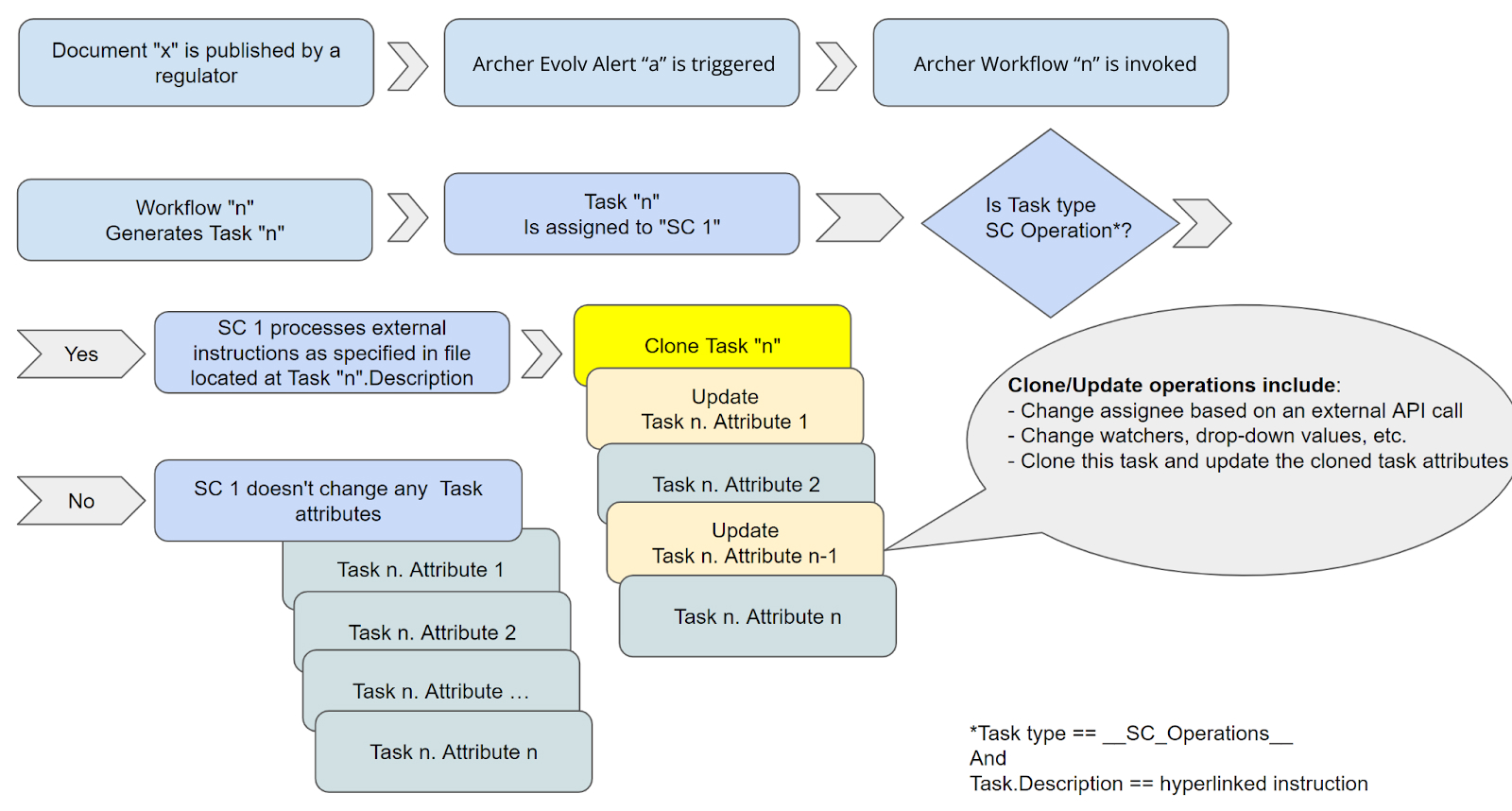
In order to support dynamically cloning a task, Archer Evolv SC completes the following processes automatically:
-
SC follows "instructions" provided as a hyperlink in the "task.description" SC task (task assigned to the SC identity). SC applies the instructions in the referenced file to perform the following operations:
-
Create copy (or copies) of the task
-
Cloned tasks can have "unique" or "shared" task attributes, such as "watchers" (notifiers), "drop down options", "assignees", "title" and "description".
-
Update the cloned items with clone specific attributes (including assignee & watcher info)
Update Task Information instruction syntax and schema
To dynamically update or clone a task, you need to create a JSON formatted "update instruction information" document.
The instruction document should be hosted on an SFTP server with a location path that is accessible by the SC identity account. Archer Evolv supports using a Archer Evolv managed SFTP server https://complianceai.files.com for this purpose. To configure and use the Archer Evolv managed SFTP server, reach out to support@compliance.ai .
Once the instruction document is uploaded, add a link to the document's location in the Description attribute of the SC assigned task in URL format, as depicted in the screenshot below.
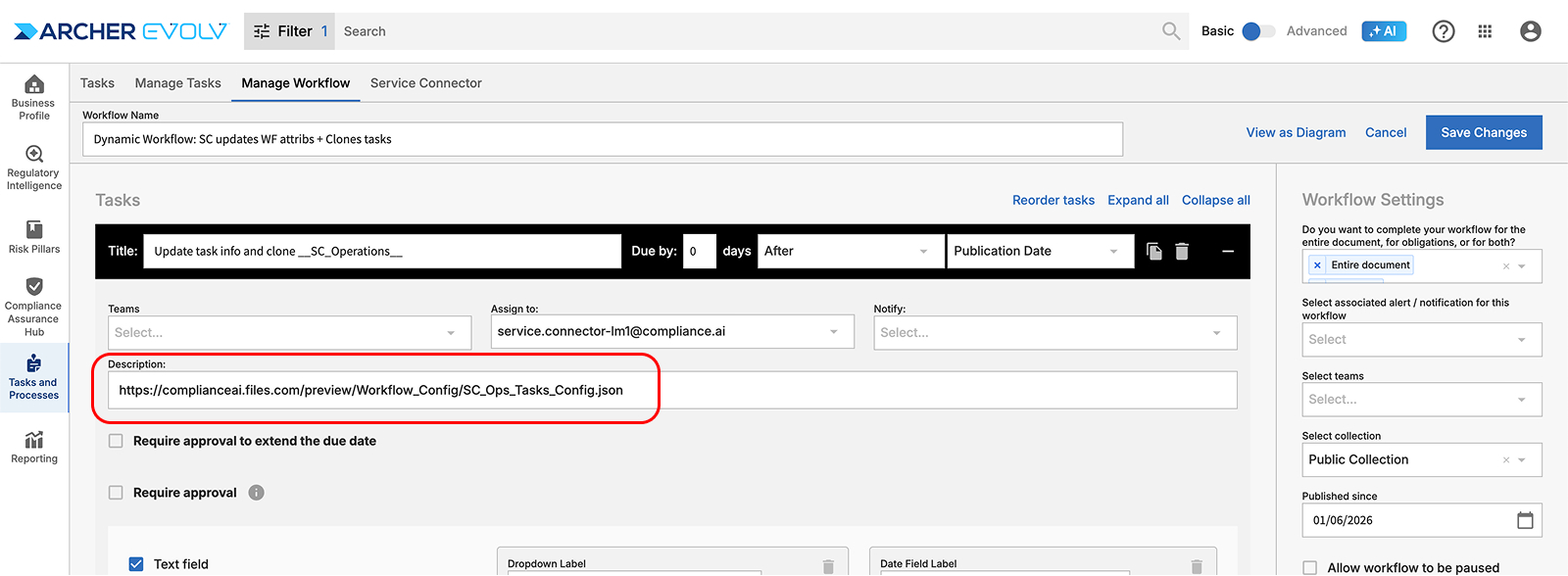
Each update task information "operational instruction file" should be enclosed in "SC_Ops { … }".
"SC_Ops" should include an "operations [[...]]" element that should include a list of lists.
Each list item represents a "task_type" that is to be performed by the SC to update the task information.
Currently supported task_types include the following:
|
Parameter-Target |
Description |
|---|---|
|
CloneTask |
Creates copies of the current document task and creates cloned tasks.
Each cloned task can have unique attribute updates using
task types ("per_clone_operations") and common attribute
updates ("shared_for_all_clones").
Each "per_clone_operations" "task_type" is evaluated and applied for each unique cloned task (specific to each cloned task) For example, while all cloned tasks can share the same "drop_down" values for all drop down items, they can have different watchers.
Instructions["operations"]["mapping"]["data"]
The "data" element supports the Archer Evolv dot notation formatted syntax for determining what Archer Evolv content values/combination of attributes should be used.
Instructions["operations"]["method"]]
Instructions["operations"]["api_params"][0]["value"]
Response content format: Regardless of the method used to retrieve the information, the default result data format is a JSON formatted list of dictionaries. Here's a sample response payload: { "list_item_name": [ { "list_1_attrib_1": "value 1", "list_1_attrib_2": "value 2, "list_1_attrib_n": "value n" }, { "list_2_attrib_1": "value 21", "list_2_attrib_2": "value 22, "list_2_attrib_n": "value 2n" }, { "list_3_attrib_1": "value 31", "list_3_attrib_2": "value 32, "list_3_attrib_n": "value 3n" } ] } |
|
setDropDownValue |
Set the drop-down values of an existing dropdown referenced in the current document task |
|
list_group |
Get a list of user ids to be used in the next processes within the instruction of operations Subsequent instructions can include references to list_groups to access the data retrieved as part of this process |
|
setAssignee |
Set the assignee of the current document task |
|
setNotify |
Set the watcher(s) (Notifiers) of the current document task |
|
setDescription |
Set the description of the current document task |
|
setTitle |
Set the title of the current document task |
|
update_taskdata_task_name_prefix |
Prefix of tasks in Archer Evolv workflow that instruct the SC instance to perform user defined changes to the workflow task. The instructions include various capabilities such as duplicating (cloning) tasks, changing assignee, dynamically changing drop-down values, etc. The actual instructions on what changes should be made are provided as an SFTP link in the description of the task. This enables authorized users to upload instructions for task updates to the specific SFTP path. The path needs to be accessible by the Archer Evolv SC instance |
The following sample SC_Ops instruction file performs the following operations based on its payload:
-
Retrieves a list of task "watchers" (users who monitor a task's progress) from an SFTP hosted file:
list_item_1_name.json -
Clones the current task for each list_item_1 item (CloneTask)
-
For all cloned tasks, performs operations listed under shared_for_all_clones:
-
Updates the dropdown options for the dropdown attribute named "Dropdown name in Archer Evolv workflow" in the original task (setDropDownValue) by retrieving values from an external SFTP hosted file:
list_dd_name.json -
For each cloned task, performs operations listed under per_clone_operations:
-
Updates the "Assignee" with the preset value: ' unassigned@compliance.ai (setAssignee)
-
Updates the "Notify" (task watcher list) with list_item_1 items (setNotify)
{
"SC_Ops": {
"operations": [
[
{
"task_type": "CloneTask",
"list_groups":[{
"mapping":
{
"data":
[
["list_item_name.{'attrib':'list_1_attrib_1', 'scope':'*', 'delim':'-$!-'}"]
]
},
"method": "SFTP:https://complianceai.files.com/path/list_item_1_name.json",
"api_params": [
[
{
"name": "api_method_name",
"value": "results.{'attrib':'attrib_3'}"
}
]
],
"task_type":"list_group"
}],
"shared_for_all_clones": [
{
"task_type": "setDropDownValue",
"mapping":
{
"data":
[
[
"list2_item_name.{'attrib':'attrib_1','scope':'*','delim':'-$!-', 'length':200}"
],
[
"{'pre_val':'-!$-'}"
],
[
"list3_item_name.{'attrib':'attrib_2','scope':'*','delim':'-$!-', 'length':2000}"
],
[
"{'post_proc':'join_attribs','set_delim':'-!$-', 'delim':':', 'split_attribs':'-$!-'}"
]
]
},
"method": "SFTP:https://complianceai.files.com/path/list_dd_name.json",
"name": "Dropdown name in Archer Evolv workflow",
"api_params": [
[
{
"name": "api_method_name_2",
"value": "attrib.{'attrib_4':'attrib_4'}"
}
]
]
}
],
"per_clone_operations": [
{
"task_type": "setAssignee",
"mapping":
{
"data":
[
["{'pre_val':'unassigned@compliance__ai'}"]
]
},
"method": "Preset",
"name": "Assignee"
},
{
"task_type": "setNotify",
"mapping":
{
"data":
[
[ "list_groups.items"]
]
},
"method": "Preset",
"name": "Notify"
}
]
}
]
]
}
}
Summary steps to configure and test dynamic updates to Task Information
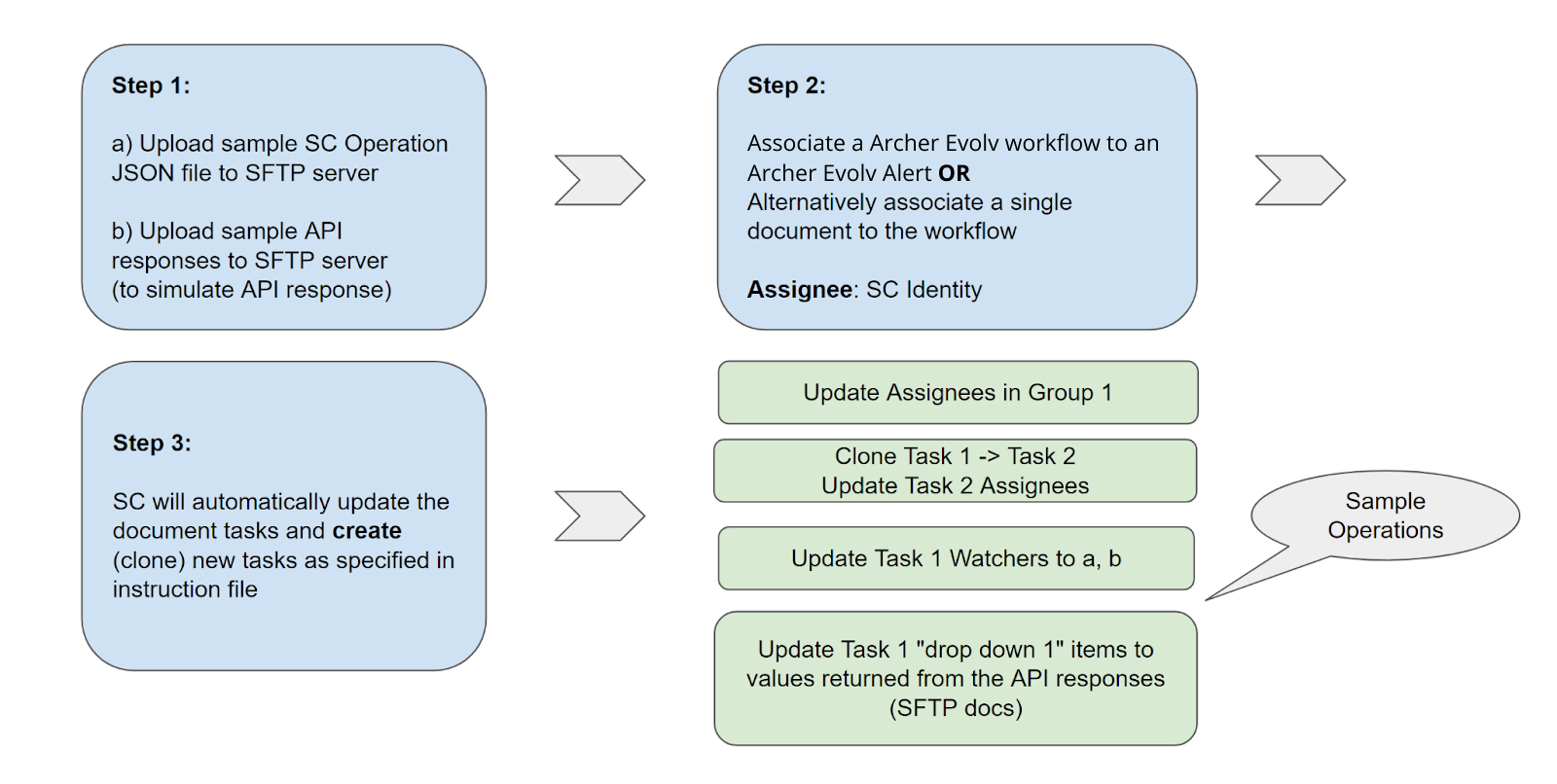
Connecting Archer Evolv SC to 3rd party systems and solutions
Connecting Archer Evolv SC to Archer, SAI 360, etc. (SFTP_CSV)
Configurations and mapping of Archer Evolv SC and Archer & SAI 360 GRC platform. SC publishes content to an SFTP server, and the content is CSV formatted. These parameters define various settings and mappings between the two systems.
|
Parameter-Target |
Description |
Value-Source |
Type |
|---|---|---|---|
|
Document_Mapping |
See section Document_Mapping section |
{..} |
|
|
Annotation_Mapping |
See section Annotation_Mapping section |
{..} |
|
|
Obligation_Mapping |
See section Obligation_Mapping v |
{..} |
|
|
Task_Mapping |
See section Task_Mapping section |
{..} |
|
|
Auth_Mapping_0 |
See section Auth_Mapping_0 section |
{..} |
|
|
Auth_Mapping_1 |
See section Auth_Mapping_1 section |
{..} |
|
|
Auth_Mapping_2 |
See section Auth_Mapping_2 section |
{..} |
|
|
Auth_Mapping_3 |
See section Auth_Mapping_3 section |
{..} |
|
|
Document_Task_name_prefix |
Prefix for document-related task names |
"CSV_SFTP_DOC" |
String |
|
Document_Type_Task_name_prefix |
Prefix for document type-related task names |
"AB_DOC" |
String |
|
Annotation_Task_name_prefix |
Prefix for annotation-related task names |
"AB_ANN" |
String |
|
Obligation_Relevant_Task_name_prefix |
Prefix for relevant obligation-related task names |
"AB_OBLR" |
String |
|
Obligation_All_Task_name_prefix |
Prefix for all obligation-related task names |
"AB_OBL" |
String |
|
Auth_Source_Task_name_prefix |
Prefix for authentication source-related task names |
"AB_RES" |
String |
|
auth_source_levels |
Level of authentication source hierarchy |
"4" |
String |
|
Regulations |
Information about regulations |
"" |
String |
|
ftp_server |
FTP server address |
"complianceai.files.com" |
String |
|
ftp_uid |
FTP server user ID |
"serviceconnector" |
String |
|
ftp_pwd |
FTP server password |
"TBD” |
String |
|
sftp_folder_incremental |
SFTP path for incremental file exports |
"exportfilesCAITEST/incremental" |
String |
|
sftp_folder |
SFTP Folder path for recent file exports (consolidated) |
"exportfilesCAITEST" |
String |
|
exportfiles_folder_incremental |
S3 Folder path for incremental file exports |
"exportfilesCAITEST/incremental" |
String |
|
exportfiles_folder |
S3 Folder path for recent file exports (consolidated) |
"exportfilesCAITEST" |
String |
|
destination_type |
Type of destination for file transfers |
"sftp" |
String |
|
doc_name_prefix |
Prefix for document names in the system |
"TEST_Files_" |
String |
|
recent_document_name |
Filename for the recent document records |
"DOCS_RECENT.csv" |
String |
|
recent_obligation_name |
Filename for the recent obligation records |
"OBLS_RECENT.csv" |
String |
|
recent_annotation_name |
Filename for the recent annotation records |
"ANNS_RECENT.csv" |
String |
|
recent_auth_name_l0 |
Filename for the recent authentication source records (level 0) |
"AUTH_RECENT_L0.csv" |
String |
|
recent_auth_name_l1 |
Filename for the recent authentication source records (level 1) |
"AUTH_RECENT_L1.csv" |
String |
|
recent_auth_name_l2 |
Filename for the recent authentication source records (level 2) |
"AUTH_RECENT_L2.csv" |
String |
|
recent_auth_name_l3 |
Filename for the recent authentication source records (level 3) |
"AUTH_RECENT_L3.csv" |
String |
|
max_recent_days_records |
Maximum number of recent days' records to retrieve |
"2" |
String |
Connecting Archer Evolv SC to MetricStream, 360 Factors, etc. (SFTP)
Configurations and mapping of Archer Evolv SC and Archer, MetricStream, 360 Factors GRC platform. SC publishes content to an SFTP server, and the content is JSON formatted. These parameters define various settings and mappings between the two systems.
|
Parameter-Target |
Description |
Value-Source |
Type |
|---|---|---|---|
|
Document_Mapping_Strip |
Defines the sections of the document to be included in the mapping. |
["sentence_main", "full_text"] |
Array |
|
Document_Task_name_prefix |
Prefix for the task name of documents. |
"SFTP_JSON_DOC" |
String |
|
Annotation_Task_name_prefix |
Prefix for the task name of annotations. |
"SFTP_JSON_ANN" |
String |
|
Obligation_Relevant_Task_name_prefix |
Prefix for the task name of relevant obligations. |
"SFTP_JSON_OBLR" |
String |
|
Obligation_All_Task_name_prefix |
Prefix for the task name of all obligations. |
"SFTP_JSON_OBL" |
String |
|
Auth_Source_Task_name_prefix |
Prefix for the task name of authorization sources. |
"SFTP_JSON_RES" |
String |
|
auth_source_levels |
Specifies the level of authorization sources to include. |
"0" |
String |
|
Regulations |
Specifies any relevant regulations. |
"" |
String |
|
ftp_server |
SFTP server address for file transfer |
"complianceai.files.com" |
String |
|
ftp_uid |
SFTP username. |
"serviceconnector" |
String |
|
ftp_pwd |
SFTP password. |
"TODO_FTP_PWD" |
String |
|
exportfiles_folder_incremental |
Folder path for incremental export files. |
"TODO_TENANT_NAME/incremental" |
String |
Connecting Archer Evolv SC to LogicGate (LG)
Configuration and mapping between Archer Evolv SC and LogicGate GRC platform. These parameters define various settings and mappings between the two systems.
|
Parameter-Target |
Description |
Value-Source |
Type |
|---|---|---|---|
|
LogicGate_wf_regulation_schema |
Mapped to LogicGate Regulations API |
Managed by Archer Evolv |
String |
|
LogicGate_wf_requirement_schema |
Mapped to LogicGate Requirements API |
Managed by Archer Evolv |
String |
|
LogicGate_Mapping_File_Template |
Mapped to LogicGate Mapping -> Archer Evolv template (to be used for new installations) |
Managed by Archer Evolv |
String |
|
LogicGate_Mapping_File |
Mapped to LogicGate Regulations API |
Managed by Archer Evolv |
String |
|
LogicGate_Requirement_Mapping_File_Template |
Mapped to LogicGate Requirement Mapping Template (to be used for new installations) |
Managed by Archer Evolv |
String |
|
LogicGate_Requirement_Mapping_File |
Mapped to LogicGate Requirement Mapping file |
Managed by Archer Evolv |
String |
|
LogicGate_Host |
Host address |
https://TODO_TENANT.logicgate.com |
String |
|
LogicGate_Authorization_URL |
LogicGate Auth URL |
/api/v1/account/token |
String |
|
LogicGate_Authorization_Code |
LogicGate Auth URL |
Provided by client |
String |
|
LogicGate_Steps_WF_Regulations_URL |
LogicGate API steps for adding a Regulation |
/api/v1/fields/workflow/TODO_KEY/values |
String |
|
LogicGate_Steps_WF_Requirement_URL |
LogicGate API steps for adding a Requirement |
/api/v1/fields/workflow/TODO_KEY/values |
String |
|
LogicGate_Create_Record_URL |
LogicGate API steps for creating a new record |
/api/v1/records/public |
String |
|
LogicGate_Search_for_Regulation |
LogicGate access to cache & map to Regulations |
/api/v1/records/search?query=CAI_ID&page=0&size=10&operationType=READ&workflow=TODO_KEY |
String |
|
LogicGate_Search_for_Requirement |
LogicGate access to cache & map to Requirements |
/api/v1/records/search?query=CAI_ID&page=0&size=10&operationType=READ&workflow=TODO_KEY |
String |
|
LogicGate_link_regulation_with_requirement_URL |
LogicGate access to cache & map Regulatory Requirements |
/api/v1/records/CAI_DOC_ID_TO_LG_REGID/child?layout=1 |
String |
|
LogicGate_Requirement_Task_name_prefix |
Task prefix to be used in Archer Evolv workflow to trigger LogicGate related SC processes |
__LG__ |
String |
Connecting Archer Evolv SC to LogicManager (LM)
Configuration and mapping between Archer Evolv SC and LogicGate GRC platform. These parameters define various settings and mappings between the two systems.
|
Parameter-Target |
Description |
Value-Source |
Type |
|---|---|---|---|
|
"LogicManager_Authorization |
Logic Manager API Authorization code |
Provided by client |
String |
|
LogicManager_API_Version |
LogicManager API version |
v1_2 |
String |
|
LogicManager_API_Key |
LogicManager API Key |
Provided by client |
String |
|
LogicManager_Incidents_URL |
LogicManager API URL for incident management |
https://logicmanager.server.address |
String |
|
LogicManager_Base |
LogicManager API URL |
ermmarketplace.logicmanager.com |
String |
|
LogicManager_Host |
LogicManager API Host address |
ermmarketplace.logicmanager.com |
String |
|
LogicManager_Mapping_File |
Mapping file template |
Managed by Archer Evolv |
String |
|
LogicManager_Reported_by |
Default name of 'Reporter' user in LogicManager |
Provided by client |
String |
|
LogicManager_Users |
cached copy of LogicManager users |
Provided by client |
String |
|
LogicManager_Groups |
cached copy of LogicManager groups |
Provided by client |
String |
|
LogicManager_Preset_Fields |
List of attributes that need to be present in all mapped records |
[ { "key": "Subject", "data": "$cai_category_name$ + Notification: + $doc_title$" }, { "key": "Description", "data": "$cai_category_name$ + Publication: + $doc_title$" }, { "key": "Due Date", "data": "$task_deadline$" } ], |
List |
Connecting Archer Evolv SC to AuditBoard Cross Comply (AB)
Configuration and mapping between Archer Evolv SC and AuditBoard Cross Comply. These parameters define various settings and mappings between the two systems.
|
Parameter-Target |
Description |
Value-Source |
Type |
|---|---|---|---|
|
AuditBoard_Mapping_File |
JSON file for AuditBoard mapping configuration |
Managed by Archer Evolv |
String |
|
AuditBoard_Requirements_File_cached |
Cached CSV file for AuditBoard requirements |
Managed by Archer Evolv |
String |
|
AuditBoard_To_CAI_Mapped_Reqs_cached |
Cached CSV file for AuditBoard to Archer Evolv mapped requirements |
Managed by Archer Evolv |
String |
|
AuditBoard_Authorization |
Authorization token for AuditBoard API |
Managed by Archer Evolv |
String |
|
AuditBoard_API_Version |
Version of the AuditBoard API |
v1_2 |
String |
|
AuditBoard_API_Key |
API key for AuditBoard |
Managed by client (from AuditBoard instance) |
String |
|
AuditBoard_URL |
URL for accessing AuditBoard framework items API |
https://TODO_TENANT_NAME_.auditboardsupport.com/api/v1/framework_items |
String |
|
AuditBoard_Base |
Base URL for AuditBoard API |
https://TODO_TENANT_NAME_.auditboardsupport.com/api/v1/ |
String |
|
AuditBoard_Host |
Host URL for AuditBoard API |
https://TODO_TENANT_NAME_.auditboardsupport.com/api/v1/framework_items |
String |
|
Docs_To_Publish |
Documents to publish (empty in this case) |
|
String |
|
bucket_name |
Name of the bucket |
Managed by Archer Evolv |
String |
|
AB_assessment_file |
File for AB assessment |
|
String |
|
doc_by_section_file |
Document by section file |
|
String |
|
match_record_attribute |
Attribute for matching records |
field_data.custom_field_pdf_link |
String |
|
AuditBoard_Preset_Fields |
Preset fields for AuditBoard |
[] |
List |
|
Document_Mapping |
See section Document_Mapping below |
{..} |
|
|
Annotation_Mapping |
See section Annotation_Mapping below |
{..} |
|
|
Attribute_Translate |
See section Attribute_Translate below |
{..} |
|
|
Attribute_Label_Prefix_Mapping |
See section Attribute_Label_Prefix_Mapping below |
{..} |
|
|
Document_Task_name_prefix |
Prefix for document task names in the system |
"__AB_DOC__" |
String |
|
Document_Type_Task_name_prefix |
Prefix for document type task names in the system |
"__AB_DOC__" |
String |
|
Annotation_Task_name_prefix |
Prefix for annotation task names in the system |
"__AB_ANN__" |
String |
|
Obligation_Relevant_Task_name_prefix |
Prefix for obligation relevant task names in the system |
"__AB_OBLR__" |
String |
|
Obligation_All_Task_name_prefix |
Prefix for all obligation task names in the system |
“__AB_OBL__” |
String |
|
Auth_Source_Task_name_prefix |
Prefix for authentication source task names in the system |
“__AB_RES__” |
String |
|
Ext_Annot_Assess_File_prefix |
Prefix for external annotation assessment file names |
"__AB_ASSESS_ANNOT_EXT__" |
String |
|
auth_source_levels |
The number of authentication source levels |
"4" |
String |
|
Requirements |
|
"" |
|
|
ftp_server |
The FTP server address |
"complianceai.files.com" |
String |
|
ftp_uid |
The FTP server username |
Managed by Archer Evolv |
String |
|
ftp_pwd |
The FTP server password (TODO: To be replaced with an actual password) |
Managed by Archer Evolv |
String |
|
exportfiles_folder_incremental |
The folder path for incremental file exports |
Managed by Archer Evolv |
String |
|
exportfiles_folder |
The folder path for file exports |
Managed by Archer Evolv |
String |
|
doc_name_prefix |
Prefix for document names |
"TODO_TENANT_NAME__Files" |
String |
|
recent_document_name |
The file name for the recent document records |
"DOCS_RECENT.csv" |
String |
|
recent_obligation_name |
The file name for the recent obligation records |
"OBLS_RECENT.csv" |
String |
|
recent_annotation_name |
The file name for the recent annotation records |
"ANNS_RECENT.csv" |
String |
|
recent_auth_name_l0 |
The file name for the recent authentication records at level 0 |
"AUTH_RECENT_L0.csv" |
String |
|
recent_auth_name_l1 |
The file name for the recent authentication records at level 1 |
"AUTH_RECENT_L1.csv" |
String |
|
recent_auth_name_l2 |
The file name for the recent authentication records at level 2 |
"AUTH_RECENT_L2.csv" |
String |
|
recent_auth_name_l3 |
The file name for the recent authentication records at level 3 |
"AUTH_RECENT_L3.csv" |
String |
|
max_recent_days_records |
The maximum number of days for which recent records are considered |
"2" |
String |
|
Cache_Org_User_Info |
Flag indicating whether to cache organization user information |
"False" |
Bool |
|
Cache_Workflow_Info |
|
"False" |
Bool |
Publishing consolidated regulatory changes for the entire organization
Archer Evolv SC can consolidate filtered results from various Archer Evolv alerts and make them available through our pre-filtered content API end-point . This method supports workflow driven publication, and removes the guessing game in terms of the various cross-organization content filters needed when invoking the Archer Evolv API to retrieve content.
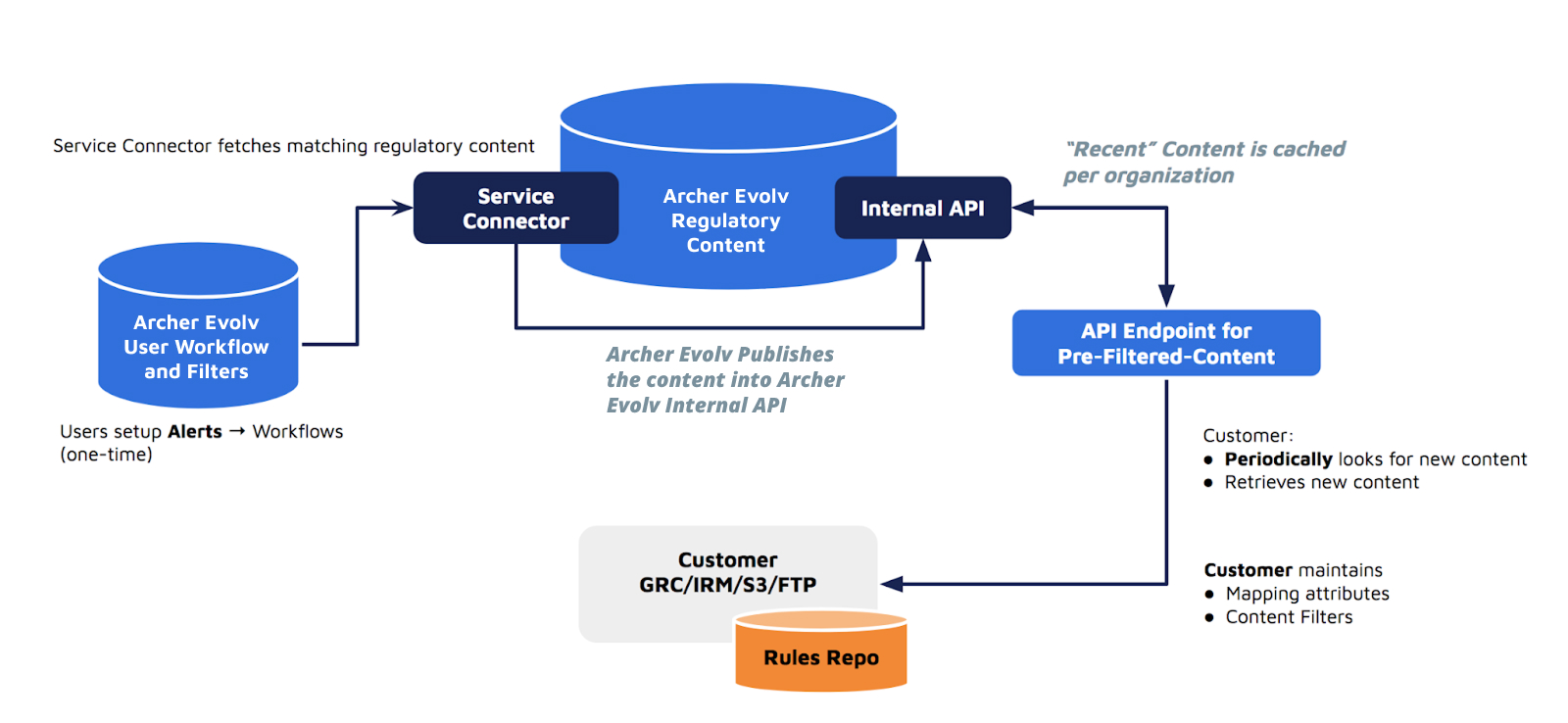
In order to configure an Archer Evolv SC instance to consolidate results from various alerts into one output, complete the following steps:
-
Setup alerts in Archer Evolv Team Edition
-
Setup a Archer Evolv workflow and configure all the Archer Evolv alerts from the prior step to invoke the newly created Archer Evolv workflow
-
Configure the Archer Evolv workflow with a Archer Evolv SC steps that publishes regulatory sources
-
Configure the Archer Evolv SC instance to publish the consolidated responses as active JSON payload
-
The JSON payload includes Archer Evolv SC content published within a dynamic window of time, and SC continuously purges older records from the payload
-
Configure Archer Evolv SC to maintain the consolidated results in a file named ‘prefiltered.json’:
"Recent_document_name": "pre_filtered_content.json" -
Please note that you can reference the workflow name, alert name and alert owner in the consolidated content to help distinguish which condition (Archer Evolv workflow and/or Archer Evolv alert) led to the publication of this specific document:
-
"workflow_name": name of the Archer Evolv workflow in question
-
"workflow_id": unique id of the Archer Evolv workflow in question
-
"alert_name": Name of Archer Evolv alert used for this specific content being published
-
"alert_creator_user_name": user id who created the alert that triggered inclusion of this publication
-
Take any necessary actions/complete the required Archer Evolv workflow steps (including annotation and labeling)
-
Use the pre-filtered content API to periodically retrieve consolidated results from the end-point.
Archer Evolv SC bot: Identification & Authentication
Archer Evolv SC user identity is managed using Archer Evolv user administration. Each Archer Evolv SC is identified as an organization user (either using Archer Evolv Team Edition or using SCIM based 3rd party solutions).
Archer Evolv SC user authentication supports externally managed (AWS Cognito based) IAM for (SC) bot user accounts.
To instruct an SC instance to use OAUTH based login (instead of Archer Evolv managed credential based login), the parameters outlined in the table below need to be configured.
The authentication settings for SC instances are currently managed & maintained by the Archer Evolv support team for onboarding, licensing and security reasons.
|
Parameter-Target |
Description |
Value-Source |
Type |
|---|---|---|---|
|
service_email |
Email address/mailbox associated with this Archer Evolv SC instance. |
Managed by Archer Evolv |
String |
|
service_pwd |
Hashed password stored location for the identity this service uses. |
Managed by Archer Evolv |
String |
|
search_api_key |
API key for the search functionality. This is search API key in Mashery |
Managed by Archer Evolv |
String |
|
auth_method |
Supports using external (AWS Cognito based) login for the Service Connector (SC) bot user |
OAUTH accepted values are: "CAI", "OAUTH". if "CAI" is specified, the legacy credential checking method is used. |
string |
|
CAI_url_base |
Base URL for the Compliance AI API. |
https://api-production.compliance.ai |
String |
|
CAI_url_auth_base |
Service Auth configuration |
https://cognito-idp.us-east-1.amazonaws.com/ |
String |
|
CAI_url_auth_jwt |
Service Auth configuration |
Managed by Archer Evolv |
String |
|
CAI_auth_app_client_id |
Service Auth configuration |
Managed by Archer Evolv |
String |
|
CAI_auth_user_pool_id |
Service Auth configuration |
Managed by Archer Evolv |
String |
|
CAI_non_loggedin_auth_code |
Service Auth configuration |
Managed by Archer Evolv |
String |
Archer Evolv SC "dot notation" syntax for mapping instructions
Archer Evolv SC supports a custom dot notation syntax to retrieve, combine, transform and map specific meta data attributes in Archer Evolv content for publication.
Dot notation format
At its simplest form, any Archer Evolv attribute can be referenced as a list item (by the name of the Archer Evolv attribute as available within the Archer Evolv schema).
For example, the following fragment uses the Archer Evolv document schema "summary_text"attribute value, and maps it to a user defined key: "description":
CAI.document.summary_text -> External_Schema.description
"description": [
[
"summary_text"
]
]
Dot notation: Concatenating attribute values
The dot notation syntax supports concatenating Archer Evolv content attribute values together.
Multiple lists can be combined for a mapped attribute. This feature enables transforming a group of Archer Evolv content attributes (mixing multi-value attributes and multiple attributes together) and mapping the resulting content to an external attribute.
For example, in the following fragment, the user-defined attribute "my_agency" is mapped to a concatenated combination of Archer Evolv document attributes "agencies.short_name" and "mainstream_news.news_source.name".
The 'dot' between "mainstream_news" , "news_source" and "name" instructs SC to traverse the Archer Evolv attribute "mainstream_news" looking for the child element "news_sourc" of the attribute "name".
Similarly, the 'dot' between "agencies" and "short_name" instructs SC to traverse the Archer Evolv content attribute "agencies" to identify the child element "short_name" value.
However, the "agencies" attribute in any Archer Evolv document could actually include more than one value (multiple agencies may contribute to the publication of the same regulatory document). In order to support multi-value attributes, SC supports the 'scope' indicator, which instructs SC to retrieve all of the values for that attribute. The 'delim' indicator instructs SC to combine the "short_name" attributes using the 'delim' value specified.
{
"my_agency": [
[
"agencies.{'attrib':'short_name' , 'scope':'*' , 'delim':','}"
],
[
"mainstream_news.news_source.name"
]
]
}
Dot notation: Restricting the length of the mapped attribute
User defined destination attributes may have size restrictions, due to data type or other field size constraints.
The 'length' indicator instructs SC to truncate the Archer Evolv attribute at the specified number of characters.
In the sample below, the 'title' attribute is cut off at 300 characters before being mapped to 'my_agency'.
{
"my_agency": [
[
title.{'length':300}
],
]
}
Dot notation: Referenced lookup translation
The 'lookup' indicator transforms the content of a Archer Evolv attribute based on an external lookup.
The lookup process supports both Archer Evolv helper/related content, and user defined lookup processes.
Archer Evolv natively supported Lookup include:
-
Archer Evolv Document types: DocTypes
-
Archer Evolv Jurisdiction: Jurisdictions
-
Archer Evolv Regulations: Regulations
-
Archer Evolv Acts: Acts
Lookup tables can be retrieved out of band and cached by the Archer Evolv SC instance
on a recurring basis.
In the example below, SC extracts the Archer Evolv content attribute value for
"cai_category_id" and looks up the corresponding value in the external Archer Evolv
'DocTypes' table. By default, 'lookup' assumes a 2 column lookup: SC uses
the value of the Archer Evolv attribute as the first column (input) and returns the
value in the second column for that row.
{
"category": [
[
"cai_category_id.{'lookup':'DocTypes'}"
]
]
}
Dot notation: Date format conversion
'Date_convert' converts the format of the Archer Evolv attribute to the desired date format.
In the example below, Archer Evolv extracts the created_at Archer Evolv attribute and maps it to the user defined CreatedDate attribute after converting it to 'UTC' format.
{
"CreatedDate": [
[
"created_at.{'date_convert':'UTC'}"
]
]
}
Dot notation: Using Static content (preset values)
'Pre_val'uses predefined values as part of the mapping.
In the example below, Archer Evolv uses the URL specified and concatenates it with the Archer Evolv content "id" attribute before mapping it to the user defined pdf_url attribute.
{
"pdf_url": [
[
"{'pre_val':'https://pro__compliance__ai/content?overlay=pdf-overlay&renderfromtask=tasks&summary_id='}"
],
[
"id"
]
]
}
Dot notation: Referencing a specific item within multi-value attributes
[n]. extracts the "nth" item within a multi-valued attribute as part of the mapping.
In the example below, Archer Evolv SC performs the following actions:
-
Uses the first list item in the summaries Archer Evolv content attribute,
-
Navigates to summary_sentences,
-
Concatenates all the values of that attribute (as specified by the 'scope':'' indicator)
-
Delimiting the items with the characters specified by the 'delim' indicator
-
Truncates the resulting string at 200 characters (as specified by the 'length' indicator)
-
Maps the truncated value to the user-defined "My Auto Summary" attribute.
{
"My Auto Summary": [
[
"summaries.[0].summary_sentences.{'attrib':'*','scope':'*','delim':' ' , 'length':200}"
]
]
}
The following table summarizes the various keywords acceptable as part of the dot notation based attribute mapping instructions.
|
Parameter-Target |
Description |
Value-Source |
Type |
|---|---|---|---|
|
scope |
Establishes the treatment for multi valued attributes.
|
'prefix_all'
'*'
|
String |
|
attrib_type |
Treat the attribute content and plain text or as rich text Default: plaintext |
'richtext' 'plaintext' |
String |
|
main_doc_attrib |
When processing related content types, reference the main document. For example, when mapping to Archer Evolv Obligations, cross reference an attribute from associated Archer Evolv Document's attribute |
Prefix indicator |
String |
|
service_var |
Referencing variables from the 'current' document |
Prefix indicator |
String |
|
lookup |
Referenced lookup for the attribute. Lookup tables need to be pre-defined (pre-referenced) as part of the SC setup. External files can be referenced using the "EXT_assessment" keywords. The name of the external file is expected as the suffix of the EXT_ value. For example to reference lookup from the contents of an file named abc, the value would be EXT_abc |
Archer Evolv Document types; DocTypes
|
String |
|
document_task |
Instructs SC to use document task related attributes |
|
String |
|
'doc_label':'True' |
When processing related content types, reference the main document's labels. For example, when mapping to Archer Evolv Annotations, cross references the labels associated with the Archer Evolv Document's labels |
Prefix indicator |
String |
|
date_convert |
Converts the Archer Evolv content's date format to another format
Convert to UTC format: UTC
|
UTC, ABBR_10 |
String |
|
attrib |
References the name of an attribute within the Archer Evolv content meta data |
title |
String |
|
delim |
Specifies the delimiter to be used for concatenating the multiple values within a Archer Evolv attribute. The delimiter can contain more than one character. |
, |
String |
|
length |
Truncate the content at the specific characters |
100 |
Integer |
|
proc_date |
The date Archer Evolv SC processed the specific attribute row |
|
String |
|
wf_name |
The name of the Archer Evolv workflow that the SC task is associated with |
Workflow name |
String |
|
pre_val |
Predetermined value to be used for mapping. If the predetermined value contains dots ("."), each needs to be replaced with 2 underscores ("__") character (to avoid conflict with the dot notation syntax) |
'https://pro__compliance__ai' |
String |
|
.[n] and .[*] |
Specifies the specific enumerated attribute to use for
multi valued attributes.
|
[1] |
List |
|
truncate |
Dynamic strategy for truncating content (instead of using specific characters) |
Archer Evolv Managed |
String |
|
doc_info |
|
|
|
|
uplevel |
Instructs the SC to traverse the content upstream "n" levels, looking for the parent of the current document. |
1, 2,.. |
Integer |
|
alert_name |
The name of the Archer Evolv alert that the current document is associated with (caused the workflow to process it) |
alert_1 |
String |
|
post_proc |
Instructs the SC to perform additional processes after
processing all the other steps specified.
|
join_attribs |
String |
|
split_attribs |
What character to use when splitting a concatenated string. |
',' |
String |
Appendix
Questionnaire
Archer Evolv SC questionnaires help gather specific information related to Archer Evolv SC mappings, publication and destination infrastructure.. This information is crucial for Archer Evolv to effectively integrate and align with the destination systems document management practices and infrastructure.
GRC Systems Questions
The following information helps us determine the suitable Archer Evolv SC configuration for formatting, transforming and publishing regulatory updates.
-
Are you currently using a GRC (Governance, Risk, and Compliance) solution?
-
If yes, identify the GRC from the supported list below.
|
GRC solution |
Integration Documents |
Protocols |
|---|---|---|
|
Archer |
RSS, SFTP |
|
|
LogicManager |
API |
|
|
Galvanize (Diligent) |
RSS |
|
|
360 Factor |
JSON, SFTP |
|
|
AuditBoard |
API |
|
|
LogicGate |
API |
|
|
ServiceNow |
API |
|
|
MetricStream |
API/RSS |
|
|
Navex |
SFTP-CSV |
|
|
SAI360 |
API |
|
|
Riskonnect |
API |
-
If not using a supported GRC system:
-
Determine the preferred published content format:
-
Options: CSV, JSON, or XML.
-
Determine the preferred publication method:
-
Option 1- Publish directly to designated content management systems: SFTP, AWS S3, Azure, GDrive, etc. Client to
-
Option 2 - Integrate with customer’s API: Invoke client API & publish to their system
-
Option 3 - Customer retrieves published content using a hybrid model that combines the Service Connector and Archer Evolv API
Data Mapping Questions
-
Make a list of Archer Evolv attributes needed: Use Document Search Response Schema to determine required attributes.
-
Provide preferred formatting/structure of the destination attributes (Attributes that surface in the destination system).
Workflow Questions
-
Do you want to review content for relevancy/make annotations prior to them being published?
-
Do you want to review & annotation obligations and/or create annotations on regulatory content before publication?
Sample mapping configuration settings
Sample content mapping: AuditBoard Cross Comply (AB)
Mapping parameters for transforming regulatory documents for usage in AuditBoard Cross Comply application. Specifies how various document fields or attributes are mapped/transformed to externally defined attributes or taxonomies. Each mapping is represented as a key-value pair, where the key is the external (Target) field name and the value is a transformation or extraction rule for the Archer Evolv content.
|
Parameter-Target |
Description |
Value-Source |
Type |
|---|---|---|---|
|
custom_field_cai_unique_id1 |
Unique ID of the AuditBoard Cross Comply field |
id |
String |
|
name |
Name of the regulatory framework item in AuditBoard |
title.{'length':300} |
String |
|
uid |
Unique identifier of the item in AuditBoard |
official_id |
String |
|
description |
Description of the item |
document_location.{'attrib':'title', 'scope':'*', 'delim':'| '}" |
String |
|
field_data.custom_field_pdf_link |
Link to the PDF document associated with the item |
{'pre_val':'https://pro__compliance__ai/content?overlay=pdf-overlay&renderfromtask=tasks&summary_id='}, id |
String |
|
framework_item_custom_multiselect1_option_ids |
AuditBoard Cross Comply Option IDs selected in a custom multi select field |
{'doc_label':'True'}.{'attrib':'label', 'scope':'*', 'delim':',','length':20000}.{'lookup':'RequirementsAB'} |
String |
|
custom_text3 |
AuditBoard Cross Comply Custom text field |
web_url |
String |
|
section |
AuditBoard Cross Comply Section of the item |
jurisdiction.{'lookup':'Jurisdiction_parent_jurisdiction_name'} |
String |
|
subsection |
AuditBoard Cross Comply Subsection of the item |
jurisdiction.{'lookup':'Jurisdiction_name'} |
String |
|
custom_text5 |
AuditBoard Cross Comply Custom text field |
jurisdiction.{'lookup':'Jurisdiction'} |
String |
|
custom_text4 |
AuditBoard Cross Comply Custom text field |
cai_category_id.{'lookup':'DocTypes'} |
String |
|
custom_text6 |
AuditBoard Cross Comply Custom text field |
agencies.{'attrib':'name', 'scope':'*', 'delim':','}, mainstream_news.news_source.name |
String |
|
field_data.custom_field_text_from_statute_regulation |
AuditBoard Cross Comply Text extracted from the statute or regulation |
full_text.{'length':15000} |
String |
|
field_data.custom_field_publication_date |
AuditBoard Cross Comply Publication date of the item |
publication_date.{'date_convert':'ABBR_10'} |
String |
|
field_data.custom_field_effective_date |
AuditBoard Cross Comply Effective date of the item |
rule.effective_on.{'date_convert':'ABBR_10'} |
String |
|
DateProcessed |
AuditBoard Cross Comply Date when the item was processed |
_PROC_DATE_UTC |
String |
|
CreatedDate |
AuditBoard Cross Comply Date when the item was created |
DUTC_created_at |
String |
Sample mapping annotations: AuditBoard (AB): Annotation_Mapping
Mapping parameters for transforming user defined annotations within regulatory documents to AuditBoard Cross Comply application . Specifies how various annotation related fields or attributes are mapped/transformed to externally defined attributes or taxonomies. Each mapping is represented as a key-value pair, where the key is the external (Target) field name and the value is a transformation or extraction rule for the Archer Evolv content and the associated user-defined annotation.
|
Parameter-Target |
Description |
Value-Source |
Type |
|---|---|---|---|
|
See section CAI_matching_conditions below |
{..} |
complex |
|
|
custom_field_cai_unique_id1 |
Represents a custom field for the unique ID with the value as the ID of the first sentence |
["first_sentence_id"] |
Array |
|
|
Represents a custom field for the unique ID with a prefix value "_" |
["{'pre_val':'_'}"] |
Array |
|
|
Represents a custom field for the unique ID with the value as the ID of the last sentence |
["last_sentence_id"] |
Array |
|
name |
Represents the name parameter with the value as the name extracted from the first sentence |
{"r1": [["first_sentence_id.{'lookup':'EXT_assessment-name'}"]]} |
Object |
|
|
Represents the name parameter with the value as the label extracted from the labels with a prefix scope |
{"r2": [["labels.{'attrib':'label', 'scope':'prefix', 'length':300}"]]} |
Object |
|
|
Represents the name parameter with the value as the truncated name extracted from the sentences_text |
{"r3": [["sentences_text.{'truncate':'AB_name','length':300}"]]} |
Object |
|
subsection |
Represents the subsection parameter with the value as the subsection extracted from the first sentence |
{"r1": [["first_sentence_id.{'lookup':'EXT_assessment-subsection'}"]]} |
Object |
|
|
Represents the subsection parameter with the value as the label extracted from the labels with a prefix scope |
{"r2": [["labels.{'attrib':'label', 'scope':'prefix', 'length':300}"]]} |
Object |
|
|
Represents the subsection parameter with the value as the truncated label extracted from the labels |
{"r3": [["labels.{'attrib':'label', 'scope':'0', 'lookup':'doc_by_section-Grouped_Sentence', 'length':300, 'truncate':'AB_subsection'}"]]} |
Object |
|
custom_text4 |
Represents a custom text parameter with the value as the custom_text4 extracted from the first sentence |
{"r1": [["first_sentence_id.{'lookup':'EXT_assessment-custom_text4'}"]]} |
Object |
|
|
Represents a custom text parameter with the value as the label extracted from the labels with a prefix scope |
{"r2": [["labels.{'attrib':'label', 'scope':'prefix', 'length':300}"]]} |
Object |
|
framework_item_custom_select5_option_id |
Represents the framework_item_custom_select5_option_id parameter with the value as the option ID extracted from the first sentence |
{"r1": [["first_sentence_id.{'lookup':'EXT_assessment-framework_item_custom_select5_option_id'}"]]} |
Object |
|
|
Represents the framework_item_custom_select5_option_id parameter with the value as the label extracted from the labels with a prefix scope |
{"r2": [["labels.{'attrib':'label', 'scope':'prefix', 'length':300}"]]} |
Object |
|
uid |
Represents the UID parameter with the value as the UID extracted from the first sentence |
{"r1": [["first_sentence_id.{'lookup':'EXT_assessment-uid'}"]]} |
Object |
|
|
Represents the UID parameter with the value as the label extracted from the labels with a prefix scope |
{"r2": [["labels.{'attrib':'label', 'scope':'prefix','length':2000}"]]} |
Object |
|
|
Represents the UID parameter with the value as the label extracted from the labels without a prefix scope |
{"r3": [["labels.{'attrib':'label', 'scope':'no_prefix','length':2000}"]]} |
Object |
|
|
Represents the UID parameter with the value as a combination of doc_info.id, first_sentence_id, and last_sentence_id with prefix values "_" |
{"r4": [["doc_info.id"]], ["{'pre_val':''}"], ["first_sentence_id"], ["{'pre_val':''}"], ["last_sentence_id"]]} |
Object |
|
custom_text5 |
Represents a custom text parameter with the value as the jurisdiction extracted from doc_info |
[["doc_info.jurisdiction.{'lookup':'Jurisdiction'}"]] |
Array |
|
custom_text6 |
Represents a custom text parameter with the value as the agencies' names extracted from doc_info and the mainstream news source's name |
[["doc_info.agencies.{'attrib':'name', 'scope':'*', 'delim':','}"], ["doc_info.mainstream_news.news_source.name"]] |
Array |
|
description |
Represents the description parameter with the value as the sentences_text |
[["sentences_text"]] |
Array |
|
custom_text3 |
Represents a custom text parameter with the value as the web_url extracted from doc_info |
[["doc_info.web_url"]] |
Array |
|
section |
Represents the section parameter with the value as the section extracted from the first sentence |
{"r1": [["first_sentence_id.{'lookup':'EXT_assessment-section'}"]]} |
Object |
|
|
Represents the section parameter with the value as the label extracted from doc_info with a prefix scope |
{"r2": [["doc_info.{'doc_label':'True'}.{'attrib':'label','scope':'prefix','length':300}"]]} |
Object |
|
|
Represents the section parameter with the value as the title extracted from doc_info |
{"r3": [["doc_info.title.{'length':300}"]]} |
Object |
|
framework_item_custom_select2_option_id |
Represents the framework_item_custom_select2_option_id parameter with the value as a prefix value "4" |
[["{'pre_val':'4'}"]] |
Array |
|
field_data.custom_field_pdf_link |
Represents the custom field for a PDF link with the value as a combination of prefix values, doc_info.id, first_sentence_id, and last_sentence_id |
[["{'pre_val':'https://pro__compliance__ai/content?overlay=pdf-overlay&renderfromtask=tasks&summary_id='}"], ["doc_info.id"], ["{'pre_val':'&ag='}"], ["first_sentence_id"], ["{'pre_val':'_'}"], ["last_sentence_id"]] |
Array |
|
framework_item_custom_select4_option_id |
Represents the framework_item_custom_select4_option_id parameter with the value as the option ID extracted from the first sentence |
{"r1": [["first_sentence_id.{'lookup':'EXT_assessment-framework_item_custom_select4_option_id'}"]]} |
Object |
|
|
Represents the framework_item_custom_select4_option_id parameter with the value as the label extracted from the labels with a prefix scope |
{"r2": [["labels.{'attrib':'label', 'scope':'prefix','length':2000}"]]} |
Object |
|
Comments |
Represents the Comments parameter with the value as the comments extracted from the comment_threads |
[["comment_threads.[].comments.{'attrib':'richtext', 'scope':'', 'delim':',', 'l':20000, 'attrib_type':'richtext'}"]] |
Array |
Mapping Archer Evolv labels to AuditBoard: Attribute_Label_Prefix_Mapping
The "Attribute_Label_Prefix_Mapping" in the provided JSON represents a mapping between attributes or labels used in AuditBoard and their corresponding prefixes in Archer Evolv service connector. This mapping helps in aligning and matching the attributes or labels between the two systems.
These mappings facilitate the matching and synchronization of attributes and labels between AuditBoard and Archer Evolv service connector.
For example, when transferring data or information from AuditBoard to Archer Evolv, the attribute "uid" in AuditBoard will be mapped to its corresponding prefix "uid" in Archer Evolv. Similarly, the attributes "section," "subsection," and "name" will be mapped to their respective prefixes. The label prefixes such as "reg applicability," "country," "lifecycle," and "Cons/FinCrime" provide context or categorization to the associated attributes or labels in Archer Evolv.
|
Parameter-Target |
Description |
Value-Source |
Type |
|---|---|---|---|
|
uid |
The unique identifier attribute in AuditBoard |
"uid" |
String |
|
section |
The section attribute in AuditBoard |
"section" |
String |
|
subsection |
The subsection attribute in AuditBoard |
"subsection" |
String |
|
name |
The name attribute in AuditBoard |
"name" |
String |
|
framework_item_custom_select5_option_id |
The label prefix for regulatory applicability |
"reg applicability" |
String |
|
framework_item_custom_select2_option_id |
The label prefix for country |
"country" |
String |
|
custom_text4 |
The label prefix for lifecycle |
"lifecycle" |
String |
|
framework_item_custom_select4_option_id |
The label prefix for consolidated/financial crime |
"Cons/FinCrime" |
String |
Workflow Automated Tasks
Setup Automated BPM based obligation extraction and control generation process
Archer Evolv provides automatic obligation extraction and summarization, which automatically extracts obligations, classifies them, and provides the business and operational impact of the obligations. Evolv also supports automatic control procedure generation, which uses extracted obligations, business context, and existing controls to suggest and draft new control procedure.
The automated BPM based obligation extraction process allows a business to determine obligations relevant to their operation based on their business profile. The process reviews obligations that apply to business categories using your business specific configuration as specified in the Evolv solution.
By using this workflow task, you can make use of automated processing to evaluate obligations in the context of your business profile.
The task has multiple configurations and provides an output report of the processing to help fine tune the results before you put the workflow task into a production/recurring state.
The process automatically adds annotations to your obligations that specify the justification and allows for the grouping of obligations into collections.
A configurable option also allows for the creation of automatically generated control procedures.
This specific Archer Service Connector (SC) workflow task type supports processing documents that match an alert’s criteria.
Before creating your task
- Identify your SC user (usually support+<ORG NAME>-sc@compliance.ai)
- Verify your task prefix – default prefix is: __Obligation Extraction and Enhancement__
- Verify that you have role capable of creating tasks and workflows (Workflow Admin or Org Admin)
- Select a collection name for new obligations
- Determine whether you will be changing any of the default configuration options
- Verify you have access to the web-based file server to download SC run reports
Configuration Options
| Parameter | Description | Acceptable Values | Required or Optional | Default Value |
| AUTO_ANNOTATE_RELEVANCE_JUSTIFICATION | Add justification as an annotation comment to each obligation. | true / false | Optional | true |
| AUTO_LABEL_BU_AND_RISKS | Classify obligations by Business Unit (label type) or Risk labels (with Risk: prefix). | true / false | Optional | false |
| AUTO_LABEL_CITATION_NAME | Add a citation-style label to the obligation name. | true / false | Optional | true |
| AUTO_LABEL_OBLIGATION_TYPE | Classify the type of obligation (e.g., Obligatory, Prohibitive, etc.). | true / false | Optional | true |
| AUTO_LABEL_RELEVANT_THEMES | Classify obligations by matching business or operational themes. | true / false | Optional | true |
| AUTO_LABEL_SIMILAR_OBLIGATIONS | Not supported yet. Optionally cluster similar obligations using matching language. | true / false | Optional | false |
| collection_id | Collection ID in E4C to create obligations in. Either provide this or collection_name | Collection ID of an E4C collection the service connector has access to | Optional | - |
| collection_name | Collection name in E4C to create obligations in. | Collection name of an E4C collection the service connector has access to | Optional | public |
| create_non_relevant_obligations | Create obligations for non-relevant/non-obligatory segments based on scope. | true / false | Optional | true |
| create_obligations_in_app | Create obligations in E4C or perform a dry run (report only). | true / false | Optional | true |
| CREATE_SUGGESTED_CONTROL | Create suggested controls as actual E4C control records and auto-link to obligations. | true / false | Optional | true |
| LINE_OF_BUSINESS_SCOPE | Line of Business scope to apply within the document. | org / team | Optional | org |
| LINE_OF_BUSINESS_TEAM_NAME | If LINE_OF_BUSINESS_SCOPE is :team, specify the E4C team name. | Name of E4C team | Optional | |
| auto_process_children | Also process all children/grand-children of the document. Useful for resource-type documents. | true / false | Optional | true |
| SUGGEST_CONTROL | Add suggested controls as annotation comments to obligations. | true / false | Optional | true |
Sample JSON
{
"collection_name": "Test",
"auto_process_children": true,
"create_obligations_in_app": true,
"create_non_relevant_obligations": true,
"LINE_OF_BUSINESS_SCOPE": "org",
"AUTO_LABEL_ANNOTATE_STRATEGY": {
"AUTO_LABEL_CITATION_NAME": true,
"AUTO_LABEL_RELEVANT_THEMES": true,
"AUTO_LABEL_BU_AND_RISKS": false,
"AUTO_LABEL_LINES_OF_BUSINESS": false,
"AUTO_LABEL_OBLIGATION_TYPE": true,
"AUTO_ANNOTATE_RELEVANCE_JUSTIFICATION": true,
"AUTO_LABEL_SIMILAR_OBLIGATIONS": false
},
"SUGGEST_CONTROL": true,
"CREATE_SUGGESTED_CONTROL": true
}
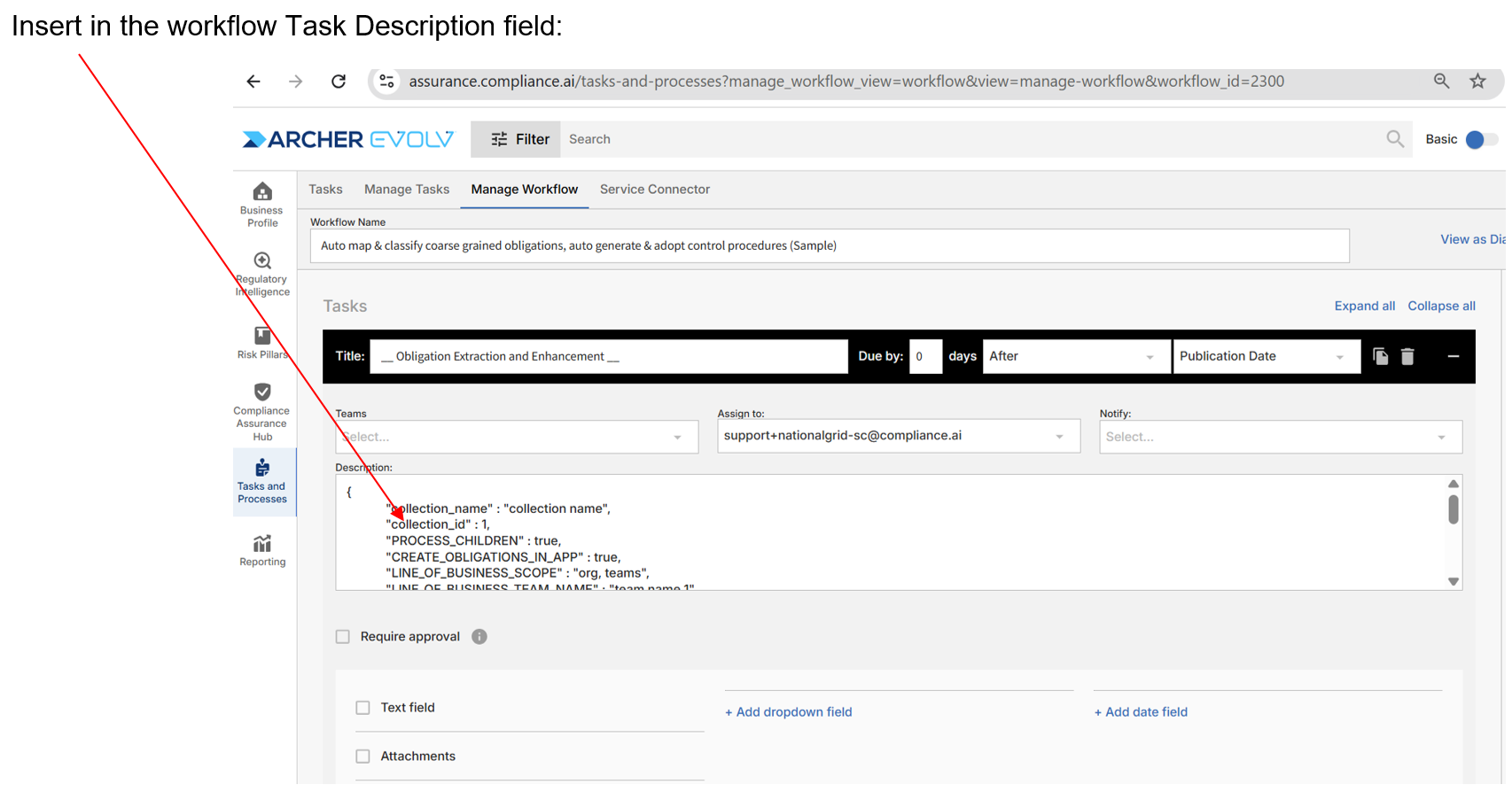
Once the SC run has completed, to verify the task has been processed successfully, perform the following tasks:
Obligation type classification can fall into one of the following categories:
| Obligation Type | Description |
| Obligatory | Specifies actions that must be taken or conditions that must be met. These are enforceable requirements with no discretion allowed. Often triggered by words like “shall” or “must.” |
| Prohibitive | Specifies actions that are forbidden or conditions that must not occur. These prevent non-compliant behavior and are also typically mandatory. |
| Permissive | Indicates actions that may be taken but are not required. These offer flexibility or discretion to the subject. Common markers include “may” or “can.” |
| Advisory | Offers guidance, recommendations, or best practices without enforceability. These are often framed as beneficial but optional steps. |
| Descriptive | Provides background, context, or explanatory information. These do not prescribe actions but help clarify other obligations. |
| Procedural | Specifies how an action must be taken or what process should be followed. These support obligatory or prohibitive rules by detailing the method or sequence of compliance |
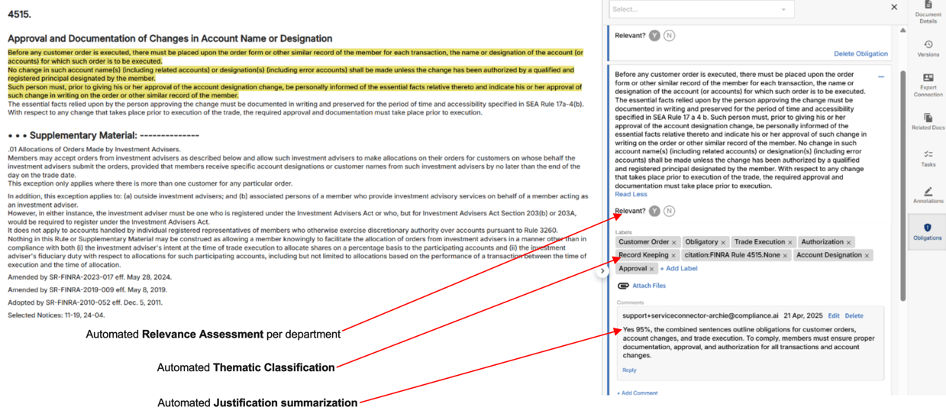
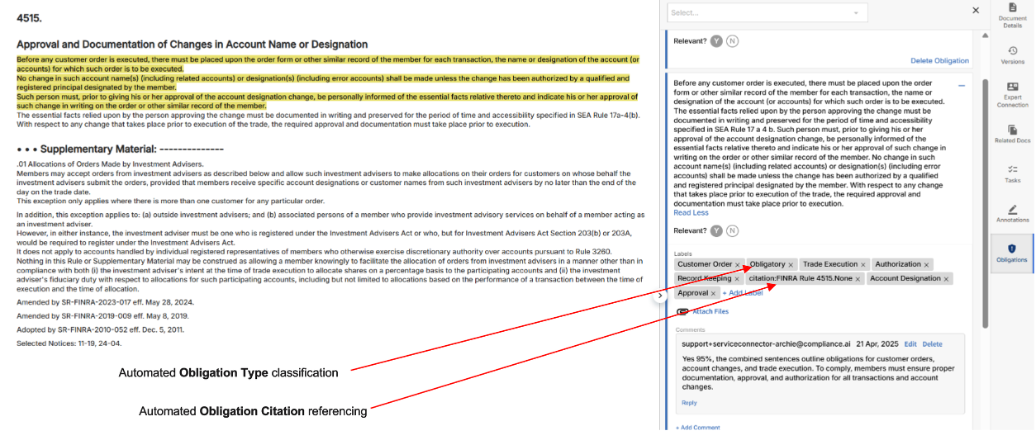
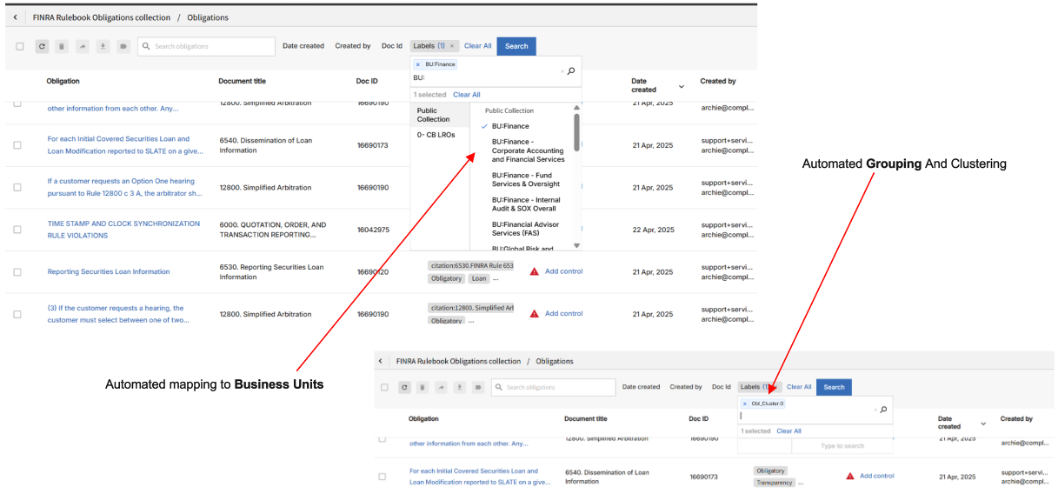
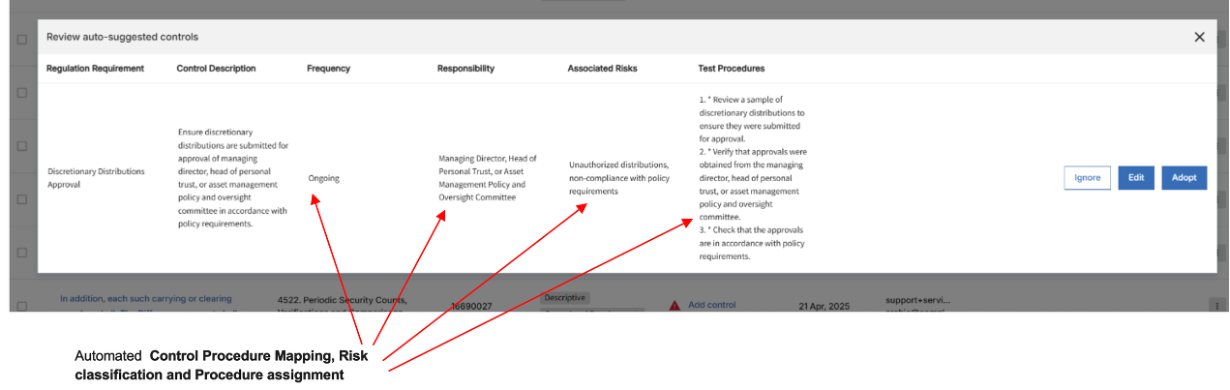
Setup Auto-BPM relevance assessment (alerts->documents) process
Archer Evolv supports automated document thematic classification based on business profile management (bpm) and theme definitions. Evolv uses AI models to assess each document’s relevance to a company’s operations and regulatory themes, assigning structured labels such as Directly Relevant to Business or Relevant to Theme “X”. This enables organizations to focus only on content aligned with their risk profile, jurisdiction, and compliance priorities, while filtering out unrelated materials.
To use the feature, Archer Service Connector (SC) needs to be configured accordingly.
The auto-bpm relevance assessment workflow task allows for bpm based assessment that rely on the following factors:
- Alerts (themes) criteria definition that are associated with the Workflow:
- Products, Services and Jurisdictions selected for the organization as part of Evolv business profiling
- Business Description provided as a label using Annotations -> Business Profile Description
- Theme description provided as a label using Annotations -> Theme -> description (label should match the alert name)
This specific Service Connector workflow task type supports processing documents that match an alert’s criteria, are part of active themes, or are specifically included in the workflow task definition.
The task optionally supports processing documents beyond the standard workflow lookback period of up to 30 days. To use this feature, set bpm_processing_type to bpm_process_all_alerts (see table below for more information).
As part of the configuration options custom relevance labels and label prefixes may be configured based on your needs.
The expected end result for this task type is a series of labelled documents with one of the following assessment types:
| Assesment Label* | Description |
| 1- Directly Relevant to Business | Documents that clearly apply to the business’s activities are considered directly relevant. The content aligns with the business’s products, services, or operations as defined in its business profile and profile description in Evolv. These may include rules, guidance, or enforcement actions that specifically impact the business and typically require timely review and action to stay compliant. |
| 2- Indirectly Relevant to Business | Documents that may indirectly impact the business are considered indirectly relevant. These don’t specifically name the business but may affect it through broader industry trends, competitor actions, or sector-wide regulations. While not immediately binding, they can help inform future compliance planning, policy updates, and risk management strategies. |
| 3- Not Relevant to Business | Documents that are not relevant to the business have no clear connection to its industry, operations, or regulatory obligations. They cover unrelated sectors, regions, or topics outside the business’s scope and do not impact compliance or operations—so they typically require no action or monitoring. |
| 4- Relevant to Theme "name" | Documents that are relevant to a theme “name” include content that aligns with the risks, controls, or obligations defined under that theme in Evolv’s Alert/Annotation features. While they may not target a specific business, they reflect regulatory topics—like cybersecurity, ESG, or AML—that help organizations track developments and maintain thematic coverage across compliance, risk, and audit programs. |
| 5- Not Relevant to Theme "name" | Documents that are not relevant to a theme “name” do not include content aligned with the risks, obligations, or topics defined under that theme in Evolv’s Alert/Annotation features. They may cover unrelated regulatory areas or industries and offer little value in guiding the organization’s efforts related to that specific theme. |
* Each document may be mapped to a combination of assessment labels.
While certain content in a document may be directly relevant, other pages may indicate indirect relevance to the business.
For example:
- Directly Relevant to Business &
- Relevant to Theme a
- Indirectly Relevant to Business &
- Not Relevant to Theme a
- Relevant to Theme b
- Not Relevant to Business &
- Relevant to Theme a
- Relevant to Theme b
Before creating your task
- Create one or many thematic "alerts" that requires BPM processing
- Create a public collection "Theme" type label matching the alert "name"
- Verify label "description" provides the detailed definition of this "theme"
- Identify your service connector user (usually support+
-sc@compliance.ai) - Verify your task prefix – default prefix is: __Auto BPM Assess__
- Verify that you have role capable of accessing and updating workflow tasks (Workflow Admin or Org Admin)
- Determine whether you will be changing any of the default configuration options
Configuration Options
| Parameter | Description | Acceptable Values | Required or Optional | Default Value |
| bpm_directly_relevant_label_prefix | label prefix to use to specify documents relevant to business. Append name of business as specified in Evolv for this business profile to the label | string | Optional | Directly Relevant to |
| bpm_inrdirectly_relevant_label_prefix | label prefix to use to specify documents indlrectly relevant to business. Append name of business as specified in Evolv for this business profile to the label | string | Optional | Indirectly Relevant to |
| bpm_not_relevant_label_prefix | label prefix to use to specify documents not-relevant to business. Append name of business as specified in Evolv for this business profile to the label | string | Optional | Not Relevant to |
| bpm_directly_relevant_label | label to use to specify documents relevant to business | string | Optional | - |
| bpm_inrdirectly-relevant_label | label to use to specify documents indlrectly relevant to business | string | Optional | - |
| bpm_not_relevant_label | label to use to specify documents not-relevant to business | string | Optional | - |
| bpm_relevant_to_theme_label_prefix | label prefix to use to specify documents relevant to theme (alert and associated label). Append theme name as specified in Evolv for this alert name to the label. | string | Optional | Directly Relevant to |
| bpm_not_relevant_to_theme_label_prefix | label prefix to use to specify documents not relevant to theme (alert and associated label). Append theme name as specified in Evolv for this alert name to the label. | string | Optional | Not Relevant to |
| bpm_processing_type | determines the operating mode of BPM run. bpm_process_all_alerts: process all alerts associated with WF bpm_process_active_themes: process all active themes passed to the BPM process (advanced, Archer Evolv system setup) bpm_process_docs: process documents associated with the WF | bpm_process_doc_list bpm_process_all_alerts bpm_process_active_themes | Optional | bpm_process_doc_list |
| bpm_enforce_doc_list | ignored if bpm_process_all_alerts is used for bpm_processing_type. Determines if BPM process should evaluate the list of matching docs or matching docs + revisiting all alerts associated with the workflow. If set to True -> only workflow->alert-> matching docs are evailauted. If set to False -> BPM will re-evaluate all alerts associated with the workflow (as of the last run) regardlress of any unprocessed documents currently in the workflow. | true false | Optional | false |
| bpm_enforce_last_run_date | ignored if bpm_process_doc_list is used for bpm_processing_type. determines if BPM process should evaluate alerts associated with the BPM workflow regardless of the last time it was run. If set to False -> Full Run: BPM will process all matching documents which don't have matching pre-defined labels. If set to True -> Incremental Run: BPM will only process newly matching documents since the process was last run regardlress of any unprocessed documents currently in the workflow. | true false | Optional | true |
Sample JSON
{
"bpm_directly_relevant_label_prefix" : "Directly Relevant to ",
"bpm_inrdirectly_relevant_label_prefix" : "Indirectly Relevant to ",
"bpm_not_relevant_label_prefix" : "Not Relevant to ",
"bpm_directly_relevant_label" : "Is Relevant to xyz",
"bpm_inrdirectly_relevant_label" : "Indirectly Relevant to xyz",
"bpm_not_relevant_label" : "Irrelevant to xyz",
"bpm_relevant_to_theme_label_prefix" : "Relevant to theme: ",
"bpm_not_relevant_to_theme_label_prefix" : "Not Relevant to theme: ",
"bpm_enforce_last_run_date" : true,
"bpm_enforce_doc_list" : false
}
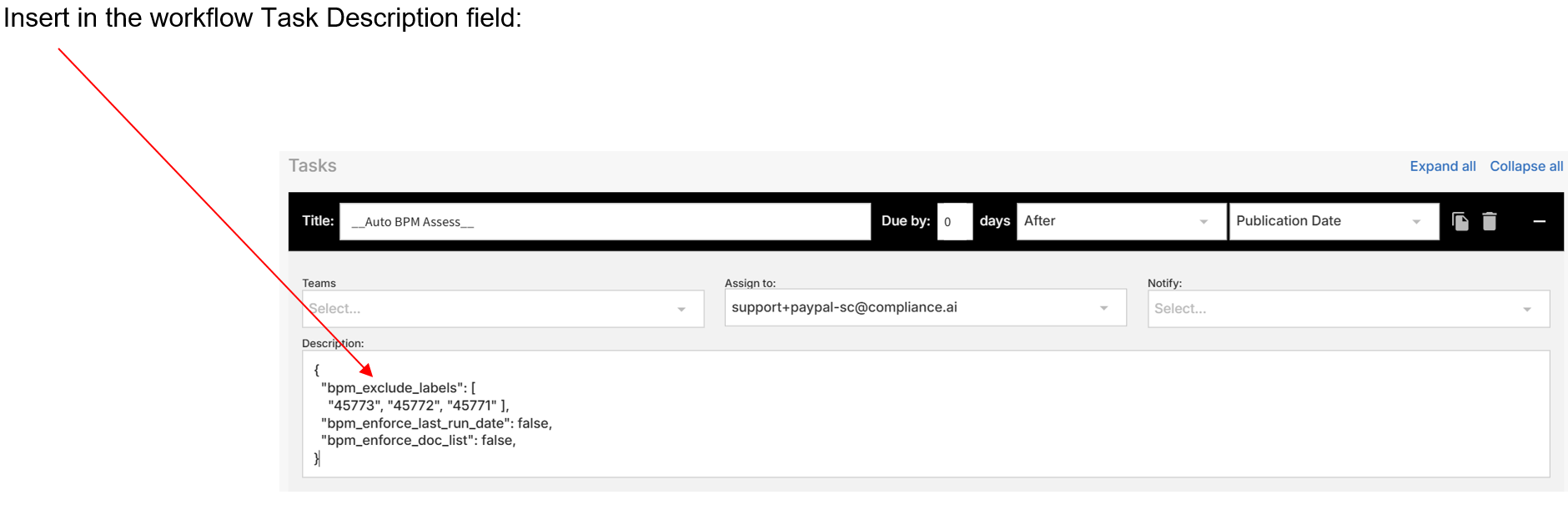
Once the SC run has completed, to verify the task has been processed successfully:
- Verify that the assigned task has been marked as completed/done
- Review the document labels and verify they include the supported label types
- Review the task annotation that includes the justification/reasoning for the BPM based assessment